

Hands-on calendar comparison
FlowSavvy is the better fit if your main problem is finding calendar time for tasks with durations and deadlines. Reclaim is the better fit if you want to protect focus time and automate recurring routines, meeting buffers, booking links, and calendar fixes.
That distinction mattered more than any generic feature count in our testing. FlowSavvy behaved like a task auto-scheduler layered over a calendar. Reclaim 2.0 behaved like a calendar-optimization system built around Agents, scheduling policies, and an Assistant.
Choose FlowSavvy for a focused, task-first workflow. Choose Reclaim when your calendar already contains the work structure and you want more ways to defend and reorganize time around it.
FlowSavvy vs Reclaim at a glance
| Category | FlowSavvy | Reclaim |
|---|---|---|
| Best for | Task-first solo planning | Broader calendar automation |
| Primary workflow | Schedule tasks from duration, availability, and deadlines | Protect and optimize calendar time with Agents and policies |
| Native task placement in our test | Immediate visible calendar placement | Tested task remained in the Tasks panel without a named calendar block |
| Task splitting | Yes, observed | Not demonstrated in the tested Reclaim 2.0 native-task workflow |
| Focus-time defense | No dedicated equivalent tested | 10-hour weekly Focus goal observed |
| Recurring routines | Repeating auto-scheduled tasks | Habits with priority and movement rules |
| Meeting buffers | No equivalent workflow tested | Filtered Buffer Agent observed |
| Scheduling links | Outside the tested core scope | Built in; custom link created |
| Tested access | Free account with seven-day Pro trial | Free account with automatic 14-day Business trial |
| Tested paid-plan list price checked | Pro: $14 monthly or $10/month billed yearly | Business: $18/seat monthly or $15/seat/month billed yearly |
How we tested FlowSavvy and Reclaim
The FlowSavvy benchmark covered fixed events, flexible and recurring tasks, deadlines, partial progress, manual movement, an impossible workload, scheduling hours, and outward calendar sync.
The Reclaim 2.0 benchmark used a controlled workweek to test a native Task, a 10-hour Focus goal, a weekday Habit, filtered Buffers, a Scheduling Link, Google Calendar output, and an Assistant-guided conflict fix.
FlowSavvy’s central object is a task that needs time. Reclaim 2.0’s strongest tested objects were calendar policies. We scored direct evidence and left unsupported comparisons unscored rather than importing old Reclaim 1.0 behavior.
The biggest difference: FlowSavvy schedules tasks; Reclaim manages calendar policies
FlowSavvy asks a practical task question: how much time does this work need, when may it start, and when is it due?
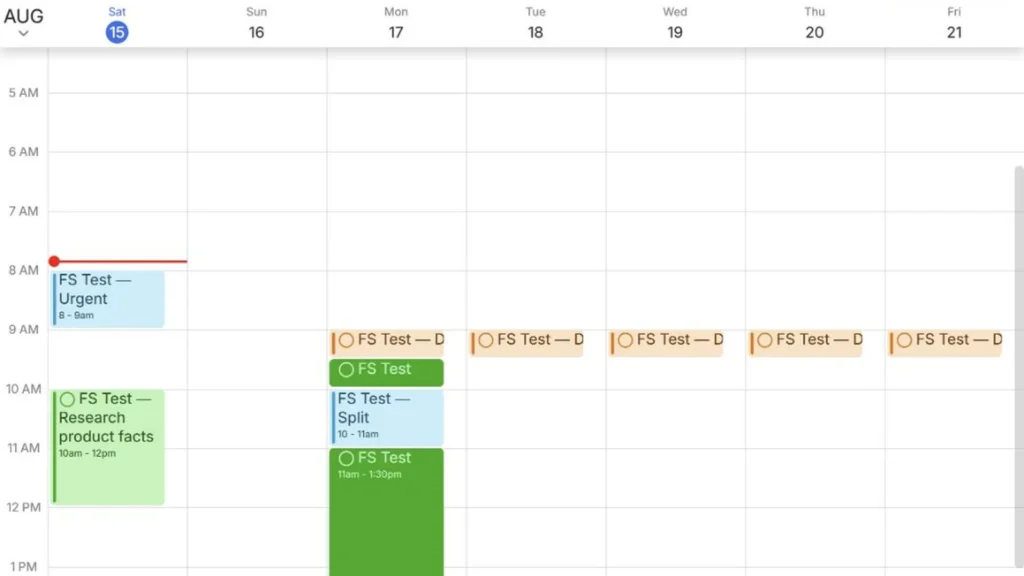
In our Free-account test, three representative tasks appeared on the calendar immediately. After we corrected the scheduling-hours profile, flexible work moved into the weekday window while a locked task and fixed event stayed in place.
The task model also supported more demanding scenarios. A three-hour Splittable task was divided into a 30-minute block and a 150-minute block around a fixed one-hour interruption. The two pieces still totaled the requested three hours.
When we marked one hour complete on a two-hour task, FlowSavvy preserved the completed block and rescheduled only the remaining hour. That behavior suits people whose calendars are driven by unfinished work.
Reclaim worked from the opposite direction. Its Agents defended a Focus quota, placed recurring Habits, and added time around selected meetings. Its Assistant could inspect a conflict and propose a fix.
We did create a native Reclaim Task with a start date, due date, two-hour duration, and priority. It appeared in the Tasks panel, but no named task block appeared in the controlled calendar week. That is a meaningful boundary for this version and workflow.
This does not mean Reclaim can never schedule tasks: integrations and account configuration may change the behavior. It means FlowSavvy demonstrated direct task-to-calendar scheduling more clearly in our tests.
FlowSavvy has the stronger tested controls for deadline-driven work
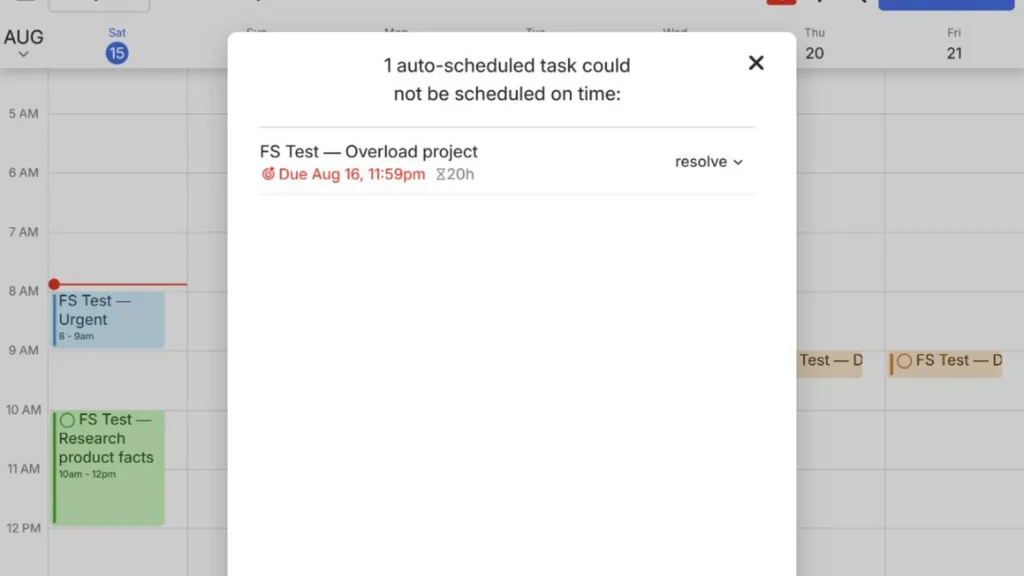
A 20-hour non-splittable task could not fit inside the configured daily window. FlowSavvy left it unscheduled and displayed a warning rather than pretending the plan was feasible. The warning panel identified the task, deadline, and remaining duration. Its Resolve menu offered completion, a due-date change, auto-ignore, or deletion.
Moving the deadline later did not help because the task still needed one continuous block longer than the daily window. An automatic planner needs to expose that constraint, not merely rearrange blocks.
We also tested manual intent. After dragging a flexible task, FlowSavvy asked whether to:
- Lock it at the selected time.
- Postpone it until that time or later.
Lock survived recalculation. Postpone acted like a not-before constraint and allowed a later valid slot—a useful distinction when every manual move should not become permanent.
We could not run the same Reclaim overload, split, or remaining-duration tests because its native task did not enter the calendar as a named block. FlowSavvy therefore has stronger observed evidence in this category, not proof of a universally better algorithm.
Reclaim is stronger for focus time and recurring routines
We set a 10-hour weekly Focus minimum, 30-minute to eight-hour blocks, and Working Hours as the eligible window. Reclaim proposed five two-hour blocks that appeared in Google Calendar as Busy events after approval.
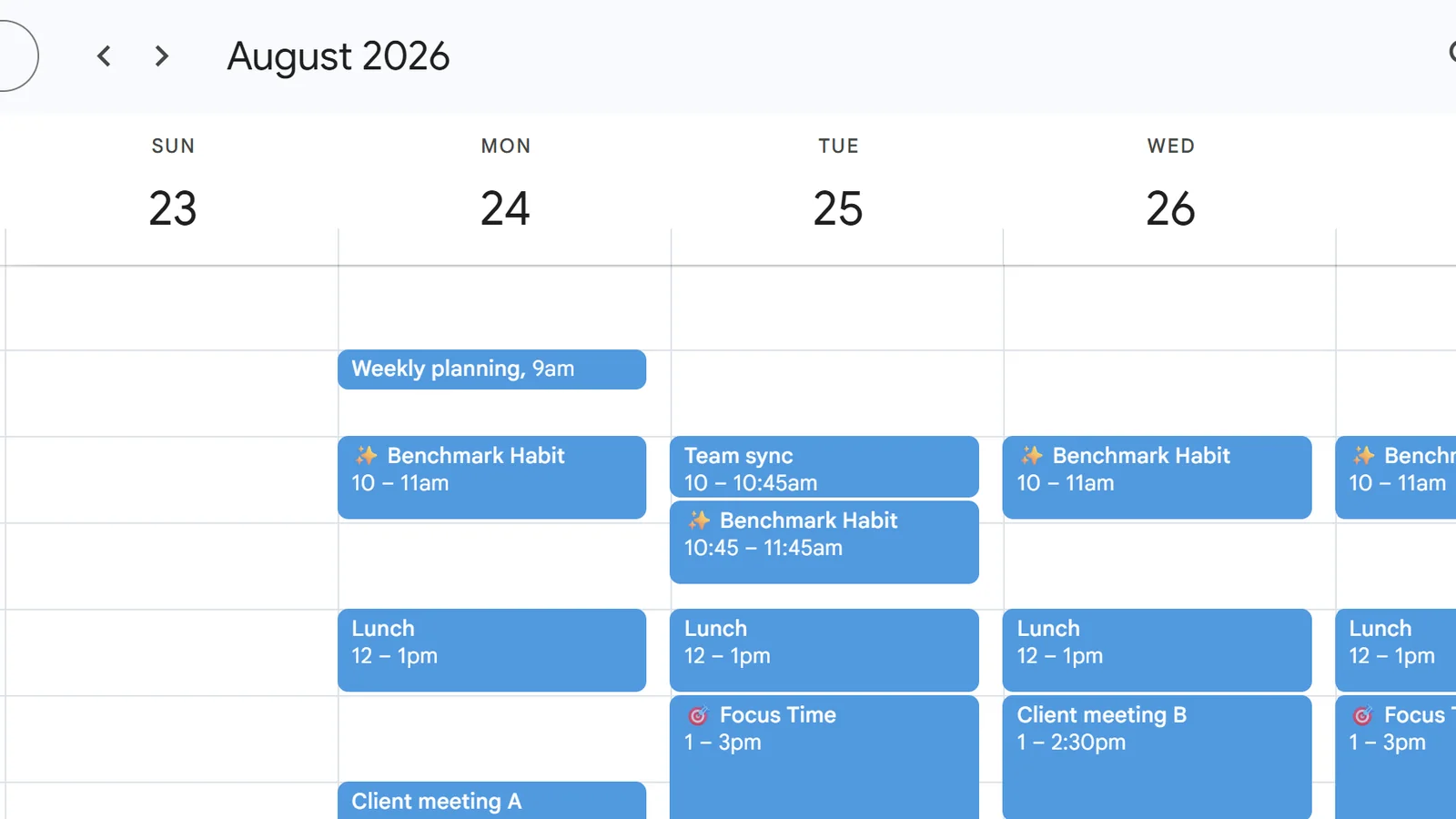
We then added a high-priority weekday Benchmark Habit. During a conflict test, it moved to an available slot and returned after the conflict was removed. The settled view occasionally required a refresh, so we treated the first stale screen as interface latency rather than the final schedule.
The high-priority Habit displaced medium-priority Focus, while Reclaim preserved the Focus quota elsewhere that week.
FlowSavvy supports repeating auto-scheduled tasks, but they are not identical to Reclaim’s Habit and Focus policies. Reclaim offered the richer tested workflow for recurring commitments that must defend themselves around meetings.
Reclaim’s meeting buffers are more flexible than a simple gap setting
Reclaim’s Buffer Agent was one of the most useful differences in the test.
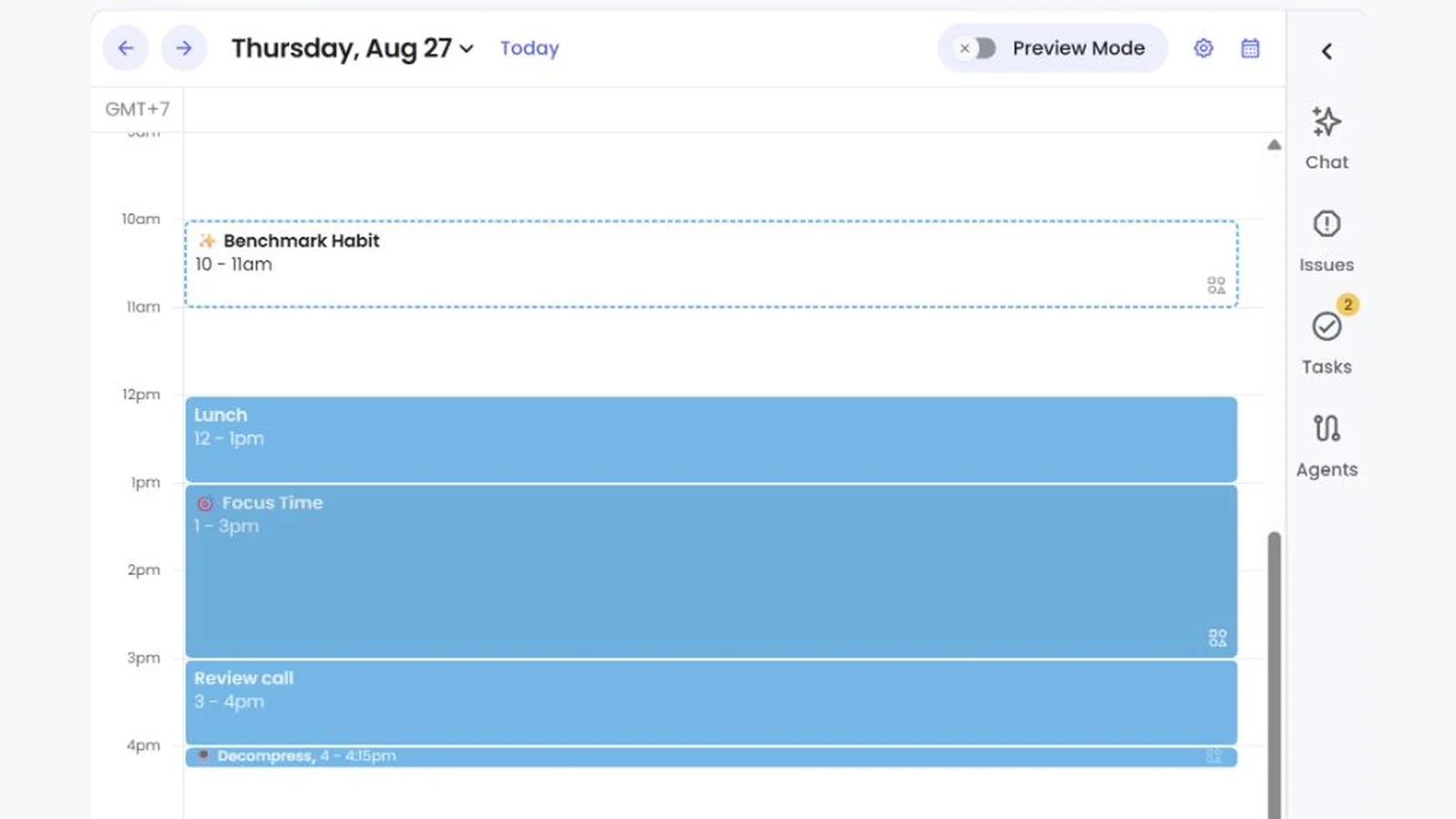
We created a low-priority Decompress rule requesting 15 minutes before and after meetings titled Team sync or Review call—four possible buffer sides in total.
Reclaim scheduled two:
- Tuesday 9:45–10:00 a.m. before
Team sync. - Thursday 4:00–4:15 p.m. after
Review call.
It omitted the other sides because Habit or Focus blocks occupied the adjacent slots. The meetings did not move, and exactly two Decompress events appeared in Google Calendar after approval.
This one scenario does show that Reclaim can apply a title filter and skip unavailable sides instead of forcing a conflict.
FlowSavvy did not expose an equivalent rule-based workflow in our benchmark. Reclaim is the stronger fit when meeting transitions matter more than task deadlines.
Reclaim’s Assistant made a useful proposal without silently changing the calendar
To test the Assistant, we created a synthetic event overlapping Client meeting B and requested an explained preview without automatic changes.
The Assistant switched to Fix issues mode, enabled Preview Mode, and proposed:
- Keep
Client meeting Bat 1:00–2:30 p.m. - Move only the synthetic conflict from 1:30–2:00 p.m. to 11:30 a.m.–12:00 p.m.
Selecting Review opened a separate dialog with Discard, Cancel, and Apply actions. The calendar changed only after explicit approval.
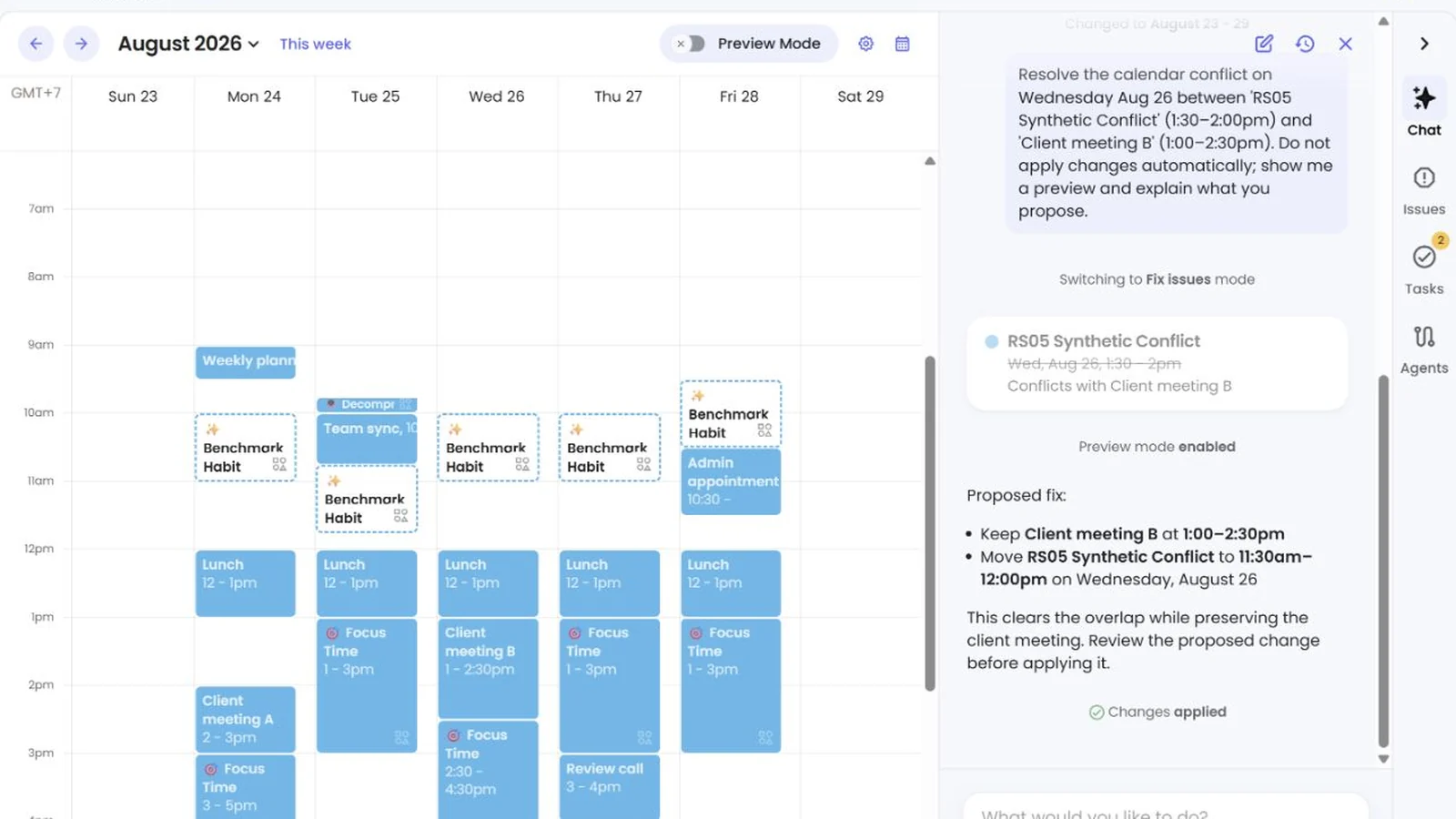
One controlled conflict cannot establish general reasoning quality, but it demonstrated a useful safety boundary: the user retained final approval.
FlowSavvy had no equivalent conversational Assistant in the tested workflow. Its strength was the directness of task controls rather than a chat layer over calendar changes.
Scheduling links make Reclaim a broader calendar tool
Reclaim also includes personal Scheduling Links. Initializing a booking page created three starter links:
- A 60-minute High Priority Meeting.
- A Flexible Quick Meeting with 15- or 30-minute options.
- A 15-minute Quick Meeting.
We added a 30-minute Google Meet link. Its controls included Meeting Hours, priority, four-hour minimum notice, a 60-day range, and buffer-aware availability.
We did not complete a public booking, so we cannot validate offered-slot accuracy or the attendee experience. We can conclude only that Reclaim combines booking links with its calendar policies.
Smart Meetings remained unscored. After expanded Google availability access was granted, Reclaim reported that the account had no recurring meeting with another attendee to convert. That is a missing test prerequisite, not a product failure.
Both can publish useful calendar output
FlowSavvy synced task blocks to Google Calendar. Disabling outward sync removed those generated blocks while preserving the source tasks, although other providers or accounts may behave differently.
Reclaim published named Focus, Habit, and Buffer events. We saw no visible duplicates, missing fixed events, or timezone shifts. An inspected Focus event was Busy and non-recurring; an inspected Habit was Free and repeated each weekday.
We did not run the same cleanup test in Reclaim, so there is no fair sync winner. Both produced useful output for their primary workflows.
Free plans and pricing
We rechecked both products’ pricing on August 18, 2026. Prices and plan limits can change, so verify them again if you are reading much later.
| FlowSavvy | Reclaim | |
|---|---|---|
| Free plan after trial | Basic | Lite |
| Free scheduling horizon | Two weeks | One week |
| Plan used in this test | Pro trial | Business trial |
| Tested plan’s monthly price | $14/month | $18/seat/month |
| Tested plan’s annual list price | $10/month billed yearly | $15/seat/month billed yearly |
| Trial observed | Seven-day Pro trial | Automatic 14-day Business trial |
FlowSavvy Basic includes unlimited auto-reschedules, one hours profile, three repeating tasks, and a two-week horizon. Pro expands the range, profiles, repeating tasks, priorities, dependencies, and sync.
The free signup entered a 14-day Business trial, so the tested features are not Lite features. The upgrade screen still required Stripe checkout, confirming no paid purchase. Without an upgrade, the account falls back to lower-limit Lite after trial.
Portal crossed out $12 and offered $8.40 per seat/month ($100.80/year). We compare the public $15 list price.
FlowSavvy has the longer free horizon and lower tested paid-plan price. Reclaim Business bundles broader calendar and team automation.
For a deeper breakdown, see our FlowSavvy pricing guide.
Is FlowSavvy easier to use than Reclaim?
FlowSavvy keeps most decisions close to task duration, due date, splitting, progress, and manual intent. Reclaim adds multiple hour types, Agents, priorities, Preview Mode, Assistant permissions, links, integrations, and team settings. We did not run a timed usability study, so the defensible conclusion is about scope: FlowSavvy is leaner; Reclaim is broader.
Who should choose FlowSavvy?
Choose FlowSavvy if most of these describe you:
- You naturally start with a task list, not a calendar policy.
- Your work has durations, deadlines, and remaining effort.
- You want tasks split around fixed events.
- You need overload to be visible rather than silently hidden.
- You want manual movement to distinguish an exact Lock from a flexible Postpone constraint.
- You prefer a smaller product surface focused on personal scheduling.
FlowSavvy is a weaker fit if your main goal is meeting optimization, protected weekly Focus quotas, automated buffers, or booking links. Those were Reclaim’s stronger tested areas.
It particularly suits deadline-driven solo users who want the calendar to answer: “When will I actually do this work?”
Our broader FlowSavvy review covers the product beyond this comparison.
If you want to reproduce the setup in a controlled way, follow our step-by-step FlowSavvy guide and begin with a few fixed events plus representative tasks.
Who should choose Reclaim?
Choose Reclaim if most of these describe you:
- Your existing calendar is meeting-heavy.
- You want a weekly Focus Time target to defend itself.
- You want Habits to move around conflicts according to priority.
- You need filtered buffers before or after selected meetings.
- You want personal booking links in the same system.
- You value an Assistant that explains a proposed calendar change and asks for approval.
- You expect to use integrations or team calendar controls beyond personal task planning.
Reclaim is a weaker fit if you mainly want a minimal task scheduler with direct, tested controls for splitting, remaining effort, overload, and Lock versus Postpone intent. Its broader policy model also requires more setup decisions.
Reclaim fits users asking: “How do I protect and improve the way time is used across this calendar?”
You can review the current product and plan details on Reclaim’s official website.
Final verdict
FlowSavvy is the stronger tested task-to-calendar scheduler. It gave us direct evidence for duration-and-deadline placement, task splitting, remaining-effort rescheduling, overload warnings, and explicit Lock versus Postpone controls.
Reclaim is the stronger tested calendar-automation system. It gave us direct evidence for weekly Focus goals, priority-driven Habits, filtered meeting Buffers, Scheduling Links, and Assistant proposals with a clear approval boundary.
Choose based on the object you naturally begin with:
- Start with tasks that need time: choose FlowSavvy.
- Start with calendar time that needs protection: choose Reclaim.
Neither is universally smarter.
Frequently asked questions
Is FlowSavvy better than Reclaim?
FlowSavvy was better for the tested task-first workflows: placement, splitting, progress, overload, and manual intent. Reclaim was better for Focus, Habits, Buffers, Scheduling Links, and Assistant-guided changes. Choose according to the job you need automated.
Does Reclaim automatically schedule tasks?
Reclaim supports task workflows and integrations. In our Reclaim 2.0 test, however, the native task remained in the Tasks panel without a named calendar block. That result should not be generalized to every integration or account.
Which has the better free plan?
FlowSavvy Free offered a two-week horizon and focused task allowances. Reclaim Lite offered one week plus Agents, one Scheduling Link, one Calendar Sync, and limited LLM/MCP access. FlowSavvy favors free task scheduling; Reclaim provides broader calendar automation.
Which is easier to use?
FlowSavvy has a leaner task-centered scope. Reclaim has more automation surfaces and setup choices. Because we did not run a timed usability study, this is not a universal ease-of-use ranking.
Can Reclaim replace Calendly?
Reclaim Scheduling Links include duration, hours, notice, range, priority, conferencing, and buffer controls. We created a link but did not complete a public booking, so we cannot claim it replaces Calendly for every workflow.
Does Reclaim’s Assistant change events automatically?
In our conflict test, the Assistant enabled Preview Mode, explained its proposal, and opened a Review changes dialog. It rescheduled only after we selected Apply changes; other permissions or prompts may behave differently.