

Reclaim is worth considering if your calendar is already the center of your work and you want software to protect focus time, keep routines flexible, and leave breathing room around meetings. In my controlled Reclaim 2.0 test, its Focus, Habit, and Buffer Agents adapted around a busy week. The Assistant also proposed a sensible conflict fix without applying it before review.
That breadth comes with a learning curve. Reclaim asks you to think about Hours, priorities, Agents, policies, and preview states. Setup is more involved than it is in a focused scheduler, and the native Task I created did not appear as a visibly named Task block in the tested calendar. Reclaim works best as a system for protecting and reshaping calendar time—not as a conventional task manager with a calendar attached.
What is Reclaim AI?
Reclaim is an AI calendar planner that works around an existing Google or Outlook calendar. Reclaim 2.0 brings a full Planner, an Assistant, and background Agents into one interface.
The Agents are the practical center of the product. Focus Time tries to defend a weekly concentration goal. Habits place recurring routines inside preferred windows. Buffers add recovery time around selected meetings. Smart Meetings are designed to monitor recurring meetings with attendees. Scheduling Links expose controlled availability for bookings.
A normal calendar waits for you to place each event manually. A task-first auto-scheduler begins with a list of work. Reclaim instead starts with rules for the time you want to protect, move, or make available, then fits those rules around fixed events and priorities.
How I tested Reclaim AI
I used a new Reclaim 2.0 account that received an automatic 14-day Business trial. No payment method was requested and no paid upgrade was authorized. The test used a synthetic Google Calendar in GMT+7 with fixed meetings, client calls, a review call, lunch blocks, and open work periods. It contained no private client or personal data.
The test covered:
- Onboarding and default configuration.
- Working, Meeting, and Personal Hours.
- One native Reclaim 2.0 Task.
- A 10-hour weekly Focus goal.
- A higher-priority weekday Habit.
- Conflict movement and recovery.
- A title-filtered meeting Buffer Agent.
- One Scheduling Link.
- One Assistant-guided calendar conflict.
- Google Calendar output and availability states.
- Smart Meeting and Insights prerequisites.
I did not complete an end-to-end Scheduling Link booking, create a recurring meeting with an authorized second attendee, wait several weeks for Insights, benchmark every third-party task integration, or test mobile PWA usability. Those are limitations of this review, not product failures.
Onboarding and setup: powerful, but not minimal
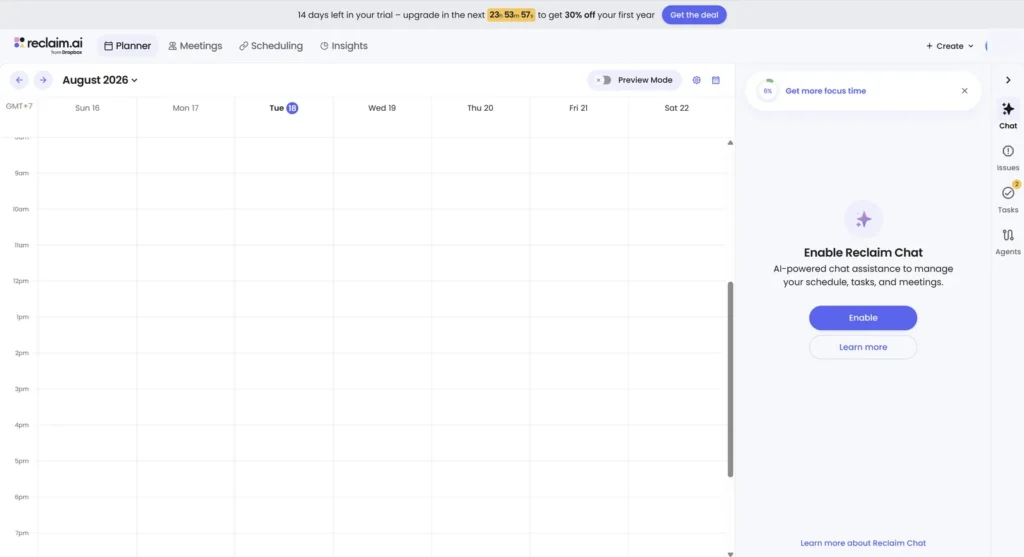
The controlled onboarding flow asked to connect a calendar, choose whether to activate the Assistant, answer profile questions, and review suggested default Agents. Suggested quick wins included Lunch, meeting breaks, and a 10-hour Focus goal. I deselected them so the benchmark would begin without hidden flexible events.
The first dashboard was understandable, but Reclaim’s breadth became clear quickly. Its settings separated Working Hours, Meeting Hours, and Personal Hours. By default, the test account used 8:00 a.m.–6:00 p.m. on weekdays for Working Hours, 9:00 a.m.–5:00 p.m. on weekdays for Meeting Hours, and 8:00 a.m.–6:00 p.m. every day for Personal Hours. I later changed Working Hours to 9:00 a.m.–5:00 p.m. on weekdays for the controlled test.
The separation is useful because work, meetings, and personal routines do not always belong in the same window. It also means that getting a good schedule takes more than connecting a calendar and clicking one switch. You need to know which Hours an Agent uses, how its priority interacts with existing events, and whether a proposed schedule is still in Preview Mode.
I did not run a timed usability study, so the test cannot settle whether every new user will find Reclaim easy. What I can say is that setup was coherent but involved more concepts and decisions than a focused task scheduler.
Focus Time and Habits were Reclaim’s strongest workflows
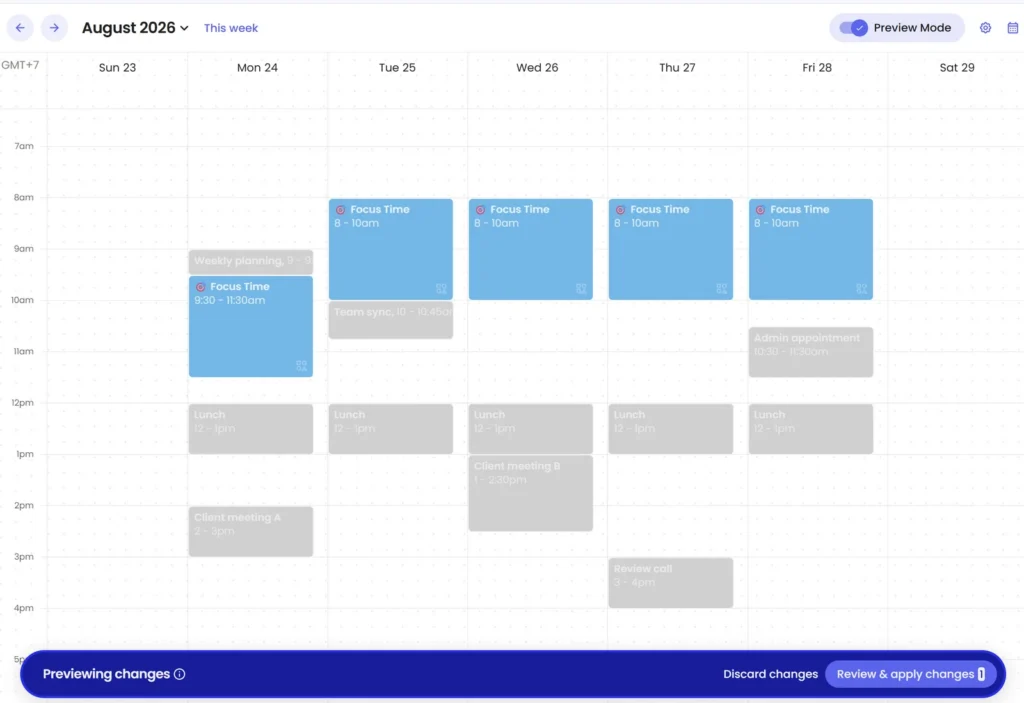
I created a Focus Time Agent with a 10-hour weekly goal, Medium priority, and controlled weekday Working Hours. In Preview Mode, Reclaim proposed five two-hour blocks. The blocks stayed inside the 9:00 a.m.–5:00 p.m. window and avoided fixed meetings and lunch.
Applying the schedule required a separate review step, which gave me a chance to inspect all five proposed events before they reached the active calendar.
Next, I created a High-priority weekday Habit from 10:00–11:00 a.m. Because the Habit outranked the Medium-priority Focus Agent, Reclaim moved Focus rather than dropping the weekly goal. When a fixed event occupied the Habit’s Thursday slot, the Habit moved to 11:00 a.m.–noon. Deleting the conflict restored the earlier placement after refresh.
The final result was correct, but the page briefly showed a stale or overlapping state before refresh. One cycle is not enough to call this a scheduling defect, although I would check the final calendar after making a meaningful change.
This was the clearest benefit in my test: recurring commitments could compete for time by priority without becoming immovable calendar events.
Buffer Agents protected meeting edges intelligently
The Buffer test targeted only events whose titles matched Team sync or Review call. I requested 15 minutes both before and after each meeting.
Reclaim did not force all four requested buffer sides into the calendar. It placed 15 minutes before Team sync and 15 minutes after Review call, while omitting the two blocked sides where a Habit or Focus event already occupied the adjacent slot. The underlying meetings, Habit, and Focus blocks did not move.
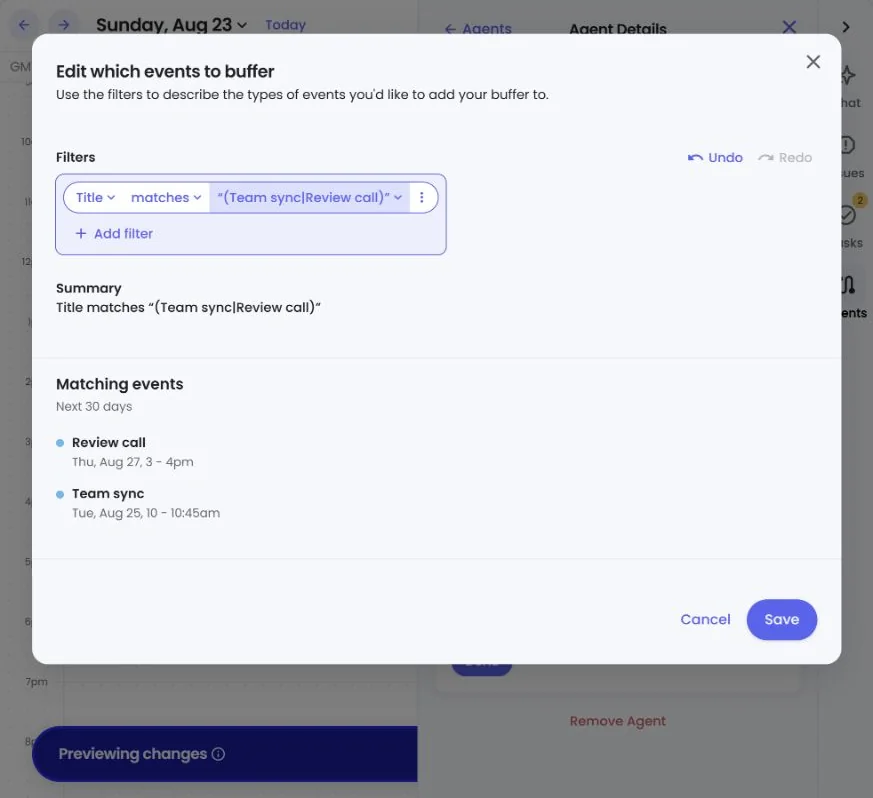
The Buffer Agent handled an imperfect calendar without creating another conflict. In practice, “add 15 minutes before and after” behaved as a preference subject to availability, not an instruction to move every neighboring event.
The Assistant proposed a fix without silently applying it
To test the Assistant, I added a synthetic fixed event that overlapped an existing client meeting. Reclaim identified the conflict and preserved the client meeting. It proposed moving only the synthetic event from 1:30–2:00 p.m. to 11:30 a.m.–noon.
The Assistant explained why the move cleared the overlap, displayed it in Preview Mode, and presented a separate Review changes dialog before applying it. I approved the move, verified the result, then removed the synthetic event and restored the baseline.
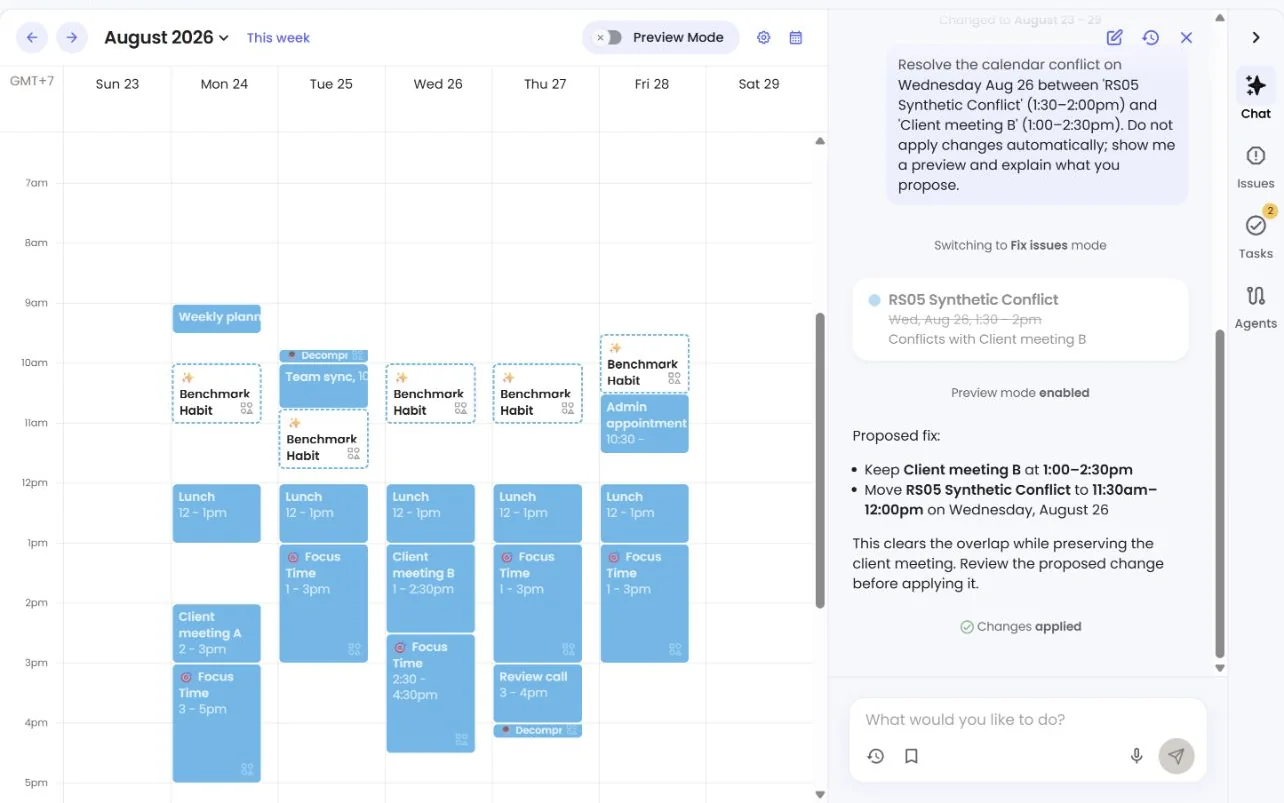
That single scenario showed a reviewable conflict-resolution workflow. It does not tell us whether the Assistant will always choose the right event, handle several linked conflicts, or use the same approval step for every action.
Reclaim Tasks need an important Reclaim 2.0 caveat
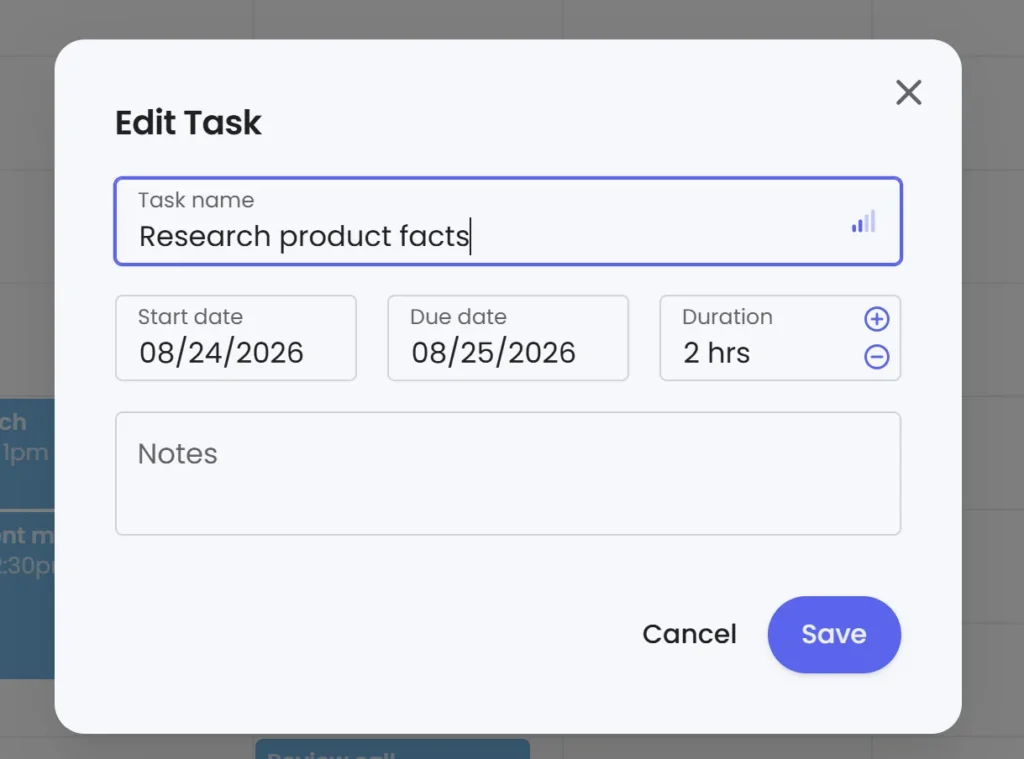
The native Task form accepted a name, start and due dates, a two-hour duration, notes, and priority. The Task list exposed actions including a timer, work logging, editing, and priority changes.
However, the configured Research product facts Task remained in the Tasks panel and did not appear as a visibly named Task block in the controlled calendar. I did not find a direct split, lock, or schedule command in that native workflow.
Reclaim does support task workflows and lists integrations with Google Tasks, Todoist, Asana, ClickUp, Jira, and Linear on eligible plans. I did not test those integrations under the same conditions. My result applies only to the native Reclaim 2.0 Task I created; it would be inaccurate to conclude that “Reclaim cannot schedule tasks.”
If visibly named task blocks, remaining-duration scheduling, or task-level dependencies are your main requirement, compare the same workload in a task-first product. Our full FlowSavvy vs Reclaim comparison owns that two-product decision.
Scheduling Links and Google Calendar output
Setting a personal booking-page slug created three starter Scheduling Links. I also created a custom Benchmark availability link for a 30-minute Google Meet meeting. Its controls included Meeting Hours, High priority, four hours of minimum notice, a 60-day range, and a buffer-aware availability setting.
I did not share or book the link, so I cannot confirm that every offered slot was correct or that a booked event would preserve all intended policies. I verified creation and configuration only.
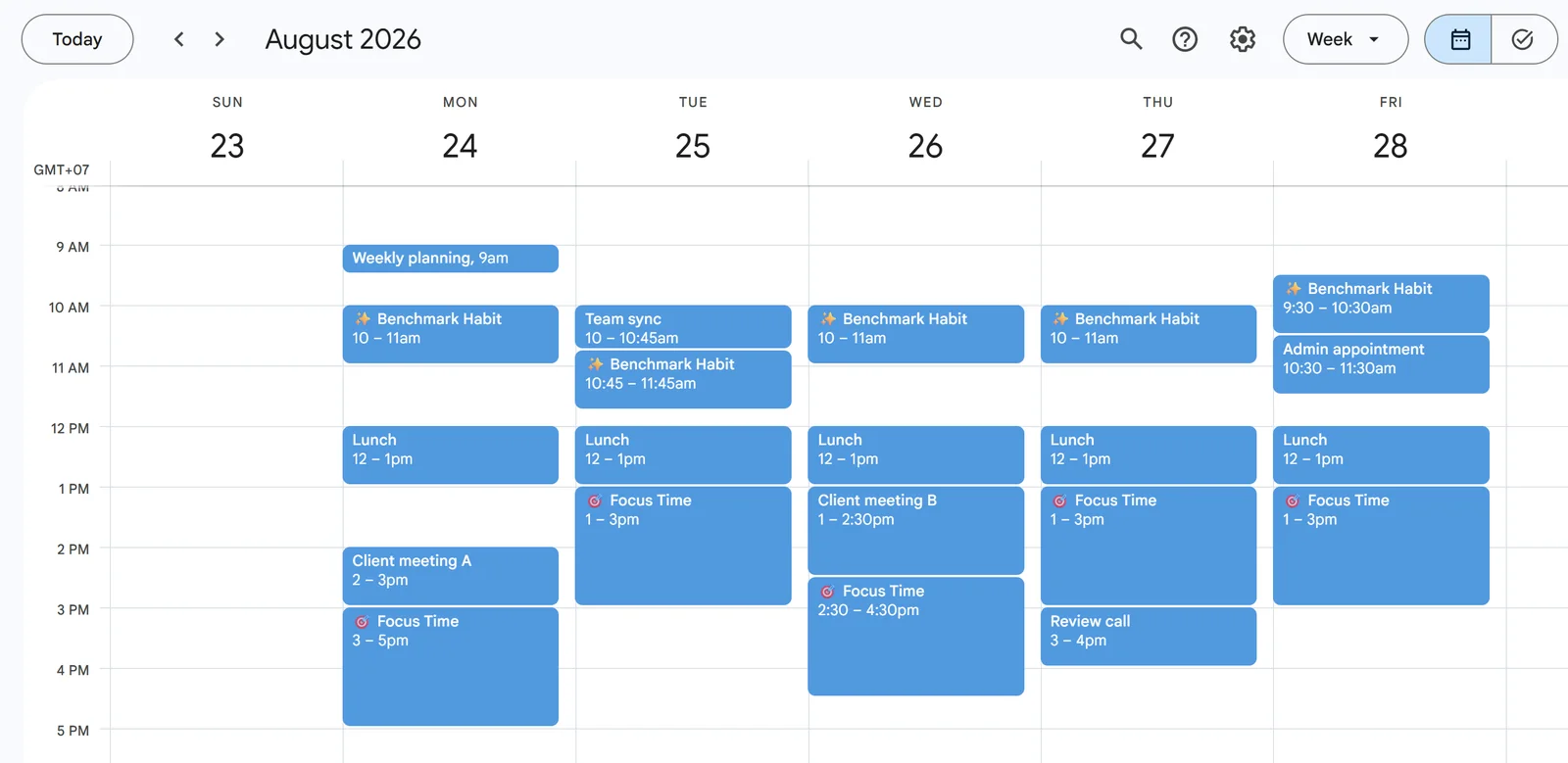
In Google Calendar, I found five named Focus Time blocks and five named Benchmark Habit blocks across the controlled week. The Buffer Agent also produced exactly two named Decompress events. I saw no duplicate flexible blocks, missing fixed events, or timezone shifts during that inspection.
The Focus occurrence I opened was Busy and non-recurring. The Habit occurrence I checked was Free and repeated each weekday. Those settings describe the inspected events, not every event an Agent can create.
Reclaim pricing: which plan makes sense?
Reclaim currently presents four tiers: Lite, Starter, Business, and Enterprise.
- Lite is free and is intended for one user. At the August 18 checkpoint, it listed a one-week scheduling range, one Calendar Sync, one Scheduling Link, and limited integrations.
- Starter was displayed at $12 per seat monthly or $10 per seat/month on the annualized view. It listed up to 10 seats, an eight-week range, three Calendar Syncs, three Scheduling Links, and the broader listed integration set.
- Business was displayed at $18 per seat monthly or $15 per seat/month annualized. It listed up to 100 seats, a 12-week range, unlimited Calendar Syncs and Scheduling Links, and integrations plus webhooks.
- Enterprise adds organization-oriented administration, support, and security controls.
The tested account was an automatic Business trial, not a paid Business subscription. Its billing portal also showed an account-specific first-year offer. That offer should not be substituted for Reclaim’s public list price.
For an individual, Lite is the sensible starting point. Use one calendar, one Scheduling Link, and representative routines to determine whether the Agent model solves a real problem. Starter becomes easier to justify when you need a longer scheduling range, more links and syncs, or paid integrations. Business is more relevant when you need unlimited links and calendar syncs, team administration, delegated access, or webhooks.
Pricing and plan packaging can change. Check the current Reclaim pricing page before purchasing.
Is Reclaim AI safe?
Reclaim says it is SOC 2 Type II certified and encrypts data in transit and at rest. Its security page describes AWS hosting in US regions, HTTPS/TLS for network traffic, and AES-256 encryption at rest. These are vendor-published statements, not an independent Volticen audit.
The product needs meaningful calendar permissions to sync events, manage tasks and habits, update RSVPs, calculate time analytics, and support enabled integrations. Reclaim’s privacy policy also describes sharing data with subprocessors that perform services on its behalf.
Its AI disclosure says core capabilities use classic machine learning and privately hosted language models inside Dropbox’s environment. Optional external-provider AI features require opt-in, according to Reclaim, and operate under zero-data-retention and no-training commitments. The privacy policy says personal, calendar, or app data is not used to train generative AI models without explicit consent or opt-in.
Reclaim provides self-service account deletion intended to remove its calendar events and account data. Its deletion guide warns that cleanup may take up to an hour, Google rate limiting can delay calendar cleanup, and Reclaim 2.0 Habit Agents may need to be removed first. Deleting an account also does not automatically unsubscribe every email.
Start with a non-sensitive calendar and review permissions before connecting confidential schedules. Read Reclaim’s current security page, privacy policy, and account-deletion guide for the vendor’s full wording.
Reclaim AI pros and cons
Pros
- Focus Time and Habits adapted around the controlled calendar.
- Priority resolved the tested competition between a Habit and Focus goal.
- Buffer Agents added only the meeting edges that remained available.
- Preview and review steps made the tested Agent and Assistant changes inspectable.
- Scheduling Links, Hours, and calendar policies live in one system.
- Google Calendar output was clean in the inspected week.
- Lite provides a practical way to test the model before paying.
Cons
- The broad Agent system requires more setup decisions than a focused scheduler.
- The tested native Reclaim 2.0 Task did not appear as a visibly named calendar block.
- Reclaim does not currently offer native iOS or Android apps.
- One conflict-recovery cycle needed a refresh before the visible state settled.
- Smart Meetings, end-to-end booking, populated Insights, and third-party task integrations were not fully tested.
- The product may feel overbuilt if you only need simple task time-blocking.
Who should use Reclaim AI?
Reclaim is a good candidate for:
- Professionals whose fixed meetings already live in Google or Outlook Calendar.
- Knowledge workers who repeatedly lose focus time to meetings.
- People who want recurring routines to remain flexible instead of fixed at one exact time.
- Users who want meeting buffers and Scheduling Links inside the same calendar system.
- Managers or executive assistants who can benefit from broader policy and delegated-access controls.
- Users comfortable reviewing Hours, priorities, Agents, and proposed changes.
Who should skip Reclaim?
Consider another product when:
- Your main requirement is turning individual tasks into visibly named calendar blocks.
- You want a small task-first workflow with fewer settings to manage.
- A native iOS or Android app is mandatory.
- You need proven Smart Meeting behavior with real attendees.
- You need independently validated ROI or several weeks of populated Insights.
- You need hands-on proof for a specific Todoist, Asana, ClickUp, Jira, Linear, or Google Tasks workflow.
If you need a broader project-and-task workspace, read our Motion app review. If you are choosing specifically between task-first scheduling and Reclaim’s calendar policies, use the dedicated FlowSavvy comparison linked above.
Final verdict: Is Reclaim AI worth it?
Reclaim is worth trying if the problem you need to solve is calendar protection rather than basic task capture. The best results in my test were concrete: five Focus blocks supported a weekly goal, a higher-priority Habit moved around conflicts, Buffer Agents protected available meeting edges, and the Assistant explained one proposed fix before a separate approval step.
The product is not frictionless magic. Its wider surface requires policy decisions, the native Reclaim 2.0 Task result needs careful wording, and several important features depend on another attendee or a longer observation window. Reclaim also lacks native iOS and Android apps today.
Start with Lite or a free trial, use a non-sensitive calendar, and configure your actual Hours before judging the schedule. Add one Focus goal and one real routine, introduce a controlled conflict, and inspect the resulting calendar. If that policy-driven model reduces calendar maintenance without obscuring your intent, Reclaim is a strong fit.
Visit the official Reclaim website to check current availability. This is a neutral editorial link; Volticen is not a Reclaim affiliate.
Frequently asked questions
Is Reclaim AI free?
Yes. Reclaim Lite was free at the August 18, 2026 checkpoint. It was limited to one user and listed a one-week scheduling range, one Calendar Sync, one Scheduling Link, and limited integrations. Verify current limits before signing up.
Is Reclaim AI worth it?
It is worth trying for calendar-heavy professionals who want flexible Focus Time, Habits, meeting buffers, and reviewable automation. It is less compelling for users who primarily want named task blocks or native mobile apps.
Does Reclaim automatically schedule tasks?
Reclaim supports native and integrated task workflows, but the native Reclaim 2.0 Task in my controlled test remained in the Tasks panel without a visibly named calendar block. I did not test every third-party task integration, so I would not generalize from that result.
Does Reclaim work with Outlook?
Yes. Reclaim officially supports Google Calendar and Outlook Calendar. Microsoft and Google have provider-specific differences, so review current Outlook documentation for the exact workflow you need.
Does Reclaim have a mobile app?
Reclaim does not currently have native iOS or Android apps. It provides a mobile-friendly web app/PWA, and Reclaim-managed events can also be handled through a supported calendar app.
Is Reclaim AI safe?
Reclaim publishes SOC 2 Type II, encryption, privacy-framework, OAuth, AI-processing, and self-service deletion information. Those are meaningful vendor disclosures, but they do not remove the need to review permissions and organizational requirements before connecting sensitive calendars.
Is Reclaim better than FlowSavvy or Motion?
Not universally. Reclaim was stronger in the focus, routine, buffer, and calendar-policy workflows I tested. FlowSavvy is more task-centered, while Motion combines scheduling with broader project and task management. Choose based on the primary workflow rather than a universal winner.