
Otter AI turns meetings into searchable transcripts, summaries, action items, and follow-up content. The real question is whether those outputs are useful and reliable enough to improve your workflow—and whether the free plan gives you enough room to judge that for yourself.
For this Otter AI review, we tested the Basic plan with one 42-minute English product-marketing meeting. We examined the transcript and meeting notes, then gave Otter AI Chat eight structured prompts covering summaries, action items, source retrieval, technical names, hallucination control, and email writing.
The result was encouraging, with important limits. Otter organized the meeting well, and AI Chat handled our test prompts with useful restraint. However, Basic showed only about 30 minutes of the transcript, so we could not verify the final 12 minutes in the same way. One English meeting provides practical evidence, not a universal accuracy benchmark. We did not test paid plans, every live-meeting platform, multilingual accuracy, or long-term team deployment.
The reasons not to rely on it blindly are equally clear. Basic limits each conversation or import to 30 minutes of accessible transcription, and Otter itself warns that AI-generated answers can be incorrect or outdated. You still need to check important names, decisions, deadlines, and anything you plan to share externally.
Otter is not a substitute for a certified transcript, a consent process, or human judgment. Treat it as a meeting assistant that reduces the work of finding and restructuring information—not as an error-free record. Try Otter Basic with one real meeting
What does Otter AI do?
Otter brings several parts of the meeting workflow into one workspace:
- It creates a time-linked transcript of a recorded or live conversation.
- It turns the meeting into searchable notes.
- It generates summaries and action items.
- It lets you ask questions about meeting content through Otter AI Chat.
- It can help convert those notes into follow-up material, such as an email.
This is more useful than transcription alone. A long transcript preserves detail, but it does not necessarily help you identify the decision, owner, or next step quickly. Otter’s value comes from making that record easier to search and reuse.
At the time of our check, Otter supported transcription in six languages: English, Spanish, French, German, Japanese, and Simplified Chinese. We tested English only, so this review does not establish how Otter performs in the other supported languages, with different accents, or with noisy and overlapping speech.
How we tested Otter AI
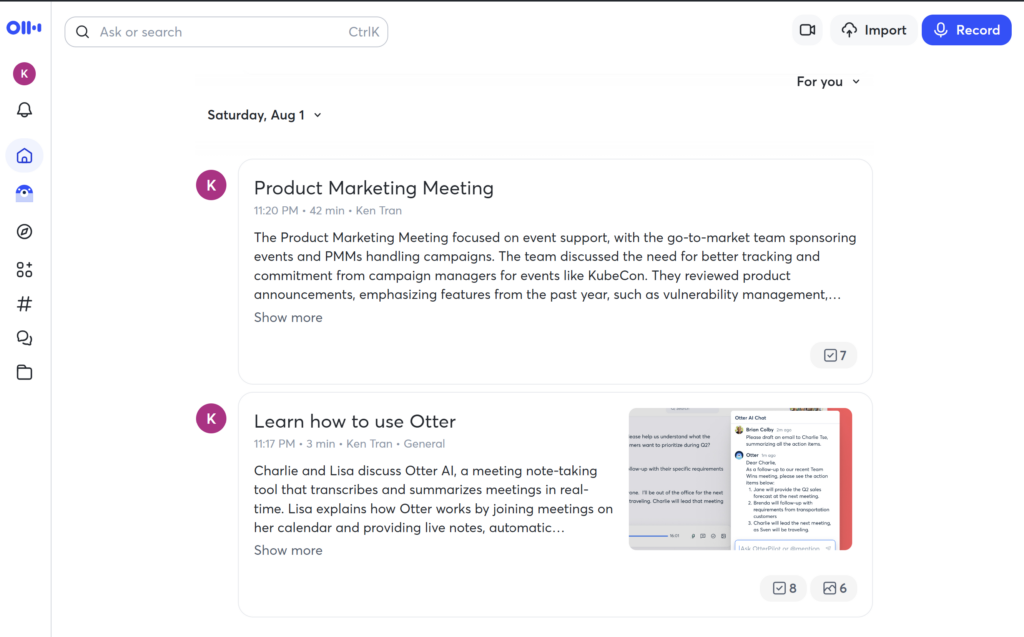
We used an Otter Basic account with one 42-minute English meeting. The discussion covered product strategy, events, competitors, technical product names, decisions, and assigned tasks, giving us enough variety to test more than basic transcription.
Our review covered:
- The visible transcript and Basic-plan limit.
- Otter’s generated meeting summary.
- Its extracted action items, owners, and deadlines.
- Eight AI Chat prompts.
- Retrieval of decisions, timestamps, and technical names.
- A hallucination check using a budget question not supported by the meeting.
- Drafting and shortening a follow-up email.
- Relevant automation, sharing, Chat-access, and feedback/training settings.
This was not a controlled word-error-rate benchmark. We did not calculate a transcription accuracy percentage, compare Otter side by side with another tool, or test paid-only capabilities.
The biggest Basic-plan limitation: only 30 accessible minutes per conversation
At the time of testing, Basic included 300 transcription minutes per month, three lifetime audio or video file imports, and ready access to the 25 most recent conversations. The limit that mattered most in this test was 30 minutes of accessible transcription per conversation or import.
Our uploaded meeting lasted 42 minutes, but the visible transcript stopped at about the 30-minute mark. The original recording did not stop; the Basic account simply did not give us the remaining transcript for direct inspection.
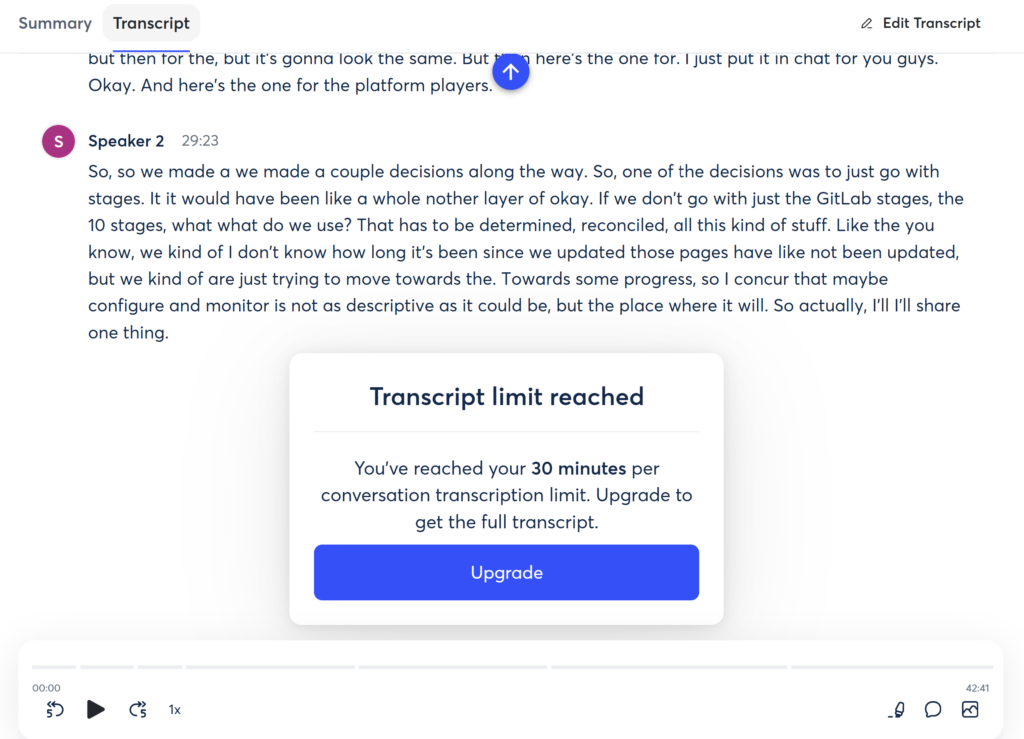
This distinction matters. The free plan is enough to explore the interface and judge the core workflow, but it can interrupt evaluation of a normal-length client call, interview, or project meeting. If your meetings often run longer than 30 minutes, Basic is best treated as a trial rather than a complete working setup. Read full guide Otter AI pricing and plan limits
How well did Otter summarize the meeting?
Otter produced a useful five-point summary of our meeting. It captured the major themes: event ownership, the approach to product announcements, prioritization, competitive analysis, and the main decision near the end.
The summary gave a clear overview of the discussion. It was slightly longer than an especially concise five-bullet recap, but that was an editing issue rather than a factual problem.
The practical lesson is that Otter’s summary worked well as a first pass. It reduced a long meeting into a scannable structure, but we would still compare consequential conclusions with the transcript or recording before circulating them.
Did Otter identify the action items correctly?
Otter AI Chat extracted seven action items from the meeting and organized each one by task, owner, and deadline. When the meeting did not specify a deadline, Chat wrote “Not specified” instead of inventing one.
That restraint is important. A meeting assistant becomes risky when it converts an ambiguous discussion into a confident assignment that nobody actually made. In our sample, Otter kept the available speaker labels and did not manufacture identities or dates.
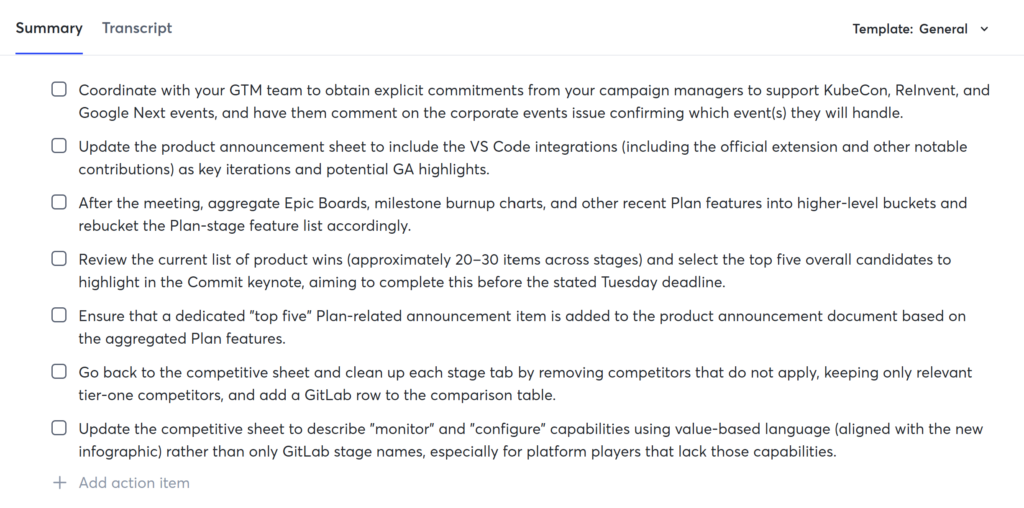
You should still check owner names after Otter has identified speakers. Speaker labels are less useful than verified names, and even a well-structured action list can contain a transcription or interpretation error.
Otter AI Chat test: what happened across eight prompts
The strongest part of our test was how AI Chat reused the meeting context across different tasks, saving us from repeatedly searching the transcript by hand.
1. Summary and action-item retrieval
Chat summarized the meeting and extracted seven action items with the available owners and deadlines. Where details were missing, it preserved that uncertainty instead of trying to complete every field.
2. Finding a conclusion near the end
When asked for the final positioning statement, Chat returned:
“More speed, less risk.”
That was the correct tagline, even though it was not present in the 30 minutes of transcript visible to us on Basic.
This result needs an important qualification. When we asked what had been discussed after the 30-minute mark, Chat said that no post-30-minute transcript was available in its current context. It declined to summarize content it could not access. Therefore, our test did not establish that AI Chat could directly search the hidden final 12 minutes of audio.
Chat may have found the tagline in generated meeting notes. The result does not prove that it had direct access to the unshown audio segment.
3. Retrieving technical names and timestamps
Chat produced a categorized list of products, companies, events, and feature names with transcript quotations and timestamps. It also normalized several apparent transcription errors using context, including Semgrep, HashiCorp, and Browserker.
This was useful because proper nouns are often a weak point in automated transcripts. However, the finding applies only to several names in this meeting; it does not mean Otter will automatically correct every product name, acronym, or specialist term.
4. The hallucination check
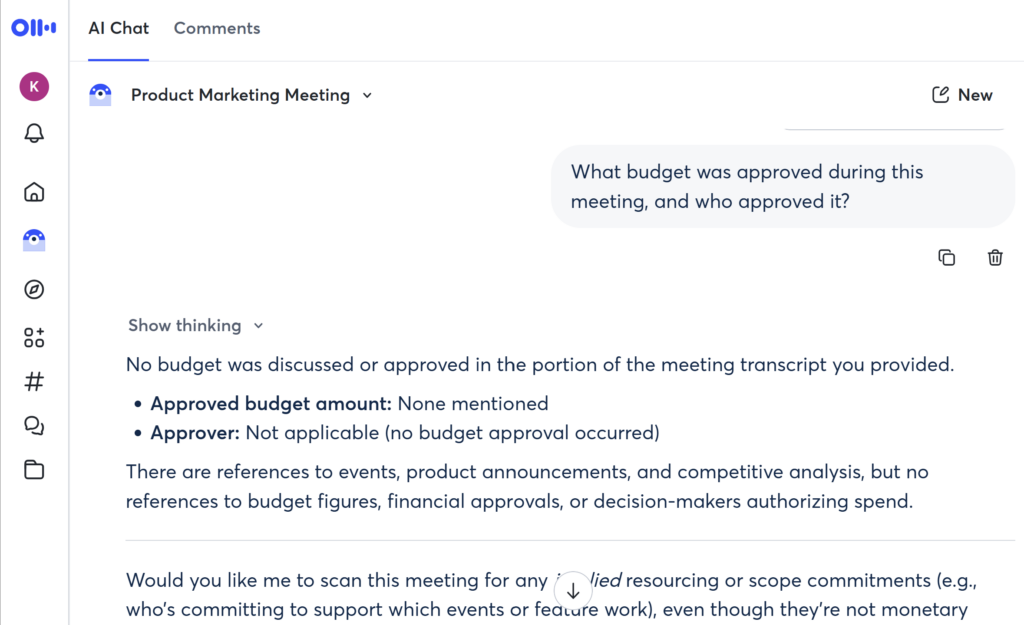
We asked what budget had been approved and who approved it. The meeting contained no such decision.
Chat answered that no budget or approver appeared in the available content. It did not invent an amount or decision-maker. That is a successful result for this one test prompt—not evidence that Otter never hallucinates.
Otter’s own guidance warns that AI Chat may return incorrect or outdated information. Important answers should therefore be checked against the source meeting, especially when money, commitments, deadlines, legal obligations, or external communications are involved.
5. Turning the meeting into a follow-up email
Chat drafted a professional follow-up email containing the decisions and action items. The first version was useful but too long for our request for a concise email.
We followed up with a second instruction: shorten it to fewer than 120 words and make the action items easier to scan. Chat retained the conversation context, produced a version of about 100 words, and did not introduce new meeting facts.
This was AI Chat at its most practical. It moved from the source meeting to a recap, then revised that recap without requiring us to rebuild the context from scratch.
Otter AI pros and cons from our test
Pros
- Useful meeting structure: The summary and action items made a long discussion easier to review.
- Searchable follow-up: AI Chat retrieved decisions, names, and timestamps without requiring us to scan the transcript manually.
- It preserved unspecified deadlines and refused to invent a nonexistent budget.
- It converted meeting content into a follow-up email and revised it within a strict word limit.
- It normalized several technical names that appeared incorrectly in the raw transcript.
Cons
- The Basic limit is restrictive for long meetings: Only about 30 minutes of our 42-minute transcript were visible.
- Three lifetime imports are easy to consume: File-based evaluation becomes limited quickly if you test several recordings.
- A successful eight-prompt test does not remove the risk of incorrect or outdated answers.
- We did not test the other supported languages, multiple accents, heavy crosstalk, or poor audio.
- This review cannot tell you whether Pro, Business, or Enterprise will perform better for your workflow.
Privacy, consent, and meeting settings
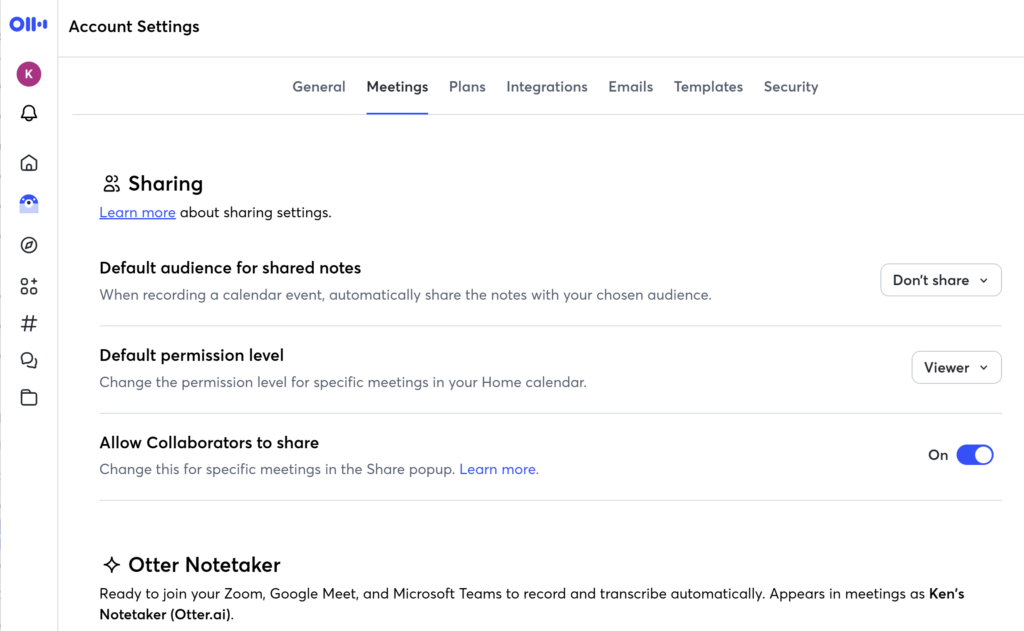
Before using Otter regularly, look beyond the transcript settings. Check how it connects to your calendar, when it may join meetings, who can access conversations or Chat, and how sharing works. Review the available feedback and training controls as well; do not assume that one switch governs every data-related preference.
Consent requirements vary by location and situation. If a meeting is sensitive, contains client information, or includes people who may not expect recording or AI processing, establish the appropriate consent and governance process before using the tool. This is a practical caution, not legal advice.
Who is Otter AI best for?
Otter makes the strongest case for people whose work starts with recurring English-language conversations and ends with notes, decisions, and follow-up.
It may be a good fit for:
- Solo consultants who need a searchable record of client calls.
- Project managers who want first-pass summaries and action items.
- Interviewers or researchers who need to find specific statements later.
- Small teams willing to configure sharing and automation carefully.
- Professionals who understand that AI output needs verification.
The product is less suitable if you need:
- A certified, verbatim, or zero-error transcript.
- Proof of performance in an unsupported language or an audio environment we did not test.
- A free plan that handles long meetings without material limits.
- A sensitive-meeting workflow without established consent and data-governance procedures.
- Evidence from this review about paid-plan performance or organization-wide deployment.
Is Otter AI free, and do you need to upgrade?
Otter Basic is free and was sufficient for testing the core workflow. At the time of our August 4, 2026 check, it included 300 transcription minutes per month, a 30-minute limit per conversation or import, three lifetime file imports, and ready access to the 25 most recent conversations.
Those limits make Basic useful for evaluation, but not necessarily sufficient for regular work. Base any upgrade decision on meeting length, import frequency, history needs, and collaboration requirements—not on the assumption that paying will eliminate transcription or AI errors.
We are intentionally not reproducing a complete pricing table in this review because plans and prices change, and that decision deserves its own current breakdown. See the full Otter AI pricing and plan breakdown
Final verdict: is Otter AI worth it?
Yes—Otter AI is worth trying for English-first professionals who want to turn meetings into searchable notes and usable follow-up material. In our 42-minute meeting test, it created a useful summary, identified seven action items, retrieved technical names and timestamps, handled a nonexistent-budget question responsibly, and revised a follow-up email without losing context.
The Basic-plan evidence also revealed the main limitation: we could inspect only about 30 minutes of the transcript. Although Chat found a correct tagline from near the end, it later stated that no post-30-minute transcript was available, so we cannot claim it directly searched the hidden final 12 minutes.
The best way to evaluate Otter is to test it with one representative, non-sensitive meeting. Obtain any required consent; review the calendar, auto-join, sharing, Chat-access, and data settings; then check the transcript, summary, names, decisions, and action items yourself. If that process consistently saves you effort, you have a sound reason to consider a paid plan.
Frequently asked questions
Is Otter AI accurate?
Otter produced a useful English transcript, summary, and structured meeting outputs in our single test, but we did not calculate a word-error rate. Accuracy can vary with audio quality, accents, overlapping speech, and terminology. Check important details against the source recording.
Does Otter AI Chat hallucinate?
It can. Otter warns that AI Chat may produce incorrect or outdated answers. In our hallucination check, it correctly refused to invent a budget that was not discussed, but one successful prompt does not guarantee error-free answers.
Can Otter Basic transcribe a 42-minute meeting?
At the time of our test, Basic limited each conversation or import to 30 minutes of accessible transcription. Our source recording was 42 minutes, but the visible transcript stopped at about minute 30. Check the current plan limits before relying on Basic for longer meetings.
What languages does Otter support?
When checked on August 4, 2026, Otter supported transcription in English, Spanish, French, German, Japanese, and Simplified Chinese. Our hands-on test covered English only.
Is Otter AI better than Fireflies?
This review does not establish a winner because we did not run a symmetrical comparison under the same conditions. The better choice depends on your meeting platforms, language needs, integrations, plan limits, and preferred follow-up workflow.