

Table of Contents
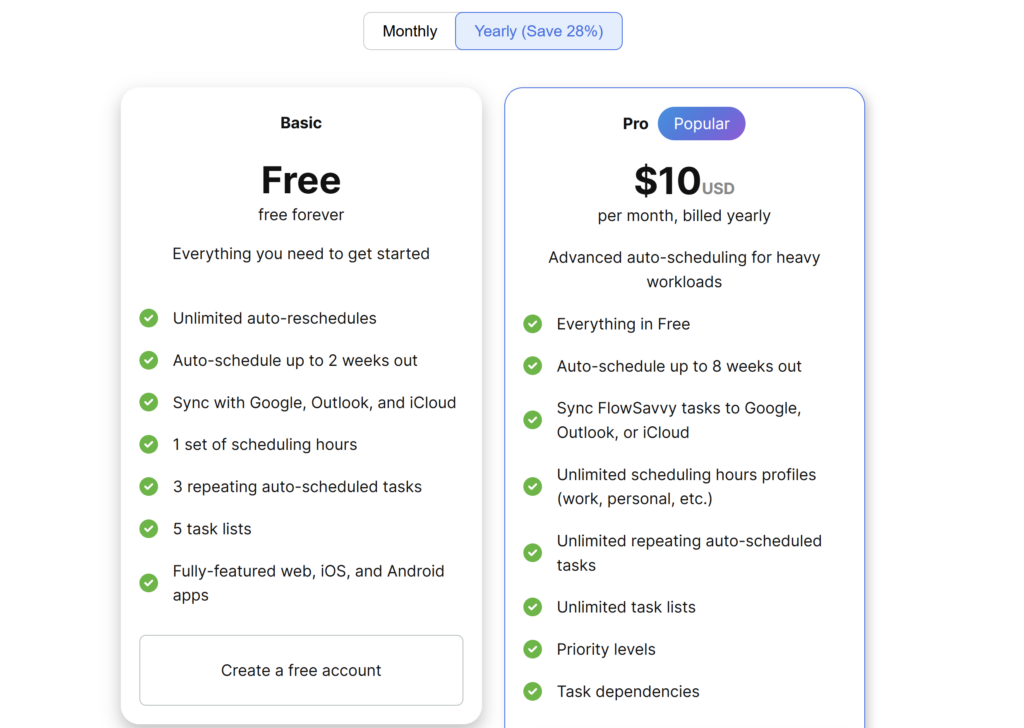
FlowSavvy has two plans. Basic is free. Pro costs $14 per month with monthly billing or $10 per month billed yearly. The annual plan costs $120 for the year, compared with $168 for twelve monthly payments—a $48 difference before tax or currency conversion.
Free already includes the core auto-scheduler. Pro mainly removes planning and organization limits and adds priority, dependencies, and outward task sync. For most new users, the sensible starting point is Free. Upgrade only when one of those boundaries affects a real workflow.
Pricing check: Prices and limits were verified on August 15, 2026. Confirm the selected billing cycle and final checkout total before subscribing.
FlowSavvy pricing at a glance
| Plan | Price | Main limits or additions | Best current fit |
|---|---|---|---|
| Basic | Free | Two-week horizon, one scheduling-hours profile, three repeating auto-scheduled tasks, five lists | First-time evaluation and a focused personal workflow |
| Pro monthly | $14/month | Eight-week horizon, unlimited profiles/repeating auto-scheduled tasks/lists, priorities, dependencies, outward task sync | Users who need Pro but want billing flexibility |
| Pro annual | $10/month billed yearly ($120/year) | Same documented Pro feature set | Established workflows after the trial |
FlowSavvy advertises annual savings of 28%. The $10 figure is a monthly equivalent attached to annual billing, not a month-to-month subscription.
What FlowSavvy Free includes
Basic currently includes:
- unlimited auto-reschedules;
- scheduling up to two weeks ahead;
- one scheduling-hours profile;
- three repeating auto-scheduled tasks;
- five task lists;
- unlimited events, tasks, and ordinary repeating tasks/events;
- web, iOS, and Android apps;
- 30 days of task history;
- unlimited synced calendars;
- Google, Outlook, iCloud, and Todoist integrations listed in the pricing table.
Our Free-account test showed that this is enough to evaluate the core product. FlowSavvy placed flexible work, rebuilt it around a fixed conflict, preserved Lock and Postpone intent, recorded partial progress, split eligible work, and exposed an impossible task.
That does not prove every Free workflow or external integration. We did not benchmark mobile apps or calendar-sync reliability. It does show that Basic is more than a static demo.
For the complete hands-on findings, use our FlowSavvy review. For setup, see our step-by-step FlowSavvy guide.
Where the Free plan becomes restrictive
The planning horizon stops at two weeks
Tasks due beyond the Free auto-scheduling cutoff do not enter the active schedule until they move inside the two-week range. That is adequate for weekly planning, but it is less suitable when you want long projects distributed visibly across the next month or two.
One scheduling-hours profile may mix incompatible work
One profile works when FlowSavvy manages either a work schedule or a personal schedule with similar availability. It becomes restrictive if professional tasks belong inside weekday office hours while personal tasks belong in evenings and weekends.
Repeating auto-scheduled tasks are limited to three
Our first weekday recurring task displayed 1 out of 3. A user with several flexible routines—exercise, study, planning, writing, or administration—can reach that boundary quickly. Ordinary repeating events are a different category and should not be counted as repeating auto-scheduled tasks.
Five lists may be enough until the workflow expands
Five lists can cover a simple system such as Inbox, Work, Personal, Learning, and Admin. More client, project, or life-area separation requires Pro or a simpler list structure.
Free prioritizes by due date
The official prioritization guide says Free orders auto-scheduled tasks by due date. Pro adds explicit Do ASAP, High, Normal, and Low priority levels. A paid priority setting is useful only if due dates alone cannot express the order you need.
What FlowSavvy Pro adds
Pro currently adds:
- scheduling up to eight weeks ahead;
- unlimited scheduling-hours profiles;
- unlimited repeating auto-scheduled tasks;
- unlimited lists;
- priority levels;
- task dependencies;
- outward synchronization of FlowSavvy tasks to Google, Outlook, or iCloud calendars;
- unlimited task history.
The plan table also lists the core Free features in Pro, including automatic rescheduling, workload balancing, smart color coding, overcommitment warnings, auto-splitting, buffers, apps, integrations, and support.
We activated Pro and tested the buying-decision features with a synthetic workload. The results below describe that account and test setup; they do not guarantee identical placement in a different calendar.
Priority levels
Pro lets users separate Do ASAP, High, Normal, and Low work. FlowSavvy says tasks in higher priority levels are scheduled before lower-priority work, with due dates ordering tasks inside a level.
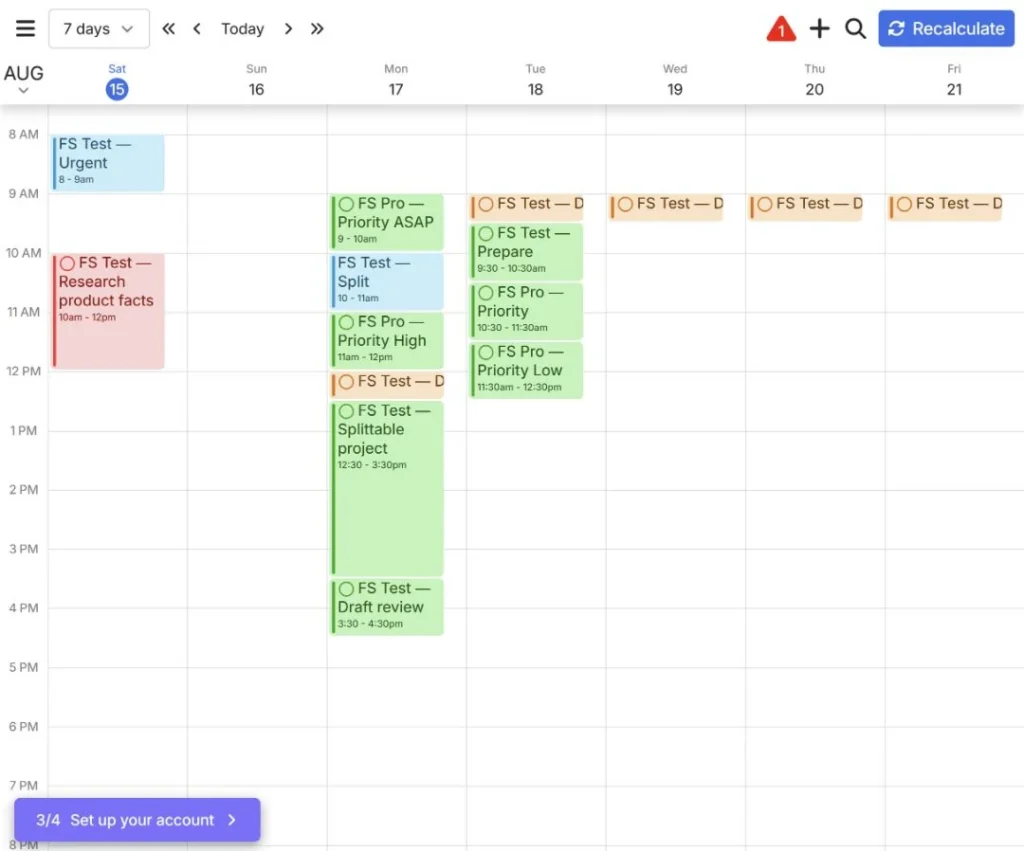
In our aligned one-hour task test, FlowSavvy placed Do ASAP and High work before Normal and Low work. Existing fixed events and other tasks still affected the exact times, so priority is best understood as an ordering input—not a guarantee of the first open block.
Task dependencies
Dependencies express that one task must finish before another. This is potentially useful for research → draft → edit → publish workflows, but repeating-task dependencies are not supported according to the official task guide.
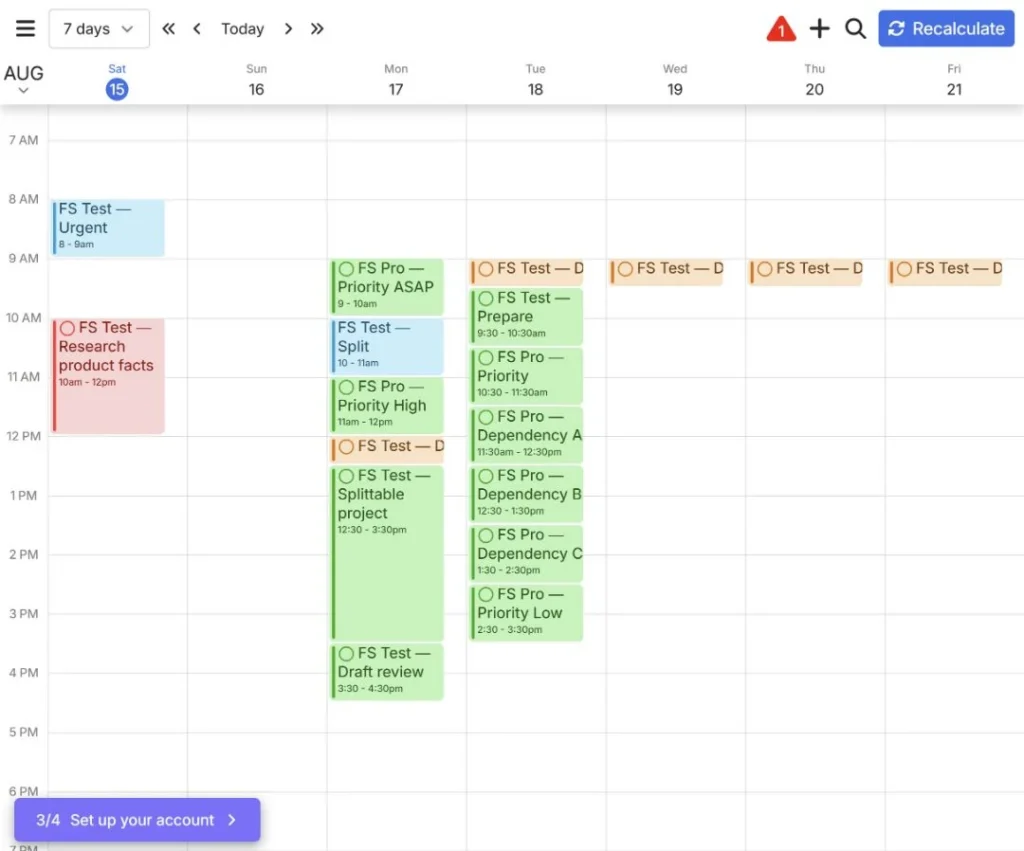
Our A → B → C test was scheduled consecutively on Tuesday: A at 11:30am, B at 12:30pm, and C at 1:30pm. The order was clear after each task’s before/after relationship had been configured.
Multiple scheduling-hours profiles
Unlimited profiles allow separate work, personal, morning, evening, or custom availability. This is one of the clearest documented upgrade triggers because our Free test showed how strongly availability changes output.
In our account, a work-hours task landed at 9:30–10:30am and a personal-hours task at 11:30am–12:30pm under their respective profile configurations. This is useful when the profiles represent genuinely different availability, rather than merely adding more labels.
Eight-week scheduling horizon
An eight-week horizon may help distribute long projects earlier instead of waiting until their deadlines enter the Free two-week window.
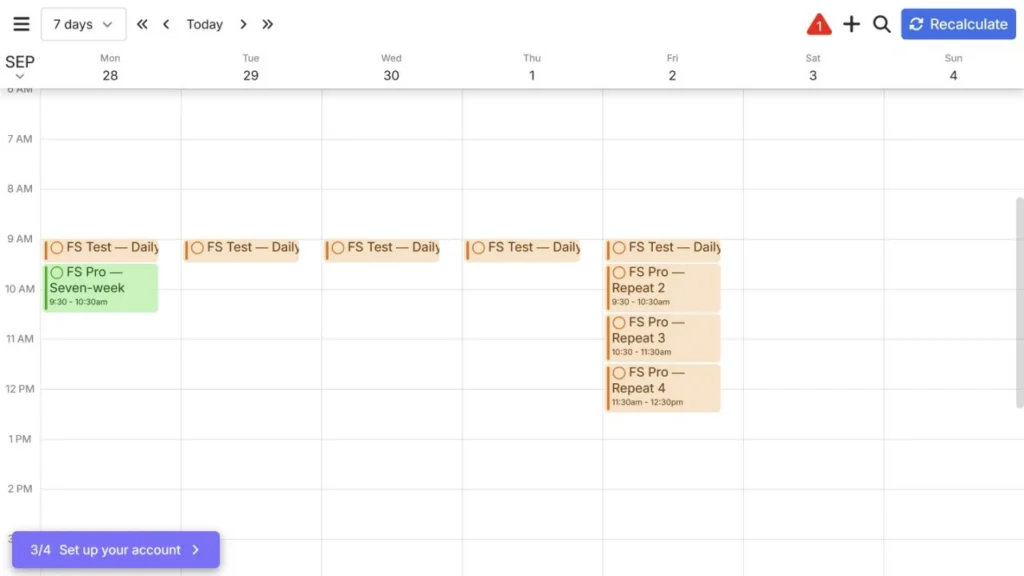
The upgraded account initially retained its former two-week cutoff, so simply activating Pro did not extend the live schedule. After we manually changed the setting to eight weeks, a one-hour task that could start September 28 and was due October 2 was placed on Monday, September 28 at 9:30–10:30am. That confirms the longer horizon works, while exposing an important setup detail for upgraded accounts.
Syncing FlowSavvy tasks outward
Free can bring supported external calendars into FlowSavvy. Pro adds the reverse task route, allowing FlowSavvy tasks to appear on selected Google, Outlook, or iCloud calendars.
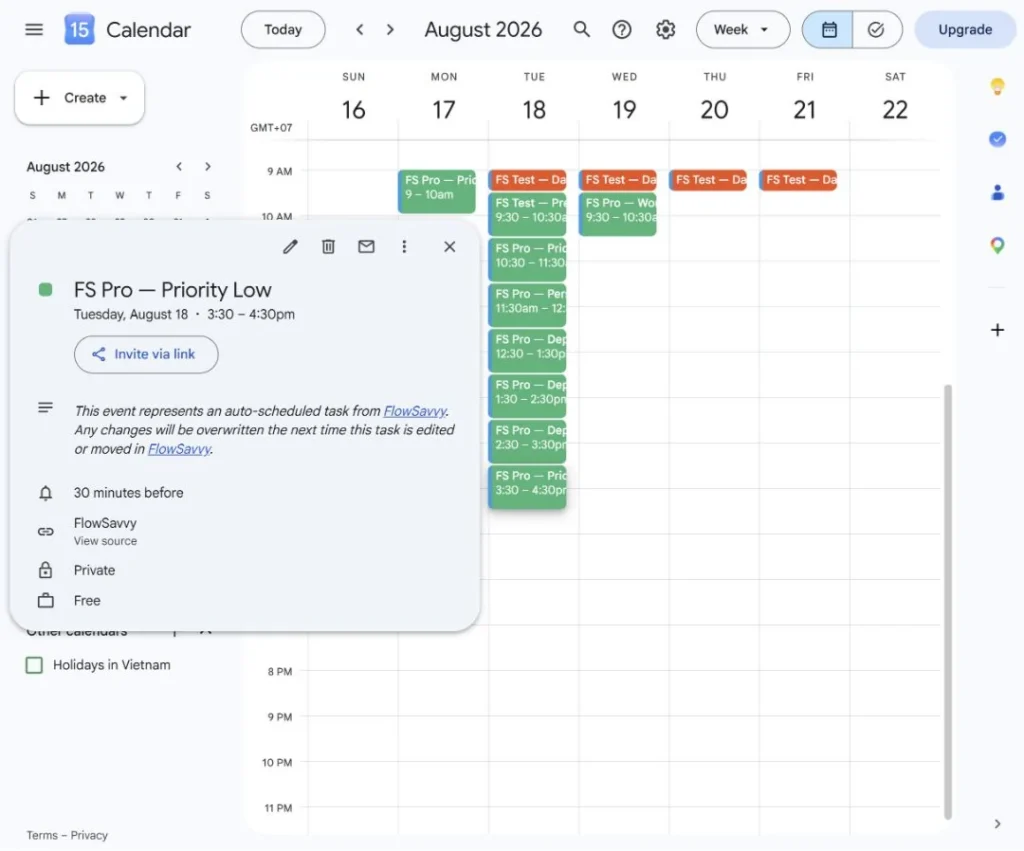
Our synthetic tasks appeared in Google Calendar on the same dates and times shown by FlowSavvy, with no duplicates visible in the inspected week. The synced event was marked Private and Free. Its description warned that Google Calendar edits would be overwritten when the task was next edited or moved in FlowSavvy, making FlowSavvy the practical source of truth. We did not measure exact propagation time.
Is FlowSavvy Pro worth $14 per month?
Verdict: Pro is worth considering when a specific Free boundary repeatedly changes how you plan—not simply because the schedule looks imperfect once.
The strongest upgrade cases are:
- you plan projects more than two weeks ahead;
- work and personal tasks require different availability profiles;
- more than three flexible routines must repeat;
- due dates cannot represent the priority order you need;
- tasks have genuine dependency chains;
- FlowSavvy blocks must appear on an external calendar used by other scheduling systems.
Free remains the better choice when one scheduling profile, a two-week view, and three repeating auto-scheduled tasks cover the workflow. Paying does not improve inaccurate duration estimates, unrealistic availability, or an overloaded calendar by itself.
Our test confirmed that priorities, dependencies, separate availability profiles, a longer scheduling horizon, additional repeating tasks and lists, and outward Google Calendar delivery work in practice. None of them fixes inaccurate duration estimates or an impossible workload, so Free remains the better default when its limits are not causing friction.
Monthly or annual FlowSavvy Pro?
Choose monthly when:
- you have completed the trial but still need more than one week to validate Pro;
- project volume changes seasonally;
- outward sync or dependencies remain uncertain;
- you do not want a $120 annual commitment.
Choose annual only when the paid features are already part of a stable workflow. At current public prices:
- Monthly for 12 months: 12 × $14 = $168.
- Annual: 12 × $10 = $120 billed yearly.
- Difference: $48 per year, approximately 28.6%.
Taxes, exchange rates, and app-store pricing may change the final amount. Check the payment platform and checkout currency rather than relying only on the website’s USD headline.
Does FlowSavvy offer a free trial?
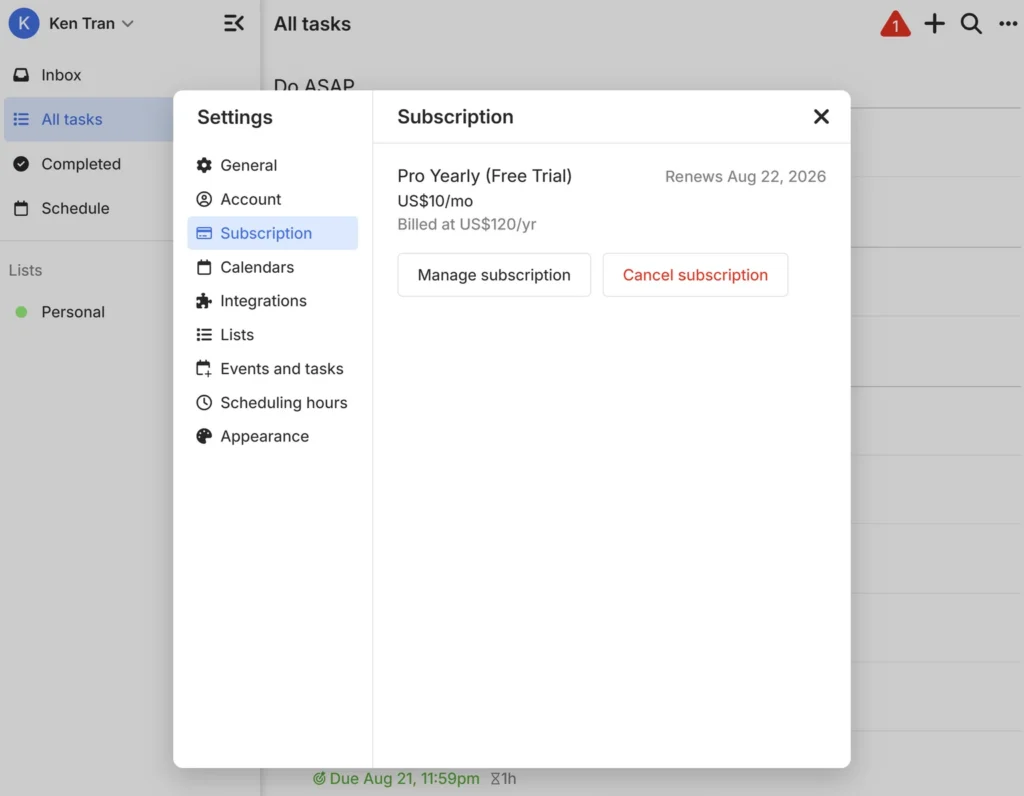
Yes. FlowSavvy currently advertises a seven-day Pro trial. Our test account showed Pro Yearly (Free Trial), an effective price of $10 per month billed as $120 per year, and a renewal date of August 22, 2026. The Subscription screen also exposed Manage subscription and Cancel subscription controls. Confirm the billing cycle, renewal date, payment requirement, and checkout total shown to your own account before activation.
Seven days is enough for a focused comparison if the test workload is prepared in advance. Do not spend the trial rebuilding the Free benchmark; test only the features that can change the buying decision.
Student discount
FlowSavvy currently offers students 50% off the first year of the annual plan. Its help material instructs students to contact support from an institutional email for a discount code and apply it through web checkout. Eligibility and future availability should be confirmed before relying on the discount.
This is a first-year discount, not a permanent $5 monthly price.
Refund and cancellation policy
FlowSavvy’s official refund guide says purchases made through Stripe on desktop or Google Play within the last 30 days are eligible for a refund by contacting support. Apple controls App Store refund requests under its own policy.
The cancellation guide says a canceled subscription retains Pro access through the end of its billing period. Platform-specific management differs between Stripe, Google Play, and Apple.
FlowSavvy also says tasks, events, and calendars remain on the account after a trial or subscription expires. Pro features become unavailable until another subscription starts. We have not canceled or allowed the test subscription to expire, so data retention and post-Pro controls remain vendor-documented rather than independently observed.
Review the current refund instructions and cancellation guide before purchasing.
Hidden costs and limitations
Annual billing is paid as a commitment
The $10 monthly figure represents annual billing. It should not be compared directly with a competitor’s flexible monthly price.
Different platforms manage payment differently
Stripe, Google Play, and Apple have different subscription, refund, plan-change, and promotional-code paths. The same FlowSavvy account can use Pro across devices, but billing management follows the purchase platform.
Pro expands constraints; it does not replace planning judgment
Priority and dependencies can express more intent, but they can also create stricter conflicts. More profiles and a longer horizon provide additional space; they do not make an impossible amount of work possible.
External calendar sync deserves its own test
Outward task sync worked in our Google Calendar check, and no duplicates were visible in the inspected week. Exact latency was not measured, and FlowSavvy’s event description establishes that external edits can be overwritten, so users should treat FlowSavvy as the editing source of truth.
Which FlowSavvy plan should you choose?
Choose Free if
- you are still evaluating automatic time blocking;
- one availability profile is enough;
- you plan within the next two weeks;
- three repeating auto-scheduled tasks and five lists are sufficient;
- external calendars only need to feed events into FlowSavvy.
Consider monthly Pro if
- a specific Pro feature matters but has not yet proved useful over several weeks;
- workload changes seasonally;
- you want more evaluation time without annual commitment.
Consider annual Pro if
- multiple scheduling profiles, priority, dependencies, longer planning, or outward sync are already part of a recurring workflow;
- the seven-day trial and additional monthly use produced consistent value;
- the $120 commitment and renewal terms are acceptable.
Final recommendation
Start with FlowSavvy Free. It can demonstrate the scheduling engine and reveal whether your durations, deadlines, events, and availability produce a useful plan.
Pro should solve a named constraint: longer-range planning, several availability profiles, more recurring flexible work, more lists, explicit priority, dependencies, or outward task sync. Monthly billing is the safer bridge when the feature is promising but not yet established. Annual billing becomes sensible only after the workflow survives a representative trial.
Frequently asked questions
Is FlowSavvy free?
Yes. Basic is free and includes the core scheduler, a two-week horizon, one scheduling-hours profile, three repeating auto-scheduled tasks, and five lists.
How much does FlowSavvy Pro cost?
Pro was listed at $14 per month or $10 per month billed yearly on August 15, 2026. The annual total is $120 before applicable taxes or currency conversion.
What is the main difference between FlowSavvy Free and Pro?
Pro expands the scheduling horizon from two to eight weeks, removes limits on scheduling profiles, repeating auto-scheduled tasks and lists, and adds priority, dependencies, outward task sync, and unlimited task history.
Is there a FlowSavvy Pro free trial?
FlowSavvy advertises a seven-day Pro trial. Confirm the payment requirement, billing cycle, renewal date, and cancellation path displayed to your account before activating it.
Can I get a FlowSavvy refund?
The official policy says Stripe/web and Google Play purchases within 30 days are eligible for a refund through FlowSavvy support. Apple App Store purchases follow Apple’s refund process.
Will I lose my tasks if I cancel Pro?
FlowSavvy’s documentation says tasks, events, and calendars stay on the account after the trial or subscription expires, while Pro features are disabled. Our post-Pro account verification is still pending.
Is annual FlowSavvy Pro the best value?
It has the lower effective price, but it is only better value after Pro features become part of a stable workflow. Monthly billing is safer while usefulness or seasonal demand remains uncertain.