
The best FlowSavvy alternative depends on what you need that FlowSavvy does not prioritize. Choose Motion if you want automatic scheduling inside a broader project-management system. Choose Reclaim AI if protecting focus time, routines, and meeting boundaries matters more than task-first scheduling. Akiflow is the research-based option for consolidating tasks from several work apps, Sunsama for guided daily planning, and Morgen for cross-platform, multi-calendar planning.
None is universally better. Each adds a capability or planning style while introducing more cost, more setup, or less passive automation. If your main requirement is still putting solo tasks around an existing calendar, FlowSavvy may remain the simplest fit.
FlowSavvy alternatives: the quick answer
| Alternative | Best for | Planning model | Free access | Main tradeoff | Evidence used |
|---|---|---|---|---|---|
| Motion | Broader project and work management | Continuous task auto-scheduling inside a work platform | Seven-day trial in our test | Higher price and more product breadth | Volticen hands-on benchmark plus official sources |
| Reclaim AI | Focus time, routines, buffers, and booking policies | Calendar-policy automation | Permanent Lite plan; Business trial in our test | More policy setup; native Task workflow needs a Reclaim 2.0 caveat | Volticen hands-on benchmark plus official sources |
| Akiflow | Consolidating tasks from work apps | Unified inbox, daily planning, time blocking, and AI assistance | Seven-day trial currently displayed | No permanent free plan shown; scheduling performance not tested by Volticen | Current official documentation |
| Sunsama | Guided daily planning and workload control | Daily planning ritual with optional auto-timeboxing | Fourteen-day trial; no permanent free plan | Requires active planning rather than quietly rebuilding a full schedule | Current official documentation |
| Morgen | Cross-platform, multi-calendar planning | AI-assisted time blocking and calendar automation | Fourteen-day trial currently displayed | Paid after trial; AI Planner performance not tested by Volticen | Current official documentation |
Short recommendation: Start with the reason FlowSavvy does not fit. Test one alternative built around that problem instead of moving to the product with the longest feature list.
Prices and trials can change. At our August 18 checkpoint, FlowSavvy and Reclaim offered permanent free plans. Motion, Akiflow, Sunsama, and Morgen used time-limited trials in the evidence reviewed. Check current billing terms before subscribing.
Why look for a FlowSavvy alternative?
FlowSavvy is deliberately focused. You create tasks with durations, deadlines, priorities, and scheduling hours, and the app fits flexible work around fixed calendar events. In our controlled test, it split work around conflicts, rescheduled unfinished duration, preserved manual intent through Lock and Postpone, exposed an impossible workload, and published clean task blocks to Google Calendar.
That focus is valuable, but it also defines the reasons someone might look elsewhere:
- You need projects, documents, team workflows, or more work-management context.
- You care more about focus protection, habits, meeting buffers, and booking rules than individual task blocks.
- Your tasks begin in Gmail, Slack, Notion, Asana, ClickUp, or other work tools and need one planning inbox.
- You want a structured daily planning ritual that asks what should fit today.
- You work across several calendar providers or need native desktop and mobile surfaces on more platforms.
These are workflow differences, not proof that FlowSavvy is inadequate. Our full FlowSavvy review remains the right place for its complete hands-on verdict.
How I selected and evaluated these alternatives
I selected five products because each addresses a different objection. Adding more tools would create a longer list without improving the decision.
The evidence is mixed by design:
- FlowSavvy, Motion, and Reclaim were tested hands-on with controlled synthetic calendars.
- Motion and Reclaim were also compared directly with FlowSavvy in separate articles.
- Akiflow, Sunsama, and Morgen are assessed from current first-party pricing, product, and help documentation. I did not run their scheduling engines through the same controlled workload.
That difference affects what this article can conclude. I can compare documented workflow, plan structure, integrations, platform coverage, and the problem each product is designed to solve. I cannot claim that Akiflow, Sunsama, or Morgen schedules more accurately, reliably, or intelligently than FlowSavvy.
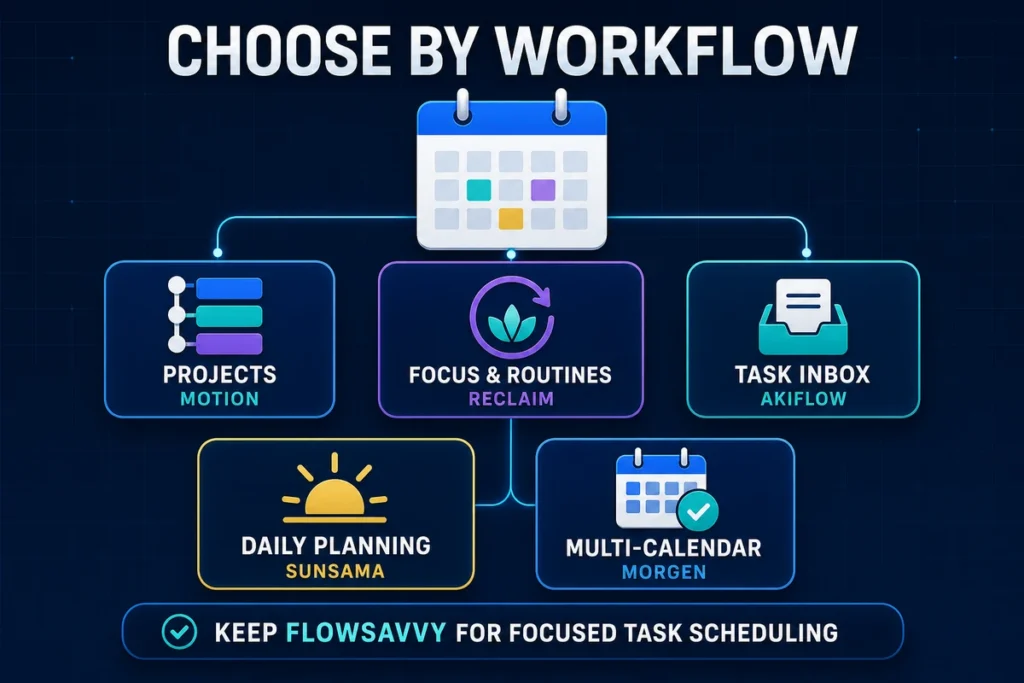
Evidence disclosure: Volticen tested FlowSavvy, Motion, and Reclaim hands-on. Akiflow, Sunsama, and Morgen are research-based selections using current first-party documentation; they do not receive performance or reliability rankings.
1. Motion: best for broader project management
Motion is the first alternative to consider when FlowSavvy feels too narrow rather than too automated. It combines task scheduling with projects, dependencies, documents, AI features, meetings, and team-oriented controls.
This recommendation has hands-on support. In the controlled benchmark, Motion scheduled tasks around calendar constraints, handled priorities and project dependencies, exposed overload, and published its planned work to Google Calendar. It also supported a hard-deadline mode that placed one task outside ordinary Work hours to finish before its deadline.
That makes Motion broader, not automatically better. FlowSavvy and Motion both produced usable schedules in the tested workload, but they asked the user to manage different amounts of product structure.
Why choose Motion over FlowSavvy?
Choose Motion when scheduling is only one part of the system you need. A project with dependent tasks, documents, status tracking, team assignments, and planning context can live closer to the scheduler instead of being split across several apps.
Motion also provides more ways to express deadline pressure. In our test, an overloaded task could remain scheduled beyond its deadline with a warning, while the hard-deadline control allowed placement outside normal hours. FlowSavvy handled a different overload scenario by leaving an impossible non-splittable task unscheduled and warning about it. Neither behavior is universally superior; the useful question is which failure state you prefer to manage.
Why not choose Motion?
Motion costs substantially more at the accepted individual pricing checkpoint, and its wider workspace introduces more concepts than a focused scheduler. If you do not need projects, documents, AI surfaces, or team controls, you may be paying for breadth that does not improve your core task-to-calendar workflow.
The tested Motion purchase path also used a time-limited Pro AI trial rather than a permanent free plan. That gives you less time than FlowSavvy Free to evaluate the product without a billing decision.
Read the full FlowSavvy vs Motion comparison for the symmetric scenarios, or the Motion app review for the standalone verdict.
2. Reclaim AI: best for focus time and calendar policies
Reclaim is the stronger alternative when your calendar needs protection rules rather than a deeper task manager. Its Reclaim 2.0 surface centers on Agents for Focus Time, Habits, Buffers, meetings, and other calendar policies, alongside Scheduling Links and an Assistant.
In our controlled week, a Focus Agent met a ten-hour weekly goal with five two-hour blocks. A higher-priority Habit moved around a fixed conflict while affecting Focus placement, and a title-filtered Buffer Agent added only the meeting edges that remained available. In one synthetic overlap, the Assistant explained a proposed move and left it behind a separate review step.
Why choose Reclaim over FlowSavvy?
Choose Reclaim when the unit you want to manage is protected calendar time. It is better aligned with questions such as:
- How many hours of focus should the week contain?
- When may a routine move?
- Which meetings need recovery time?
- What availability should a booking link expose?
- Which proposed calendar change should be reviewed before applying?
FlowSavvy can schedule recurring tasks and flexible work, but it is not primarily a meeting-policy or focus-protection system. Reclaim’s broader calendar layer is the more natural fit when those policies are the actual job.
Why not choose Reclaim?
Reclaim asks you to understand Hours, priorities, Agents, policies, and preview states. That setup can be worthwhile, but it is more involved than entering tasks and letting a focused scheduler place them.
The native Reclaim 2.0 Task I created also remained in the Tasks panel without appearing as a visibly named Task block in the controlled calendar. That finding applies only to the tested native workflow. Reclaim supports task integrations, so it would be inaccurate to say that Reclaim cannot schedule tasks.
Use the full FlowSavvy vs Reclaim comparison for the task-versus-calendar-policy decision. The Reclaim AI review covers the complete Reclaim 2.0 test.
3. Akiflow: best for consolidating tasks from work apps
Akiflow is the research-based alternative for people whose planning problem begins before scheduling: tasks are scattered across inboxes, project tools, and communication apps.
Its current official pricing page presents a combined task and calendar workspace with quick capture, tasks and subtasks, daily planning, time blocking, Google and Outlook calendar sync, two-way sync, desktop and mobile apps, integrations, and the Aki assistant. The page currently shows a seven-day trial, then $34 per month or $19 per month when billed yearly.
Why choose Akiflow over FlowSavvy?
Akiflow is worth considering if reducing task fragmentation matters more than keeping the scheduler minimal. A user who receives work through several systems may benefit from collecting it in one inbox, converting it into tasks, and planning it beside meetings without rebuilding every item manually.
Its keyboard-oriented capture and daily-planning surface may also fit people who want a faster command-center workflow rather than a task list that mainly exists to feed an automatic calendar.
Why not choose Akiflow?
Akiflow does not currently present a permanent free plan on its public pricing page, and its paid entry price is above FlowSavvy Pro at the accepted checkpoint. A seven-day trial is a short window for deciding whether integrations remain reliable across a normal work cycle.
More importantly, Volticen has not run Akiflow through the FlowSavvy benchmark. The official page documents features, but it does not prove how well AutoPlan or Aki will handle your conflicts, deadlines, rescheduling preferences, or integration edge cases. The vendor’s time-saved and ROI calculator is marketing material, not an independently verified outcome.
Review the current Akiflow pricing and feature page before starting a trial.
4. Sunsama: best for guided daily planning
Sunsama is the most deliberate alternative in this shortlist. Instead of quietly rebuilding an entire schedule in the background, it guides the user through deciding what belongs in the day.
Its official manual describes a daily flow that reviews unfinished work, pulls in tasks and meetings, compares planned time with a workload threshold, asks the user to defer excess work, and then orders or timeboxes the selected tasks. Sunsama can auto-schedule a selected task around existing events and auto-reschedule conflicts or early completions, but the surrounding workflow remains intentionally hands-on.
Why choose Sunsama over FlowSavvy?
Choose Sunsama when overcommitment is partly a decision problem. Its predicted workload and shutdown-time framing encourage you to remove work from the day before treating every open calendar slot as available capacity.
It may also suit people who want daily and weekly planning rituals, reflection, objectives, and task import from connected tools. Google, Outlook, and Apple/iCloud calendars are documented, allowing planned work to sit beside meetings across common providers.
Why not choose Sunsama?
The deliberate workflow requires participation. If your goal is to enter tasks with deadlines and let the calendar keep recalculating them, FlowSavvy is closer to that expectation. Sunsama’s ritual can become valuable structure or unwanted planning overhead depending on how you prefer to work.
Sunsama also has no permanent free plan. Its official billing guide currently states $22 per user monthly or $17 per user/month billed annually after a 14-day trial. Because one pricing-page FAQ contained stale-looking higher figures during research, verify the checkout amount rather than relying on an old comparison.
Volticen has not tested Sunsama hands-on for this article. Its placement is based on the documented planning model, not a claim that its schedule quality is better than FlowSavvy’s.
Check the current Sunsama pricing page before subscribing.
5. Morgen: best for cross-platform multi-calendar planning
Morgen is the research-based alternative for people who need their planner to span more calendars, operating systems, and task sources. Its official pricing page lists Google Calendar, Outlook, iCloud, and a broad set of task integrations, alongside Windows, macOS, Linux, mobile, and browser access.
The same product surface includes AI-assisted time blocking, calendar automations, a booking page, and Scheduling Links. Current individual pricing is displayed at $30 monthly or $15 per month billed yearly after a 14-day full-access trial without a credit card.
Why choose Morgen over FlowSavvy?
Choose Morgen when provider and platform coverage is the first requirement. Someone who moves between Linux, mobile, browser, Google, Microsoft, and Apple environments may value a single calendar layer more than FlowSavvy’s more focused task scheduler.
Morgen may also suit users who want task integrations, booking links, and calendar automations beside AI-assisted planning. That combination can reduce the need to maintain separate tools for viewing calendars, importing work, and exposing availability.
Why not choose Morgen?
Breadth does not prove scheduling quality. Volticen has not tested Morgen’s AI Planner, conflict handling, recovery behavior, or integration sync under the controlled workload. The article therefore cannot tell you whether its planner will make better choices than FlowSavvy for your tasks.
Morgen is also paid after the trial. Its yearly price is competitive with some broader planners but still exceeds FlowSavvy’s accepted annualized Pro baseline. Platform availability should not be read as feature parity; confirm that the specific control you need works on the device and provider you use most.
Review the current Morgen pricing and integration page before beginning the trial.
When FlowSavvy is still the better choice
An alternatives article should not assume that switching is progress. Keep FlowSavvy on your shortlist when the main job remains turning solo tasks into a flexible calendar.
FlowSavvy is especially sensible when:
- you want a permanent Free plan for a representative test;
- tasks need durations, deadlines, priorities, splitting, dependencies, and custom scheduling hours;
- you want unfinished work recalculated without adopting a full project platform;
- you prefer visible named task blocks over a broader focus-and-meeting policy system;
- lower cost and a narrower interface matter more than integrations, rituals, or team breadth.
The Free plan is enough to test the core scheduling model, while Pro expands the horizon and removes limits relevant to heavier workflows. The complete plan economics belong in our FlowSavvy pricing guide.
FlowSavvy alternatives compared
| Product | Primary reason to switch | Calendar/task approach | Project/team breadth | Calendar/platform distinction | Current free access | Accepted individual price checkpoint |
|---|---|---|---|---|---|---|
| FlowSavvy | Baseline: focused task scheduling | Continuous flexible task scheduling | Focused; not a full work platform | Google, Outlook, and iCloud support in accepted evidence | Permanent Free plan | Pro $14 monthly or $10/month billed yearly |
| Motion | Need broader project management | Automatic task scheduling within projects | High relative breadth | Google, Outlook, and iCloud in accepted evidence | Seven-day trial observed | Individuals Pro AI $49 monthly or $29/month billed yearly |
| Reclaim AI | Need focus, routines, buffers, and booking policies | Calendar-policy Agents plus Assistant | Broader calendar/team policy surface | Google and Outlook; web/PWA at checkpoint | Permanent Lite plan | Starter $12/$10; Business $18/$15 per seat, monthly/annualized |
| Akiflow | Need task consolidation | Unified inbox, daily planning, time blocking, AI | Integration-heavy personal/work planning | Google/Outlook sync; desktop/mobile listed | Seven-day trial displayed | $34 monthly or $19/month billed yearly |
| Sunsama | Need a deliberate planning ritual | Guided daily planning plus optional auto-timeboxing | Objectives, rituals, integrations and shared workspaces | Google, Outlook, Apple/iCloud documented | Fourteen-day trial | $22 monthly or $17/month billed yearly |
| Morgen | Need cross-platform multi-calendar breadth | AI-assisted time blocking and calendar automation | Integrations, links and team options | Windows, macOS, Linux, mobile, browser; Google/Outlook/iCloud listed | Fourteen-day trial displayed | $30 monthly or $15/month billed yearly |
This table compares product scope and current plan structure, not scheduling accuracy. Prices and packaging require a publication-day refresh.
Which FlowSavvy alternative should you choose?
- Choose Motion if tasks need to live inside projects, dependencies, documents, AI, and broader work management.
- Choose Reclaim AI if focus goals, routines, meeting buffers, booking links, and calendar policies are the priority.
- Choose Akiflow if tasks arrive from many work apps and you want one fast planning inbox.
- Choose Sunsama if you want a daily ritual that makes you decide what realistically fits.
- Choose Morgen if cross-platform access, multiple calendar providers, and broad integrations come first.
- Keep FlowSavvy if you mainly want a focused, lower-cost task auto-scheduler with a permanent Free plan.
Whichever route you choose, test one representative week with non-sensitive data. Use the same fixed meetings, task durations, deadlines, and conflict. Then check what moved, what remained unscheduled, what reached the external calendar, and how much review the result required.
Frequently asked questions
What is the best free alternative to FlowSavvy?
Reclaim Lite is the clearest permanent-free alternative in this shortlist, but it solves a different problem: calendar protection, routines, buffers, and booking policies. Motion, Akiflow, Sunsama, and Morgen used time-limited trials at our checkpoint. If you mainly need task-first auto-scheduling, FlowSavvy’s own Free plan may still be the most relevant free option.
Is Motion better than FlowSavvy?
Motion is a better fit when you need projects, dependencies, documents, AI features, and broader work management around the scheduler. FlowSavvy is the better fit when you want a focused solo task scheduler at a lower price. Our tests do not support a universal winner.
Is Reclaim better than FlowSavvy?
Reclaim was stronger for Focus Time, Habits, meeting buffers, Scheduling Links, and one reviewable Assistant workflow. FlowSavvy was the clearer task-first scheduler in the tested workload. Choose according to whether tasks or calendar policies are the main job.
Which alternative is best for Todoist or other task integrations?
Akiflow and Morgen are the research-based candidates for broad task consolidation, while Reclaim lists integrations with several task systems depending on plan. Integration presence does not guarantee that every field, recurrence, priority, or completion state syncs exactly as expected, so test your specific source before migrating.
Which FlowSavvy alternative works with iCloud Calendar?
Sunsama and Morgen officially document Apple/iCloud calendar support, and Motion supported iCloud in the accepted project evidence. Reclaim currently focuses on Google and Outlook calendars. Provider support and feature parity can change, so verify the exact account and workflow before purchasing.
Should I switch from FlowSavvy?
Switch only if you can name the missing workflow. Projects point toward Motion, calendar policies toward Reclaim, task consolidation toward Akiflow, guided planning toward Sunsama, and cross-platform multi-calendar planning toward Morgen. If none of those is a real constraint, changing tools may add setup without improving your schedule.
Bottom line
There is no single best FlowSavvy alternative. Motion adds project and work-management breadth. Reclaim adds focus, routine, meeting, and booking policies. Akiflow consolidates work from connected apps. Sunsama turns planning into a deliberate daily ritual. Morgen emphasizes multi-calendar and cross-platform coverage.
FlowSavvy remains the sensible baseline for solo users who want tasks automatically placed around an existing calendar without adopting a broader work system. Start with the limitation that costs you the most time, test the one product designed around it, and compare the review burden as carefully as the feature list.