

MeetGeek is worth trying if recurring meetings leave you with scattered notes, forgotten decisions, and time-consuming follow-up. In our test, it turned an approximately 42-minute, multi-speaker English recording into a readable transcript, a structured summary, timestamped next steps, and meeting insights. We also tested MeetGeek Chat with eight prompts.
The result was useful, but it was not hands-off. Some technical names were transcribed incorrectly, and the AI-generated analysis still required human review. MeetGeek works best as a first-draft meeting record—not as an unquestionable source of truth.
This review is based on one English meeting, not a controlled accuracy benchmark. We did not test every accent, language, recording method, paid plan, or integration.
What is MeetGeek?
MeetGeek is an AI meeting assistant that records or imports conversations and turns them into transcripts, summaries, highlights, action items, and searchable meeting history. It can capture Zoom, Google Meet, and Microsoft Teams calls with a meeting bot, while browser, desktop, mobile, and upload options support bot-free workflows. MeetGeek’s official Chrome Recorder guide explains how browser-based recording works without adding a bot to the call.
The product also includes templates, analytics, AI Chat, integrations, API and MCP access, and workflow automation, depending on the current plan. That wider workflow matters: a transcript preserves what was said, while structured notes and integrations help move decisions into the tools where work continues.
MeetGeek cannot decide whether recording is appropriate. Consent, access, retention, and sharing must still match the meeting and your organization’s policies.
How we tested MeetGeek
We used one approximately 42-minute English recording with several speakers discussing product announcements, conference support, feature prioritization, competitor positioning, and messaging. This fixed audio file is reused across our tests of AI meeting assistants so later product comparisons are based on the same source meeting. See Our step-by-step MeetGeek guide
We reviewed:
- The generated transcript.
- The meeting summary and topic breakdown.
- Timestamped next steps.
- AI-generated observations about the meeting.
- The Insights view, including talk-time and meeting-dynamics signals.
- Eight MeetGeek Chat prompts covering summary, actions, end-of-meeting retrieval, source grounding, hallucination control, email drafting, and follow-up context.
- Available account, sharing, join, upload, and AI workspace screens.
We did not calculate a word-error rate or compare MeetGeek against another assistant on identical audio. We also did not test paid plans, long-term team use, every recording method, live CRM automation, or transcription outside English.
What MeetGeek did well in our test
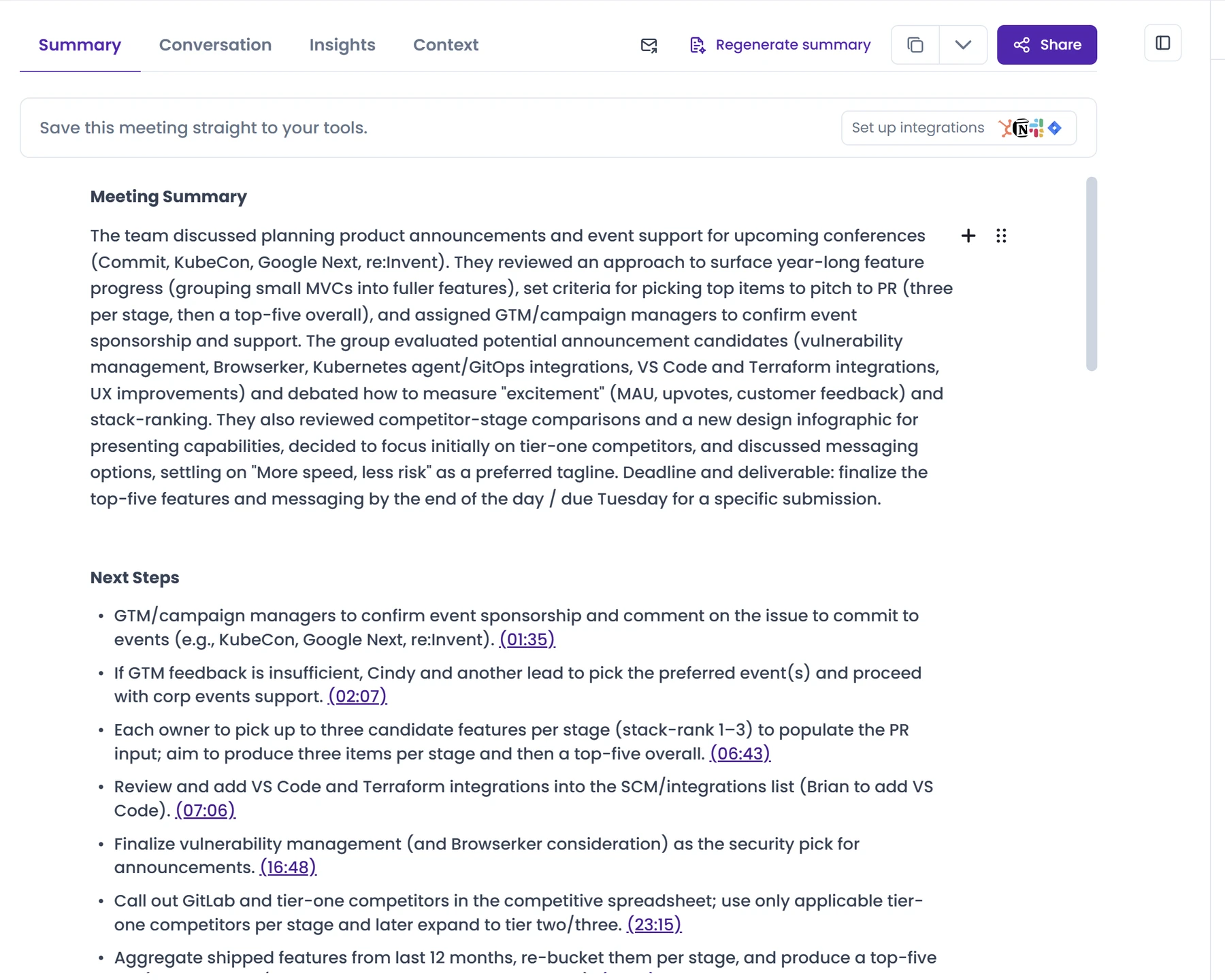
The summary captured the main arc of a long discussion
The meeting moved through several connected topics: event ownership, selecting product announcements, deciding how to rank “excitement,” comparing competitors, and refining a tagline. MeetGeek’s summary preserved that overall structure without forcing us to replay the recording.
It surfaced the team’s preferred messaging, “More speed, less risk,” and captured the plan to select a small set of priority features. It also retained representative candidates such as vulnerability management, Browserker, Kubernetes/GitOps work, VS Code, and Terraform integrations.
That does not prove the summary contained every important nuance. It shows that, for this sample, it was a useful orientation layer before reviewing the underlying conversation.
Timestamped next steps made the output auditable
MeetGeek did not only list tasks. Each next step included a timestamp link to the relevant part of the conversation. That made it easier to check where an assignment came from and recover surrounding context.
This is more useful than a summary with no link back to the source. When an owner, deadline, or exact wording matters, the reader can move from the condensed note to the relevant moment instead of accepting the summary at face value.
The output separated summary, conversation, and insights
The interface gave the meeting several useful layers:
- Summary for the main narrative and follow-up.
- Conversation for the timestamped transcript.
- Insights for meeting patterns and participation signals.
- Context and AI tools for follow-on work.
That separation made the record easier to navigate than one long block of notes. A manager can begin with the summary, an assignee can verify a task, and an editor can inspect the transcript.
Insights added a coaching lens
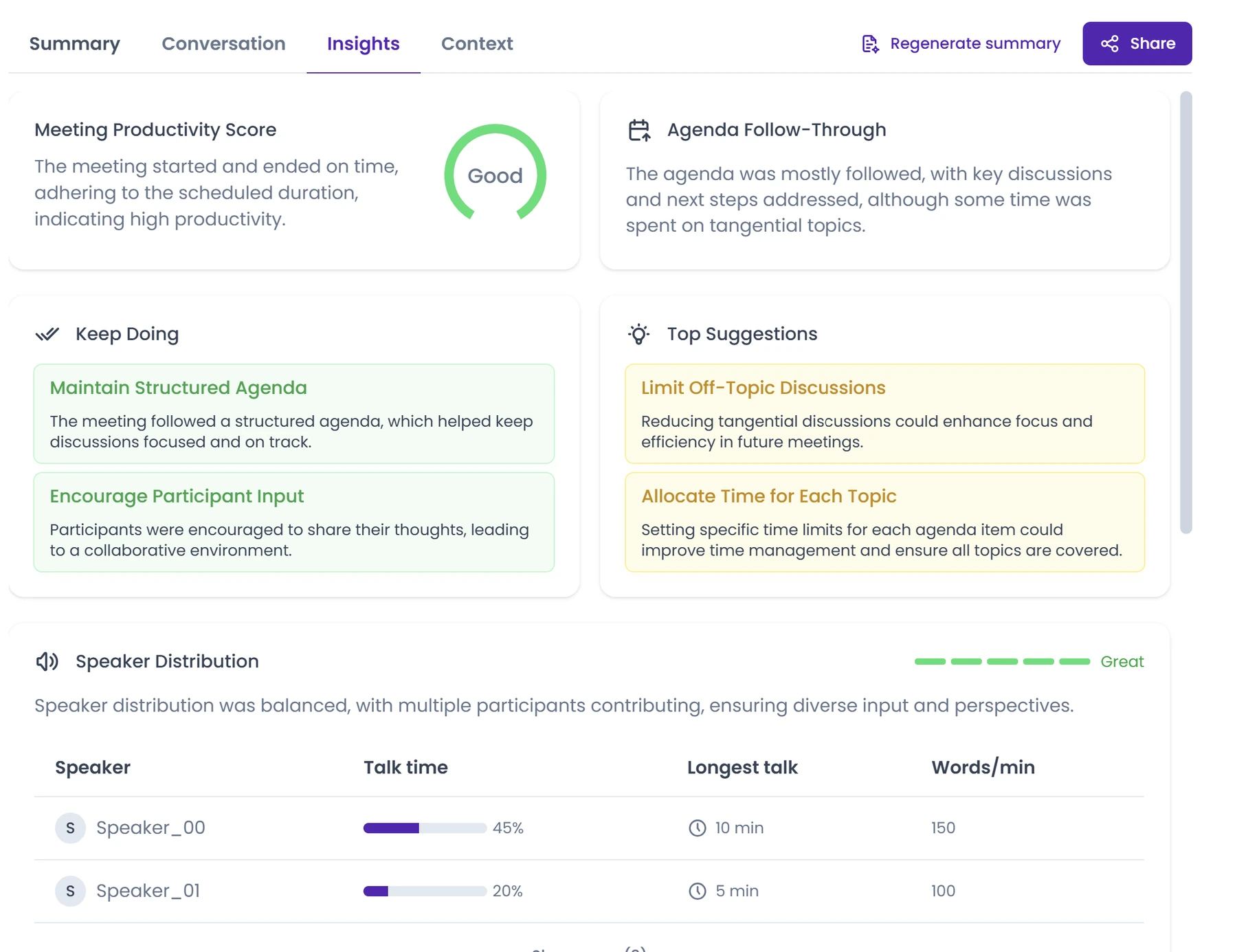
The Insights screen rated meeting productivity, described agenda follow-through, suggested improvements, and displayed speaker distribution, talk time, longest speaking turn, and words per minute.
These signals may help a team notice patterns, such as one person dominating the conversation or recurring off-topic sections. They should not be treated as objective proof that a meeting was productive. An AI score cannot know whether a necessary detour or a quiet participant produced the most important outcome.
How MeetGeek Chat performed in eight prompts
MeetGeek Chat was useful, but the results were mixed enough to rule out blind trust. We compared every answer with the saved transcript and MeetGeek-generated summary.
What Chat handled well
Chat produced usable summaries and action lists, retrieved a broad set of technical names with timestamps and transcript excerpts, and correctly said that no approved budget or approver appeared in the meeting. That budget question was deliberately adversarial: inventing either detail would have been a clear hallucination.
It also handled a follow-up editing instruction. After drafting an email, Chat shortened it to under 120 words and made the action items easier to scan. This showed that it could retain the immediately preceding context and revise its own output.
These are sample-bound results. One correct refusal does not prove that MeetGeek Chat never hallucinates, and one successful revision does not establish dependable context retention across every conversation.
Where Chat lost grounding
The most important miss involved the final tagline. Chat retrieved “More speed, less risk,” but said the meeting ended without a definitive statement. The transcript says otherwise: near the end, the speaker explicitly chose that line. Chat found the phrase but misclassified the decision.
Chat did better when asked what happened after the 30-minute mark. It returned a structured sequence covering the messaging framework, tagline options, “more speed, less risk,” the “no trade-offs” debate, and the final wrap-up, with elapsed timestamps from 33:17 through 42:35. Those topics and their order aligned with the saved transcript.
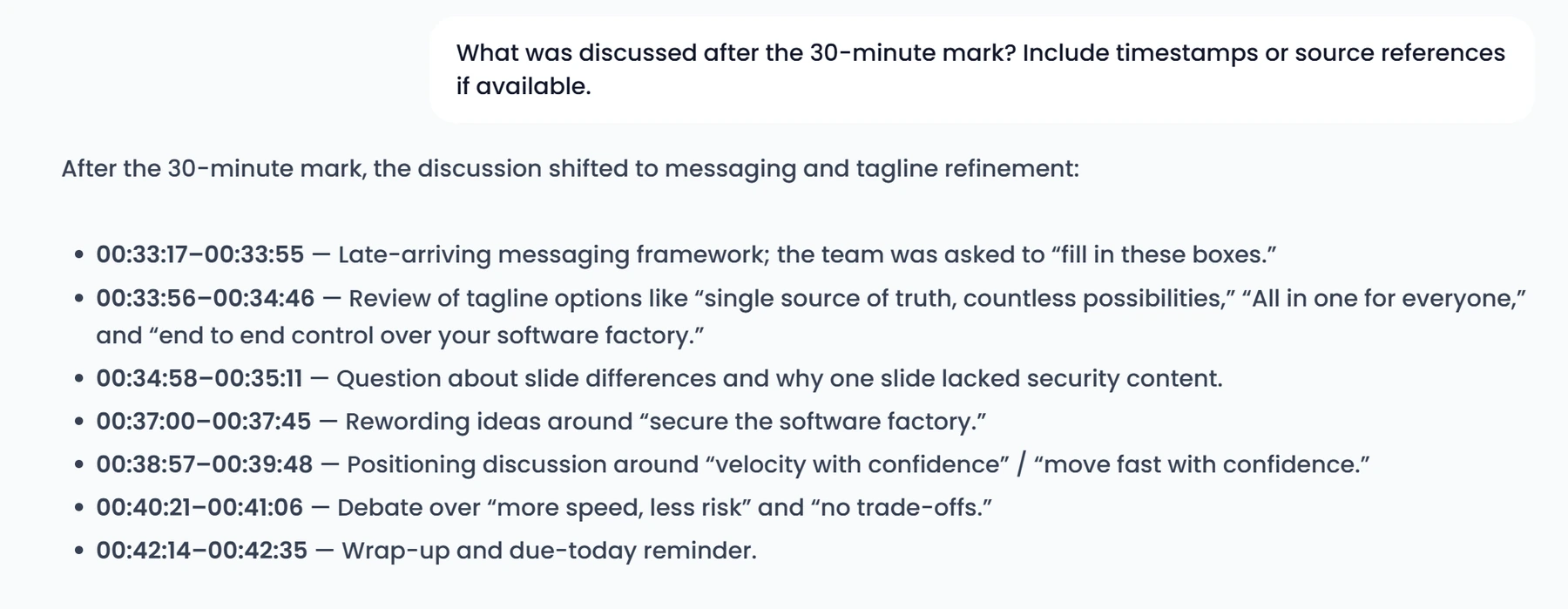
That successful retrieval still needs a boundary: one prompt does not prove that Chat will recover every late-meeting detail correctly. It also did not prevent Chat from misclassifying the final tagline decision in the preceding answer.
The drafted follow-up email correctly signed off as “Ken,” using the name associated with the MeetGeek account. That personalization was expected behavior, not invented meeting content. On rechecking the source, getting the current iteration live and adding drilldowns in the next iteration were both supported by the transcript. The caveat is narrower: the email compressed discussion-specific points into broader next steps, so their project scope still needed review before sending. The under-120-word revision retained that framing.
Chat verdict: useful for first-pass retrieval and drafting, but not reliable enough for sending or acting on output without checking the source.
Chat responses were noticeably slow
MeetGeek Chat often remained in Thinking for roughly 20–50 seconds before returning an answer during this test. Across eight prompts, those waits made the review workflow feel slower than it needed to be—especially when an answer required a follow-up correction or source check.
It also felt slower than our comparable Otter AI prompt test. This was not a controlled speed benchmark: we did not standardize network conditions, server load, run order, or repeated timing samples. The defensible conclusion is narrower—MeetGeek Chat felt slow in our sessions, and users who expect rapid back-and-forth analysis should test response time with their own meetings.
Where MeetGeek fell short
Anonymous speaker labels worked as intended
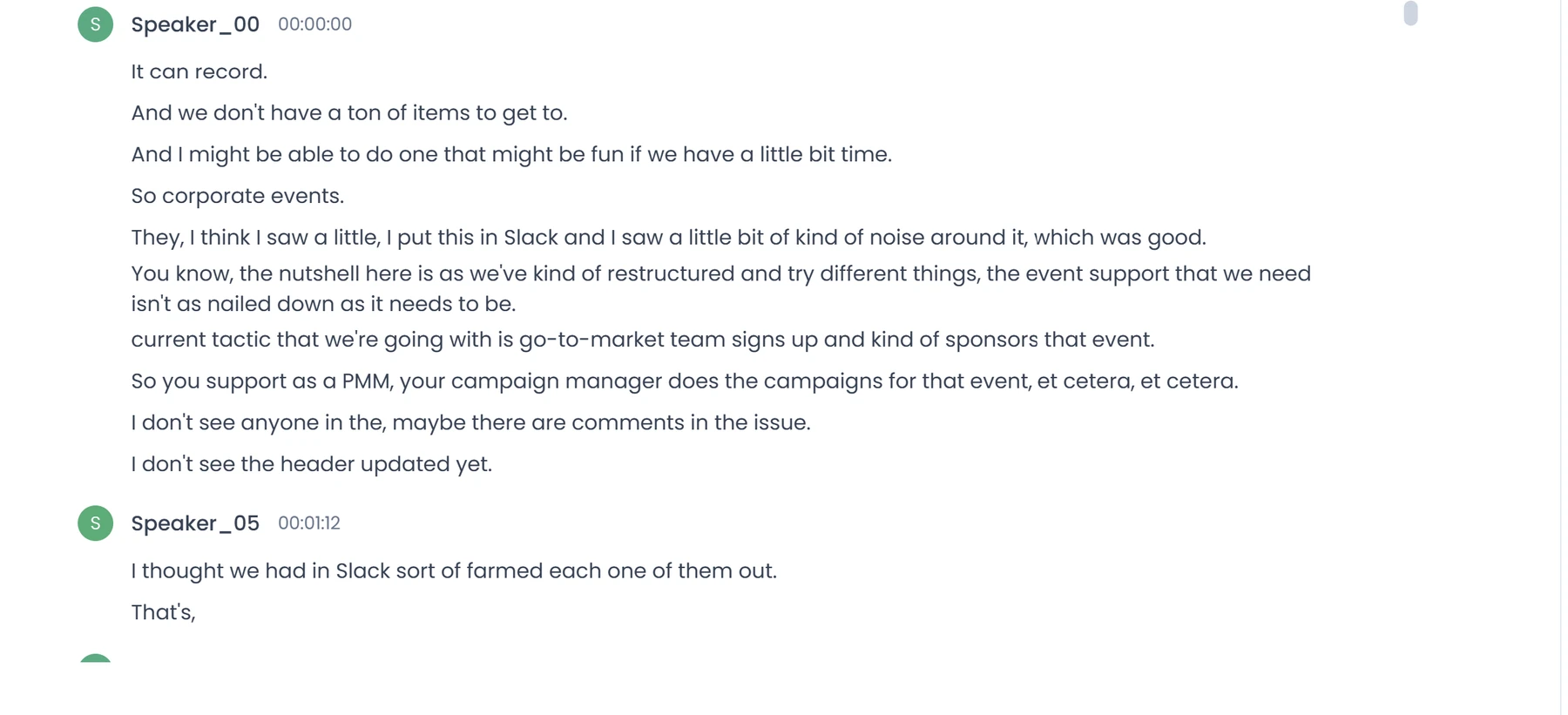
The transcript used labels such as Speaker_00 and Speaker_05 instead of exposing participants’ real names or nicknames. For this benchmark, that is valid behavior: the labels kept the speakers distinct while preserving anonymity.
Teams that need named attribution can optionally map those labels to participants after the meeting. That is a workflow preference, not evidence of a technical failure in the transcript.
Technical names were not consistently reliable
The transcript included errors in names and technical terminology. Acronyms, product names, and unfamiliar words are easier to mishear than ordinary conversation.
The practical rule is simple: verify names, numbers, decisions, owners, and deadlines before using the output outside the meeting. One readable transcript does not establish a universal accuracy rate.
AI-generated coaching can sound more certain than the evidence
Statements such as “the agenda was mostly followed” or “the meeting was highly productive” are interpretations. They can be useful prompts, but they are not neutral measurements of business value.
The same caution applies to summaries and AI Chat. Use MeetGeek to accelerate review, then confirm important details against the transcript, recording, and participants.
MeetGeek pros and cons
Pros
- Turns a long meeting into navigable summaries, topics, transcript, and insights.
- Provides timestamped next steps that can be checked against the conversation.
- Captured the central themes and final messaging choice in our sample.
- Supports both bot and bot-free recording workflows.
Cons
- Names and technical terminology may be transcribed incorrectly.
- Summaries and insights can omit nuance or overstate interpretations.
- Chat missed a confirmed decision and broadened the scope of grounded details in a drafted email.
- Chat responses took roughly 20–50 seconds in our session.
Is MeetGeek free, and is Basic enough?
MeetGeek Basic is free. When checked on August 5, 2026, the official MeetGeek pricing page listed three transcription hours per month, a two-hour limit for one meeting, three months of transcript storage, and one month of audio storage.
The free tier includes the core evaluation workflow: transcription, AI summaries, meeting analytics, global search and AI Chat, uploads, and bot-free recording options. That is enough to determine whether MeetGeek produces useful records for your meeting type.
Three hours per month averages only about 45 minutes per week, so Basic can be restrictive as a permanent plan. Consider upgrading when you need more volume, longer retention, exports, templates, integrations, team collaboration, or governance—not because you expect payment to make every note accurate.
For a plan-by-plan breakdown, see our full MeetGeek pricing guide.
MeetGeek’s official page currently advertises transcription in more than 100 languages. We tested English only, so this review says nothing about comparative accuracy across languages, accents, overlapping speech, or specialized terminology.
Who should use MeetGeek?
MeetGeek is worth considering for:
- Consultants and agencies needing searchable client-call history and faster follow-up.
- Project and product managers wanting decisions and tasks extracted from recurring discussions.
- Recruiters and researchers needing structured records when consent and data handling are appropriate.
- Sales and customer-success teams that benefit from summaries, analytics, and workflows.
- Managers who need a quick view of meetings they attended or review later.
It is a poor fit when you need:
- A certified, verbatim, or zero-error record.
- Automatic mapping of anonymous labels to real participant names without review.
- An AI score to act as an objective employee-performance measure.
- Sensitive meetings recorded without a consent, access, and retention process.
- Guaranteed accuracy across languages or specialized terminology.
Privacy, consent, and responsible setup
Before regular use, decide which meetings may be recorded, how participants will be informed, who receives follow-up emails, who can access recordings and transcripts, and how long data should be retained.
MeetGeek offers controls for recording notices, consent, sharing, access, data residency, and administration across its plans. Its recording notifications and consent guide describes pre-meeting notices and an optional explicit-consent flow. No single configuration is appropriate everywhere; requirements depend on jurisdiction, contracts, meeting type, and organizational policy.
A safer evaluation uses a representative but non-sensitive meeting, obtains any required consent, limits sharing, and checks the resulting transcript and summary before broader adoption. This is operational guidance, not legal advice.
MeetGeek alternatives
Fireflies AI, Otter AI, Fathom, and tl;dv address overlapping needs, but comparison depends on capture method, free limits, languages, integrations, governance, and output on your own meetings.
We did not run a symmetric competitor test for this article, so there is no evidence-backed winner. If named attribution, free quota, bot behavior, or team pricing is a deal-breaker, test the same representative meeting and checklist in an alternative.
If MeetGeek does not match your priorities, compare the best [MeetGeek alternatives](https://volticen.com/meetgeek-alternatives/) for live transcripts, integrations, free meeting notes, clips, uploads, and different capture methods.
Final verdict: Is MeetGeek worth it?
Yes—MeetGeek is worth trying if you regularly need to turn meetings into searchable records and follow-up. In our sample, its summary and timestamped next steps made a long, multi-topic discussion much faster to understand, and its insight layer offered useful prompts for reviewing meeting habits.
The trade-off is verification. Technical-name errors and interpretive AI insights mean important output should not be published or acted on blindly; the anonymous speaker labels themselves were valid for this benchmark.
Start free with one representative meeting. Check the transcript, summary, next steps, sharing behavior, and retention needs. If you require real-name attribution, also test how well label-to-name mapping fits your workflow. Upgrade only when a specific Basic limit gets in the way.
Frequently asked questions
Is MeetGeek accurate?
In our one English meeting, the transcript was readable and the summary captured the central themes. The numbered speaker labels kept participants distinct and anonymous as intended, while errors in technical names still required review. We did not calculate a word-error rate, so this test does not support a universal accuracy percentage.
Does MeetGeek work without a bot?
Yes. MeetGeek officially supports bot-free recording through browser and desktop options, plus mobile capture and audio/video uploads. Availability and limits can vary by plan and product version.
Is MeetGeek free?
Yes. Basic was listed with three transcription hours per month and a two-hour per-meeting limit when checked on August 5, 2026. It is sufficient for a real test, but regular users may outgrow the quota and retention limits.
Can MeetGeek identify speakers?
MeetGeek separated participants using anonymous labels such as Speaker_00 and Speaker_05. We treat those labels as valid speaker identification for this benchmark. Rename them only when your workflow specifically requires real-name attribution.
Does MeetGeek Chat hallucinate?
It can still misinterpret decisions or broaden the scope of grounded details. In our eight-prompt test, Chat correctly refused to invent a budget, but it misclassified the final tagline decision and compressed discussion-specific points into broader email next steps. Check answers against the transcript before sharing or acting on them.
Is MeetGeek safe for confidential meetings?
No meeting assistant should be assumed safe for every confidential workflow by default. Review consent, access, sharing, retention, residency, contractual, and organizational requirements before recording sensitive material.