
Table of Contents
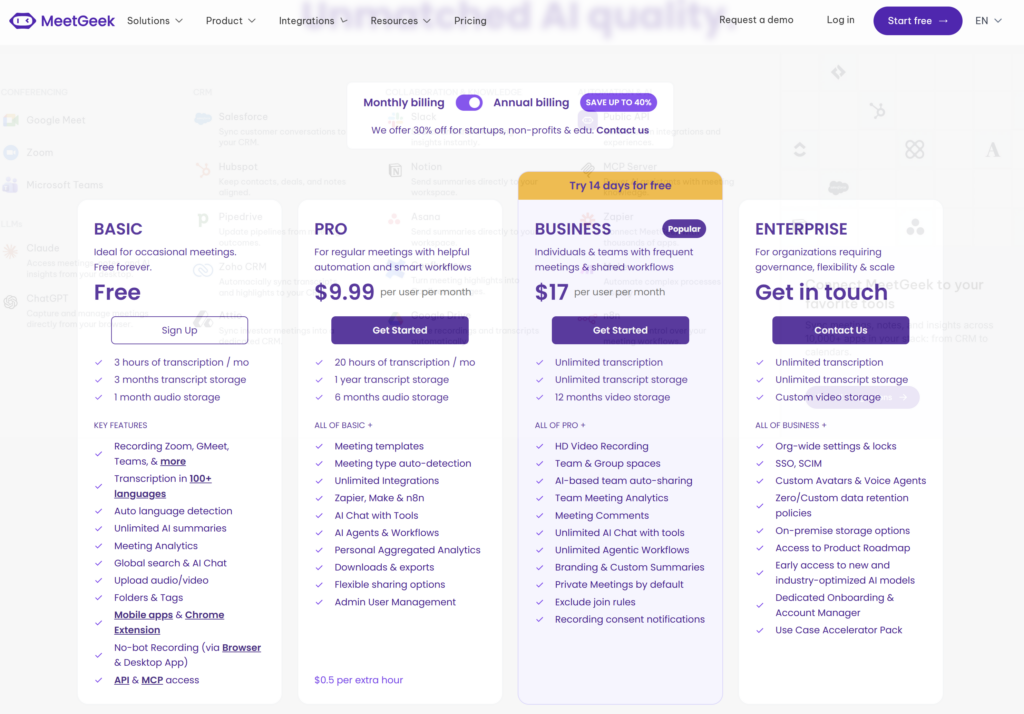
MeetGeek offers four plans: Basic, Pro, Business, and Enterprise. Basic is free. Pro costs $15.99 per user with monthly billing or $9.99 per user per month when billed annually. Business costs $27 monthly or $17 per user per month on annual billing. Enterprise uses custom pricing.
The price alone does not tell you which plan fits. The more important differences are monthly transcription hours, maximum meeting length, storage, downloads, automation, team collaboration, and administrative controls.
For most new users, the sensible path is to start with Basic and validate the meeting-to-notes workflow. Pro becomes useful when three free hours are not enough or you need exports, integrations, templates, and automation. Business is mainly for frequent meetings and shared team workflows—not simply for getting a better transcript.
Pricing check: Prices and limits were verified on August 5, 2026. MeetGeek can change pricing, limits, or features, so confirm the current checkout terms before subscribing.
MeetGeek pricing at a glance
| Plan | Monthly billing | Annual billing equivalent | Included transcription | Best fit |
|---|---|---|---|---|
| Basic | Free | Free | 3 hours/month | Occasional meetings and initial evaluation |
| Pro | $15.99/user/month | $9.99/user/month | 20 hours/month | Regular individual use, templates, exports, and automation |
| Business | $27/user/month | $17/user/month | Unlimited wording | Frequent meetings and shared team workflows |
| Enterprise | Custom | Custom | Unlimited wording | Governance, SSO/SCIM, custom retention, and high-volume deployment |
MeetGeek advertises annual savings of up to 40%. The annual figures are monthly equivalents, but the commitment is annual. Taxes, currency conversion, add-ons, or organization-specific terms may affect the final checkout total.
Important: monthly hours and meeting limits are different
MeetGeek applies more than one type of limit. A monthly quota controls how much transcription you receive during the billing cycle. A separate per-meeting limit controls the maximum length of one recording. Storage rules then determine how long the transcript, audio, or video remains available.
For example, Pro includes 20 transcription hours per month, but one meeting is still limited to two hours. Business uses unlimited monthly transcription wording, yet one meeting is limited to three hours. These are separate boundaries.
This distinction matters if you run long workshops, interviews, or training sessions. A plan can provide enough total monthly time while still cutting against the length of an individual meeting.
MeetGeek Basic: a useful free test with tight limits
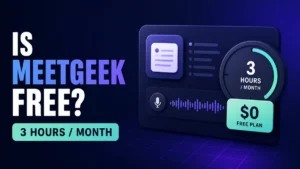
Basic is free and includes three transcription hours per month. It lists a two-hour maximum per meeting, three months of transcript storage, and one month of audio storage.
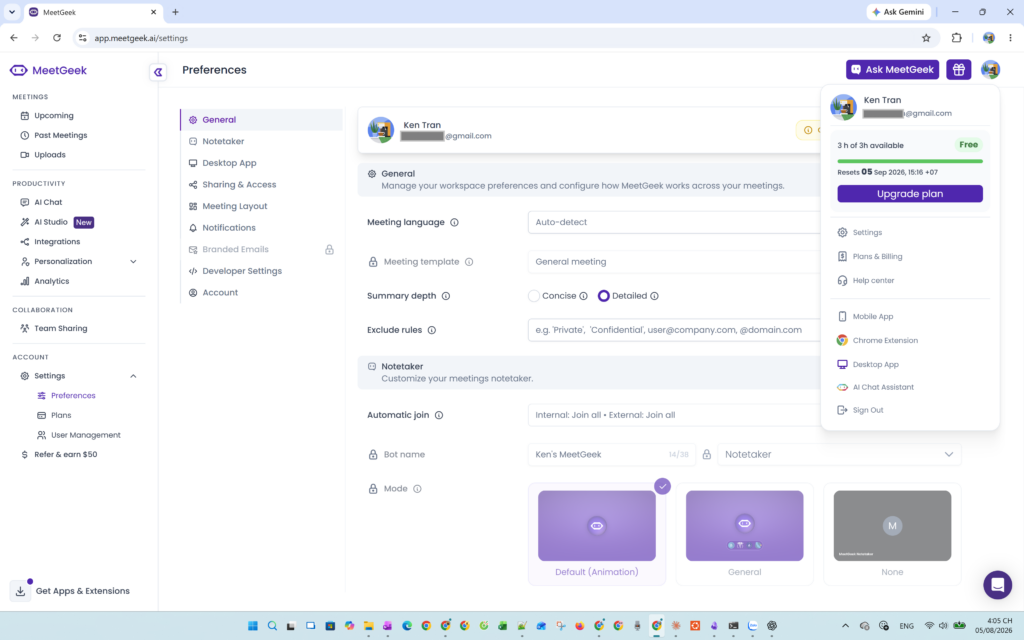
The free tier includes the core meeting-assistant experience: recording for major meeting platforms, transcription, AI summaries, meeting analytics, search and AI Chat, uploads, folders and tags, and bot-free recording options. It is enough to answer the first buying question: does MeetGeek’s workflow produce useful meeting records for your type of conversation?
Basic is less suitable as a permanent plan if you have several meetings every week. Three hours per month is only about 45 minutes per week on average. One longer client call plus a team meeting can consume a large part of the allowance.
Basic also lacks paid download/export capabilities and video recording shown in the public comparison table. Its shorter retention means it is a weaker fit if you want MeetGeek to become a long-term client or project archive.
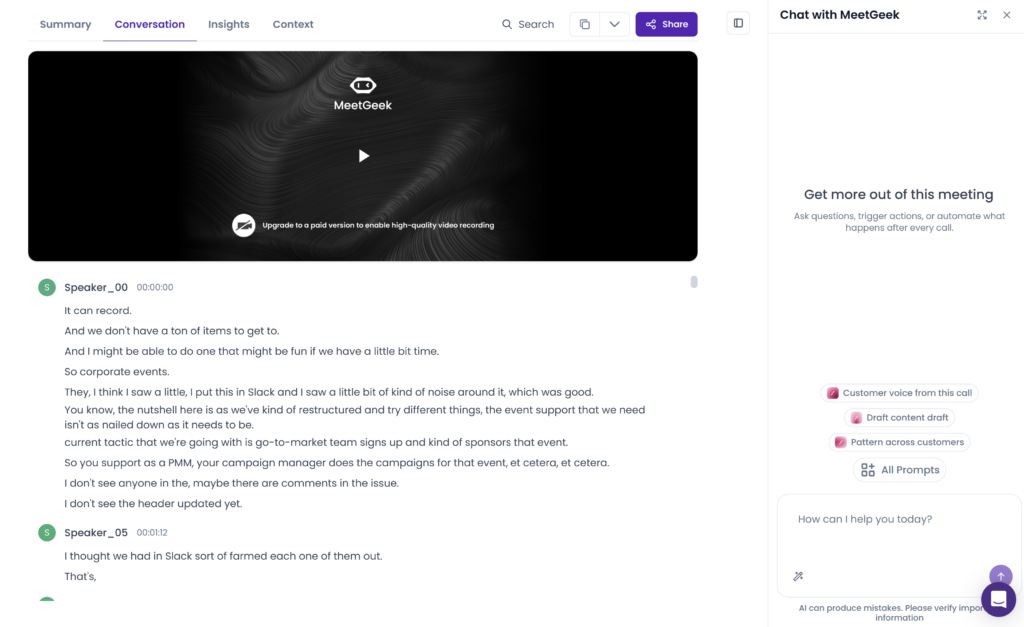
Choose Basic if: you are evaluating MeetGeek, record only occasional meetings, and can work within limited storage and export options. For a closer look at what you can test without paying, see our guide to MeetGeek free-plan limits
Skip straight to paid only if: you already know that three monthly hours, short retention, or missing exports will prevent a meaningful test.
MeetGeek Pro: the sensible first paid tier for regular users
Pro costs $15.99 per user on monthly billing or $9.99 per user per month when billed annually. It raises the monthly transcription allowance to 20 hours while keeping the two-hour limit for an individual meeting.
Storage also expands to one year for transcripts and six months for audio. More importantly, Pro adds features that turn meeting notes into a repeatable workflow: meeting templates, automatic meeting-type detection, unlimited integrations, Zapier/Make/n8n connections, AI Chat with tools, agents and workflows, downloads and exports, flexible sharing, and user management.
MeetGeek also lists pay-as-you-go transcription at $0.50 per additional hour. When PAYG is enabled, recording can continue beyond the included quota and the extra usage is billed at the end of the cycle.
The official help center adds an unusual but useful detail: if at least one minute remains in the monthly allowance when a meeting begins, that meeting can finish even if it pushes usage beyond the included quota. Rerunning transcription or summaries can also consume quota, so 20 hours should not automatically be treated as 20 hours of new meetings.
Choose Pro if: you use MeetGeek regularly as an individual or small-team operator and need exports, templates, integrations, or automated follow-up.
Stay on Basic if: you are below three hours per month and the missing paid features do not affect your workflow.
MeetGeek Business: for team workflows and frequent meetings
Business costs $27 per user with monthly billing or $17 per user per month when billed annually. It lists unlimited transcription and transcript storage, a three-hour limit for one meeting, and 12 months of video storage.
The main reason to choose Business is not a generic promise of better AI. The plan is designed around team operations: team and group spaces, automatic team sharing, team analytics, meeting comments, branding, custom summaries, privacy defaults, exclusion rules, and recording-consent notifications.
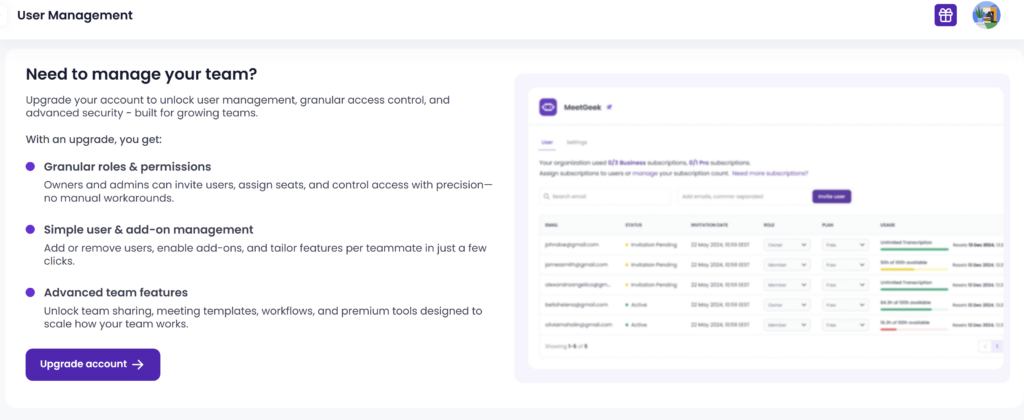
Business therefore makes the most sense when several people need to review, share, route, or govern meeting information. A solo user with fewer than 20 monthly hours may get little value from paying for collaboration controls they do not use.
Choose Business if: your team needs high meeting volume, shared workspaces, analytics, controlled sharing, or repeatable department-level workflows.
Choose Pro instead if: the workflow is primarily personal and 20 hours plus PAYG covers occasional spikes.
MeetGeek Enterprise: governance rather than a public price
Enterprise uses custom pricing. It includes organization-wide settings and locks, SSO and SCIM, custom avatars and voice agents, custom or zero-retention policies, storage options, dedicated onboarding, an account manager, and roadmap access.
MeetGeek uses unlimited transcription wording for Enterprise, but its subscription help center says Enterprise plans are capped at 200 hours per month to prevent misuse. MeetGeek says organizations can request an extension. Buyers should therefore confirm expected volume, concurrent meeting needs, retention, residency, support, and contract terms during procurement.
Enterprise is appropriate when deployment and governance requirements drive the decision. It is not automatically the best plan simply because a company has many employees; MeetGeek allows organizations to mix free and paid licenses.
Feature and limit comparison
| Decision factor | Basic | Pro | Business | Enterprise |
|---|---|---|---|---|
| Monthly transcription | 3 hours | 20 hours | Unlimited wording | Unlimited wording; 200-hour help-center cap disclosed |
| Maximum one meeting | 2 hours | 2 hours | 3 hours | 4 hours |
| Transcript retention | 3 months | 1 year | Unlimited | Unlimited/custom |
| Audio retention | 1 month | 6 months | 12 months | Custom |
| Video recording/storage | Not included | Recording available; no video retention listed in headline table | HD video; 12 months | Custom |
| Downloads/exports | No | Yes | Yes | Yes |
| Templates/integrations/workflows | Limited core experience | Yes | Yes | Yes |
| Team spaces and team analytics | No | Limited admin features | Yes | Yes |
| SSO/SCIM and org-wide controls | No | No | No | Yes |
| PAYG | No public Basic option | $0.50/additional hour | Official help references paid-plan availability; confirm in account | Contract-dependent |
Treat this table as a decision aid, not a substitute for the current checkout and feature-comparison page.
Which MeetGeek plan is best for you?
Occasional user or first-time evaluator: Basic
Start free. Use one or two representative meetings, then inspect the transcript, summary, action items, sharing behavior, and search experience. If you want to see how that workflow performed on a real 42-minute meeting before signing up, read our full MeetGeek review. A paid plan cannot compensate for output that does not fit your meetings.
Consultant, recruiter, or project manager: Pro
Pro is the strongest first paid candidate when one person runs regular meetings and needs longer retention, exports, templates, integrations, or automated follow-up. The 20-hour allowance covers roughly five hours per week before reruns or other quota-consuming actions.
Sales, customer success, or shared delivery team: Business
Business is better aligned with teams that need shared meeting knowledge, high recording volume, analytics, comments, branding, and more deliberate sharing controls. Evaluate the cost per active recorder rather than assigning a paid seat to everyone automatically.
Regulated or centrally managed organization: Enterprise
Choose Enterprise when SSO/SCIM, retention, residency, organization-wide controls, onboarding, or contractual support is mandatory. Confirm every governance requirement in writing; a feature label is not the same as an approved deployment.
When should you upgrade?
Upgrade from Basic when one or more of these constraints becomes real:
- Three hours per month prevents a representative workflow.
- You need transcript, audio, caption, or video downloads.
- Three months of transcript retention is too short.
- You need meeting-specific templates, integrations, or automated workflows.
- You need more control over follow-up sharing.
Upgrade from Pro to Business when:
- 20 hours plus PAYG is consistently more expensive or harder to manage than the team tier.
- Several people need shared spaces, comments, team analytics, or automatic sharing.
- You need longer or video-heavy meeting retention.
- Privacy defaults, exclusion rules, or consent workflows need stronger team-level treatment.
Move to Enterprise when procurement, identity, retention, storage, or support requirements cannot be met by a self-service plan.
Hidden costs and limitations to check
Annual prices require commitment
The $9.99 Pro and $17 Business figures are annual-billing equivalents. Monthly flexibility costs more. Do not compare an annual MeetGeek price with a competitor’s month-to-month price without normalizing the billing period.
PAYG can prevent interruptions but adds variable cost
At $0.50 per extra hour, a few occasional overages may be cheaper than moving every user to Business. Heavy or unpredictable usage can make the bill less obvious, particularly across multiple seats.
Unlimited still has operational boundaries
Business and Enterprise retain per-meeting duration limits, and official help discloses an Enterprise monthly anti-abuse cap. Confirm concurrent-meeting and organization-specific policies if volume is central to the purchase.
Retention is part of the price
A cheaper tier may be poor value if recordings or transcripts disappear before the team finishes a project, audit, or client relationship. Conversely, paying for indefinite storage is unnecessary if your policy requires fast deletion.
Refund terms are not clear from the public material reviewed
We did not find a reliable general refund policy during this production sprint. Before an annual commitment, inspect the checkout terms and confirm cancellation, renewal, tax, seat-change, and refund behavior with MeetGeek when these affect your decision.
Monthly or annual billing?
Monthly billing is the safer option when you are still evaluating output quality, team adoption, or meeting volume. Annual billing becomes more reasonable after MeetGeek has completed representative meetings and the paid features are part of a recurring workflow.
Do not choose annual billing only because the percentage discount looks large. First confirm:
- The transcript and summary are useful for your meeting type.
- The plan includes the exports, retention, and integrations you need.
- The number of paid seats is correct.
- Consent and sharing settings fit your organization.
- Cancellation and renewal terms are understood.
Final recommendation
MeetGeek’s pricing is straightforward at the headline level but more nuanced in practice.
- Basic is the right starting point for most new users.
- Pro is the sensible first paid tier for regular individual workflows.
- Business is justified by high volume and team collaboration—not by the assumption that it produces inherently better notes.
- Enterprise is a governance and deployment decision that requires a sales conversation.
The safest buying sequence is to test Basic with representative meetings, identify the first limit that actually blocks you, and upgrade to the lowest tier that removes that constraint.
Frequently asked questions
Is MeetGeek free?
Yes. MeetGeek Basic is free and includes three transcription hours per month, a two-hour maximum per meeting, three months of transcript storage, and one month of audio storage. It is suitable for evaluation and occasional use, but regular meeting schedules can exceed the quota quickly.
How much does MeetGeek Pro cost?
MeetGeek Pro was listed at $15.99 per user with monthly billing or $9.99 per user per month when billed annually on August 5, 2026. Recheck the selected billing state before subscribing.
How much does MeetGeek Business cost?
Business was listed at $27 per user monthly or $17 per user per month with annual billing. It adds high-volume transcription, team spaces, analytics, collaboration, branding, and stronger workflow controls.
What happens if I exceed the Pro transcription allowance?
Eligible paid accounts can enable pay-as-you-go recording at $0.50 per extra hour. MeetGeek’s help center says that if at least one minute remains when the next meeting begins, the meeting can finish even when it pushes the account beyond its included quota.
Does MeetGeek offer unlimited transcription?
Business and Enterprise use unlimited transcription wording. Individual meetings still have duration limits, and MeetGeek’s help center discloses a 200-hour monthly anti-abuse cap for Enterprise that can be extended by request. Confirm volume terms for high-usage deployments.
Does MeetGeek offer refunds?
We could not verify a general public refund policy from the official material reviewed. Check the current checkout, renewal, cancellation, and refund terms before choosing annual billing.
Which MeetGeek plan is the best value?
There is no universal best-value tier. Basic is best for evaluation and occasional use. Pro is usually the strongest first paid option for regular individual use. Business becomes better value when high volume and team collaboration replace PAYG or fragmented workflows.