
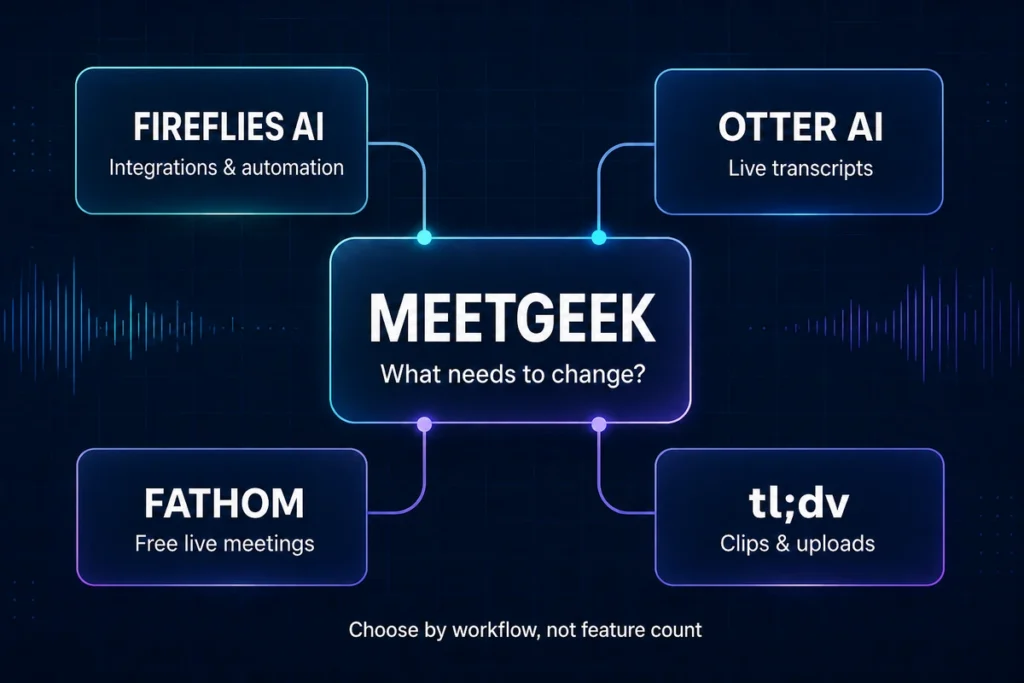
The best MeetGeek alternative depends on why MeetGeek does not fit your workflow. Fireflies AI is the strongest documented direct alternative in our current evidence set. Otter AI is worth considering when live transcripts and searchable meeting notes matter most. Fathom has a compelling free workflow for individuals, while tl;dv stands out for clips, uploads, and flexible capture.
That does not make any of them universally better than MeetGeek. Each removes one constraint while introducing another.
MeetGeek alternatives: the quick answer
| Alternative | Best reason to choose it | Main reason to hesitate | Evidence used |
|---|---|---|---|
| Fireflies.ai | You want an integration-heavy direct alternative and searchable meeting workflows | AI credits and complex outputs still require checking | Volticen hands-on test and official research |
| Otter AI | You prioritize live transcripts, searchable notes, and in-person recording | Free and paid plans impose conversation, minute, import, and language limits | Volticen hands-on test and official research |
| Fathom | You are an individual who wants unlimited live-meeting recording and transcription on a free plan | External recording uploads were not supported in the latest official article we found | Official documentation; not hands-on tested by Volticen |
| tl;dv | You want clips, uploads, video review, or a choice between bot and desktop capture | The free plan has retention, archiving, AI, clip, integration, and upload restrictions | Official documentation; not hands-on tested by Volticen |
Our recommendation: Start with the constraint that creates the most friction. Do not switch because another product has a longer feature list.
Why look for a MeetGeek alternative?
MeetGeek can record or process meetings, create transcripts and summaries, extract follow-up information, and make meeting history searchable. It also supports multiple capture paths rather than forcing every user into one recording method.
However, there are legitimate reasons to compare alternatives:
- The Basic plan’s monthly transcription allowance may be too small for regular meetings.
- A visible meeting bot may create friction, while bot-free recording shifts more responsibility to the user.
- Important decisions, names, owners, and deadlines still need human verification.
- Some users need a stronger free plan, a live transcript-first interface, easier clip sharing, or a different integration model.
- A team may prefer a tool built more specifically around sales calls, customer research, or cross-meeting reporting.
Our MeetGeek review found that the product created useful structured output, but it also showed why polished AI notes should not be treated as an authoritative record. In a controlled Chat test, MeetGeek retrieved a selected tagline but incorrectly described the decision as unresolved.
How we selected these alternatives
We did not select tools by counting features or collecting every product that uses the phrase “AI meeting assistant.” Each alternative needed to address a specific reason someone might reject MeetGeek.
Our evidence is not identical across all four products:
- We tested MeetGeek and Fireflies AI with the same approximately 42-minute English recording and the same eight Chat prompts.
- We tested Otter AI with a 42-minute English meeting and eight Chat prompts, but did not run a complete controlled head-to-head benchmark against MeetGeek.
- Our Fathom and tl;dv assessments use current official pricing pages and help documentation. We have not tested their output quality ourselves.
We therefore do not rank transcript accuracy across the four products. Prices, plan limits, and beta features can change and should be checked before subscribing.
1. Fireflies AI: best documented direct MeetGeek alternative
Fireflies AI is the easiest first alternative to shortlist because it solves substantially the same meeting-record problem: capture the conversation, create a transcript and summary, extract follow-up information, search meeting history, and connect the result to other tools.
It also has the strongest comparative evidence in this article. We uploaded the same English MP3 to Fireflies and MeetGeek, reviewed the resulting transcript and meeting notes, and gave both Chat tools the same eight prompts.
Why choose Fireflies over MeetGeek?
Fireflies deserves the first test when integration-heavy meeting workflows and recovery of a clearly finalized decision matter more than MeetGeek’s particular workspace or usage model.
In our test, Fireflies correctly recognized More speed, less risk as the selected tagline. MeetGeek retrieved the phrase and the alternatives but described the decision as unresolved. Fireflies also felt effectively immediate to query during our session, although we did not run a controlled speed benchmark.
Fireflies is especially worth considering when meeting data needs to feed CRM, task, collaboration, or automation workflows. Its official product research supports broad capture surfaces, integrations, search, AI assistance, action items, and conversation-intelligence features.
Why not choose Fireflies?
Fireflies did not eliminate verification work. In our action-item test, it placed discussion timestamps such as 10:23 and 24:18 in a column labeled Deadline. A later note distinguished those values from the actual deadline, but the table itself was unsafe to copy directly into an operational system.
Fireflies also uses separate AI-credit economics for some advanced functions. Its breadth can become complexity, and a meeting bot can still be unsuitable in organizations or conversations where third-party attendees are restricted.
Read the complete MeetGeek vs Fireflies AI comparison before choosing between them.
2. Otter AI: best for a live transcript-first workflow
Otter AI is the alternative to consider when the live transcript and searchable conversation record are the center of the workflow. It supports virtual meetings, in-person recording, summaries, action items, AI Chat, and search across stored conversations.
Why choose Otter over MeetGeek?
Otter may suit people who begin with the transcript: interviewers, researchers, project managers, students, and professionals who want to follow or search a conversation while treating generated summaries as a second layer.
In our free-account test, Otter AI Chat created a useful summary, extracted seven action items, used Not specified where deadlines were missing, rejected a false approved-budget premise, and shortened a follow-up email to the requested length. Those results show useful restraint within one test; they do not prove universal accuracy.
Otter also supports web, desktop, and mobile capture, making it relevant for users who mix virtual and in-person conversations.
Why not choose Otter?
The Basic plan interrupted our evaluation of a normal-length meeting. We submitted a 42-minute recording, but the visible transcript stopped at approximately 30 minutes. Otter Chat acknowledged that boundary rather than inventing the missing section, but the limit still reduced the usefulness of the free workflow.
The official Otter documentation we reviewed also lists monthly minutes, conversation-duration limits, import limits, and a smaller supported-language set than MeetGeek’s vendor-stated coverage. It is a poor default for teams that need dozens of transcription languages or want to evaluate long imported calls without upgrading.
See our full Otter AI review for the wider product assessment.
3. Fathom: best free MeetGeek alternative for individual live meetings
Fathom deserves a place because its individual Free plan is unusually generous on the core live-meeting workflow. The official documentation lists unlimited recordings, transcription, and storage, plus instant summaries, clips, playlists, and call search. It currently documents transcription in 38 languages.
Fathom also now offers a choice between bot and bot-free capture in its newer experience, although the official pricing page marks bot-free capture as beta and notes a Mac limitation. Product behavior may therefore differ by platform or account experience.
Why choose Fathom over MeetGeek?
Fathom makes the strongest case for an individual who mainly wants to record live meetings without managing MeetGeek’s three-hour Basic monthly allowance.
The free plan still provides a general meeting-summary workflow after its limited advanced-summary allowance. That makes it practical for someone who wants recurring recordings and transcripts before deciding whether advanced action items, follow-up emails, custom summaries, and conversational AI justify Premium.
Fathom also supports clips and playlists, which can be useful when the goal is sharing selected meeting moments rather than building a heavily automated meeting-intelligence system.
Why not choose Fathom?
Fathom is a weak alternative for an upload-first workflow. The latest official support article we found says it cannot accept an external recording for analysis. If you already record interviews, calls, or podcasts elsewhere and want to upload only selected files, MeetGeek, Fireflies, or tl;dv may fit better.
The free plan also does not make every AI feature unlimited. Official documentation limits advanced summaries and reserves AI action items, follow-up emails, custom summaries, and fuller Ask Fathom access for Premium.
Most importantly, Volticen has not tested Fathom hands-on for this article. Its position here reflects documented workflow and plan structure, not a claim that its transcripts or summaries are more accurate than MeetGeek’s.
4. tl;dv: best for clips, uploads, and flexible capture
tl;dv is the most distinct alternative in this shortlist. It combines a meeting library with transcripts, AI notes, clips, reels, uploads, cross-meeting questions, and both bot and desktop capture paths.
Its desktop app can record system audio without placing a bot in the meeting. That capture mode works beyond the main conferencing platforms, although it records audio rather than video, screen sharing, or meeting chat. Users who need a complete video record must distinguish this bot-free mode from tl;dv’s other recording options.
Why choose tl;dv over MeetGeek?
tl;dv is most relevant when the meeting moment itself is the useful asset. Clips and reels can make it easier to collect customer quotes, product-research observations, sales-call moments, or highlights for colleagues who will not watch an entire meeting.
tl;dv also accepts audio and video uploads and processes them into transcripts, summaries, and AI insights. That makes it a stronger candidate than Fathom for users who already have recordings. Its choice of bot or system-audio capture also helps users adapt the workflow to different meeting platforms.
Why not choose tl;dv?
The word unlimited on the free plan needs substantial qualification. Official documentation states that free recordings are retained for three months and move to archived storage after three days. The transcript and notes remain available, but restoring the video may take up to 90 minutes.
The first ten meetings receive full automatic AI notes; after that, Free notes cover only the first ten minutes. Free AI prompts, reports, integration uses, clips, and uploads also have lifetime limits rather than allowances that renew each month.
Uploads remain in beta, have a three-hour maximum, and currently use generic speaker labels instead of named speaker recognition. The bot-free desktop mode captures computer audio and may not produce an automatic platform notification, so the user must establish an appropriate consent process.
As with Fathom, this is a documentation-based assessment. We have not tested tl;dv transcript quality, archive-restoration friction, upload reliability, or AI answers ourselves.
When should you keep MeetGeek?
An alternatives article should not assume that switching is automatically an improvement. Keep MeetGeek on your shortlist if you want its combination of meeting capture, file uploads, structured summaries, insights, searchable knowledge, templates, and workflow automation in one workspace.
MeetGeek may remain the better fit when:
- you have already tested its outputs with representative meetings and know which fields require review;
- its monthly allowance and paid-plan economics match your volume;
- you want selective file upload as well as live meeting capture;
- its summary, insights, AI Chat, and team-management model fit your process;
- changing tools would create more workflow and governance work than it saves.
Our recommendation is to identify the MeetGeek failure that would cost you the most time or create the most risk. Then test only the alternative designed to address that failure. See our full MeetGeek review for the wider product assessment.
Which MeetGeek alternative should you choose?
Use this decision path:
- Choose Fireflies AI if you want the closest documented direct alternative and prioritize integration-heavy workflows.
- Choose Otter AI if you want live, searchable transcripts to remain the center of your meeting workflow.
- Choose Fathom if you are an individual prioritizing free recurring live-meeting recording and transcription.
- Choose tl;dv if clips, uploaded files, video review, or flexible capture matter more than a simple free-plan model.
- Keep MeetGeek if its combined workspace, uploads, summaries, insights, and usage model already match the way you work.
Whichever tool you test, use the same representative, non-sensitive meeting and prepare a short answer key: final decisions, owners, deadlines, names, figures, and explicit constraints. The useful product is not the one with the longest feature list. It is the one whose errors are easiest and safest for your workflow to detect.
Frequently asked questions
What is the best free alternative to MeetGeek?
Fathom is the strongest free-plan candidate for an individual who mainly records live meetings because its current official documentation lists unlimited recordings, transcription, and storage. Its advanced AI features are limited, and the latest official article we found says external recording uploads are not supported. tl;dv also offers free unlimited recording positioning, but retention, archiving, AI-note, prompt, clip, integration, and upload limits require closer attention.
Is Fireflies better than MeetGeek?
Not for every workflow. In our same-file test, Fireflies correctly classified a final decision that MeetGeek described as unresolved. However, Fireflies confused discussion timestamps with deadlines in an action table. MeetGeek followed a strict short-email revision better. Choose based on which failure creates more risk for you.
Is Otter AI a good MeetGeek alternative?
Yes, particularly for a transcript-first workflow involving live or in-person conversations. Its plan limits and narrower supported-language set can make it a weaker fit for long meetings, frequent imports, or multilingual teams.
Which alternative lets me upload existing recordings?
MeetGeek, Fireflies, Otter, and tl;dv support recording uploads in the datasets reviewed for this article, although their plan and file limits differ. The latest Fathom support article we found states that external recording upload is not supported. Recheck upload limits before choosing a plan.
Which MeetGeek alternative works without a meeting bot?
Fathom and tl;dv currently document desktop bot-free capture options, and Otter also documents desktop capture. MeetGeek itself has multiple capture paths. Bot-free does not automatically mean local-only or more private: recording permissions, processing, storage, sharing, and consent still need review.
Are AI meeting notes accurate enough to automate follow-up?
Not without review. Across our MeetGeek, Fireflies, and Otter tests, the tools produced useful summaries and follow-up material, but plan boundaries and different interpretation errors remained. Check decisions, owners, deadlines, names, and numbers before sending output to a CRM, project tracker, or client.
Bottom line
Fireflies AI is the strongest documented direct MeetGeek alternative in Volticen’s current evidence set. Otter is the clearest transcript-first option. Fathom offers the most compelling documented free workflow for individual live meetings, while tl;dv is the more specialized choice for clips, uploads, and capture flexibility.
Do not treat that as a universal ranking. Test the alternative that addresses your actual MeetGeek objection, and compare the review burden—not just the generated output.