
Fireflies AI is worth trying if you want a searchable record and a useful first-pass summary of your meetings. In our test, it joined a Zoom call successfully, processed a roughly 42-minute conversation with five speakers, and captured the main topics and several important decisions.
The weakness appeared when the notes were treated as an operational record. Fireflies created an Action Items section and identified the work reasonably well, but it left the items unassigned and omitted deadlines that were present in the transcript. The transcript was understandable, yet it also contained apparent errors in technical terms and proper names.
How we tested: We used the Fireflies Free plan with one real English-language Zoom meeting of approximately 42 minutes and five speakers. We compared the generated summary with the Fireflies transcript. We did not compare the transcript with the original audio, so this review does not claim an overall transcription-accuracy percentage.
Fireflies AI review: quick scorecard
| Area | Our assessment | What it means |
|---|---|---|
| Setup and meeting capture | Good | The bot joined and completed the Zoom-to-notes workflow without a paid subscription |
| Transcript usability | Usable with review | The conversation remained understandable, but technical terms and names need checking |
| Summary quality | Good for recall | Major themes and several decisions were captured clearly |
| Action items | Incomplete for execution | Tasks appeared, but owners and deadlines were not preserved reliably in our sample |
| Search and navigation | Useful | Timestamps and structured notes make a long meeting easier to revisit |
| Free-plan evaluation value | Good | Enough to test the core workflow, although storage, downloads, and advanced features have limits |
| High-stakes reliability | Poor without human review | Do not treat generated notes as an authoritative record |
What is Fireflies AI?
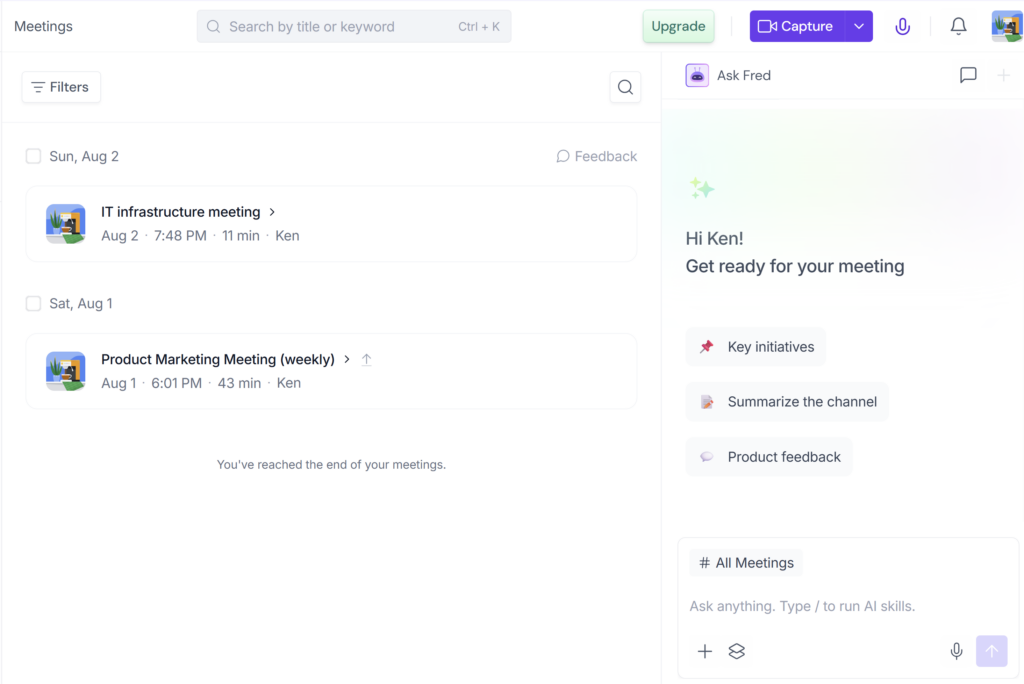
Fireflies.ai is an AI meeting assistant that can capture, transcribe, summarize, and search conversations. It works with meeting platforms including Zoom, Google Meet, and Microsoft Teams, and it can also process uploaded audio or video files.
After a meeting, Fireflies creates a workspace containing the transcript, timestamps, speakers, summary sections, and action items. Depending on the plan and configuration, users can search conversations, download content, connect other apps, analyze meetings, or apply additional AI features.
That feature list sounds broad, but the core buying question is simpler: does Fireflies reduce the work required to remember what happened in a meeting without creating a new accuracy problem? Our test suggests that it does reduce the first-pass note-taking burden, as long as someone remains responsible for validating the result.
Who should use Fireflies AI?
Fireflies is a strong fit for people who regularly need to revisit conversations rather than produce legally exact minutes.
It is most useful for:
- consultants and client-facing professionals who need a searchable call history;
- remote teams that want quick summaries after recurring meetings;
- project teams that use the transcript to verify decisions and context;
- managers who want to find where a topic was discussed without replaying an entire call;
- solo professionals who need a low-cost way to test AI meeting notes.
The product becomes more valuable when the transcript remains available alongside the summary. That combination lets a user benefit from fast AI notes while retaining a way to inspect compressed or omitted details.
Who should not rely on it without extra controls?
Fireflies is a weaker fit when the output must be correct without human review.
Use caution for:
- legal, contractual, HR, medical, or regulatory meetings;
- technical meetings where exact product names, commands, or terminology matter;
- teams expecting automatic task ownership and deadline tracking to be authoritative;
- organizations that cannot establish clear recording consent and access rules;
- anyone looking for a verbatim record without checking it against the audio.
This does not mean Fireflies cannot be used in those environments. It means the workflow needs stronger review, privacy, retention, and governance controls than a normal internal meeting.
Our hands-on Fireflies workflow
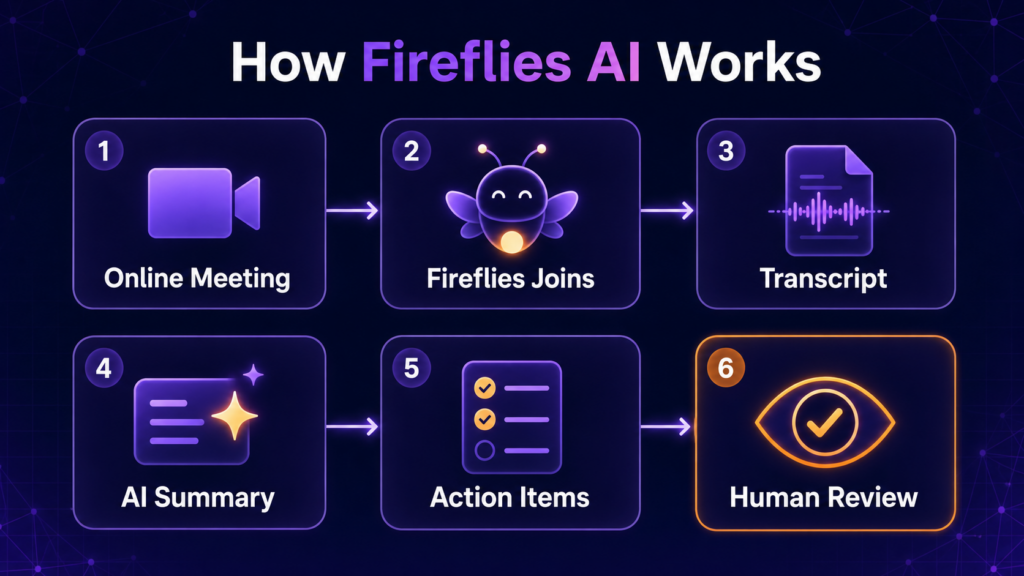
We created a Free account without entering payment-card details, connected Google Calendar, and configured the meeting workflow. The Fireflies notetaker then joined a Zoom call and completed the audio-capture process.
The test meeting lasted approximately 42 minutes and involved five speakers. It was not a short scripted demo: the conversation moved between corporate-event support, product announcements, competitive positioning, infographic design, messaging, and informal closing discussion.
After the meeting, Fireflies generated:
- a timestamped transcript;
- a structured summary;
- topic-based notes;
- a separate Action Items section.
This is important because the product completed the entire core workflow on the Free plan. We did not need to infer its value from a feature page. We could inspect how the transcript, summary, and action items represented a realistic multi-speaker conversation.
We did not record a reliable processing-time measurement, and the test evidence did not establish how many AI credits the workflow consumed. Those figures are therefore excluded from this review.
How good was the Fireflies transcript?
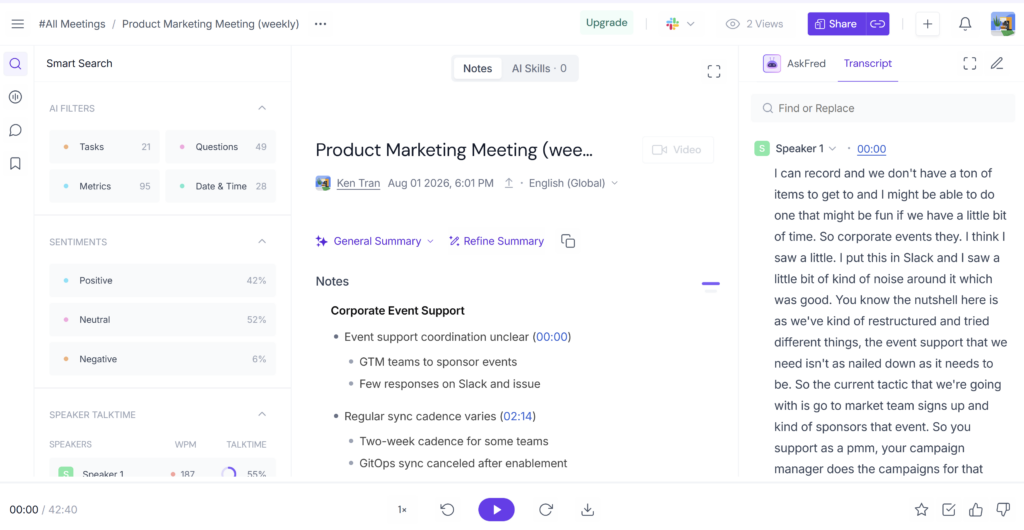
The transcript was usable as a searchable draft record. It preserved enough of the conversation for us to reconstruct the meeting, locate major topics, and check whether the summary reflected what had been discussed.
It was not clean enough to treat as an unedited transcript. The visible text included fragments, repetitions, and apparent substitutions involving technical or company terms. Context suggested examples resembling “NBC” instead of “MVC,” “Heshi Corp” instead of “HashiCorp,” and “Cloud Piece” instead of “CloudBees.”
Those errors matter because a transcript can remain generally understandable while still damaging the details that a technical or client-facing team cares about most. Names, specialist vocabulary, commitments, quotations, and numbers should be checked before they are copied into another document.
There is also an important evidence limit: we reviewed the transcript text but did not compare every line with the original audio. The examples above are apparent errors based on context, not a measured failure rate. We cannot responsibly turn this single meeting into a claim that Fireflies is a certain percentage accurate.
The practical conclusion is straightforward: the transcript is useful for search and verification, but not automatically publication-ready or authoritative.
How good were the summary and action items?
The summary was the strongest part of the output.
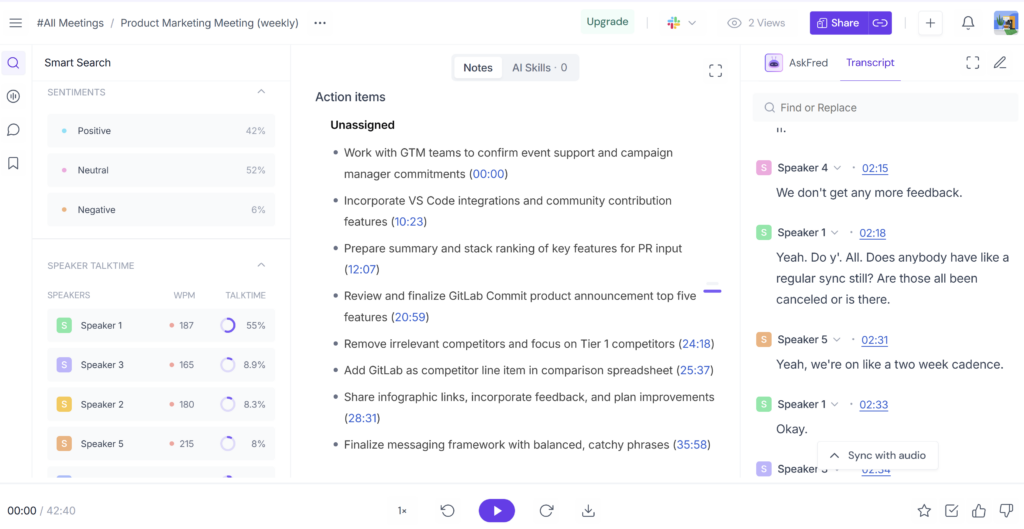
Fireflies correctly separated the meeting into its main workstreams and captured several meaningful conclusions. For example, it preserved the preference for mature features over minor releases, the decision to add GitLab to a comparison, the neutral direction for a competitive infographic, and the selected messaging line “more speed, less risk.”
This made the notes genuinely useful for orientation. A person returning to the meeting later could understand the broad agenda and find the relevant timestamp without listening to all 42 minutes again.
The summary became less reliable as the required detail moved from “What did we discuss?” to “Exactly what must happen next?”
Fireflies did create a separate Action Items list, and the listed work was generally relevant. However, the items were marked Unassigned even where the transcript contained ownership cues. It also omitted time-sensitive details, including a Tuesday deadline and work due by the end of the day.
Some decisions were compressed too aggressively. The notes did not preserve every constraint around competitor tiers, list size, absent capabilities, design treatment, and delivery limitations. The summary was not wrong at the topic level; it was incomplete as a decision log.
That distinction matters. Saying “Fireflies missed the action items” would be inaccurate. A better conclusion is:
Fireflies recognized the work and produced useful reminders, but the tested output did not reliably preserve the owner, deadline, acceptance condition, or full decision context needed for dependable execution.
Features that mattered most in practice
Searchable meeting history
The main benefit is not simply receiving a block of transcribed text. Timestamps, topics, and structured notes shorten the path back to a specific part of a long call. This is where Fireflies can save meaningful review time.
Summary plus transcript
The summary alone can omit context. The transcript alone can be noisy. Used together, they are more useful: the summary provides navigation, while the transcript provides a check on compressed claims and decisions.
Automatic meeting capture
Calendar connection and automatic join rules can remove a repetitive setup step. They can also create privacy risk if configured too broadly. Teams should restrict which meetings Fireflies may join rather than treating automatic recording as an always-on default.
Multi-platform and multilingual availability
Fireflies currently lists support for Zoom, Google Meet, Microsoft Teams, and more than 100 transcription languages. That breadth makes it easier to fit into an existing meeting stack. It does not prove that every platform, accent, or language produces equal results, and our test covered only one English Zoom meeting.
Integrations and advanced AI tools
Paid plans add downloads, video recording, integrations, AI Skills, task-management features, and additional administrative controls. These features may matter to teams building a larger workflow, but our test did not verify CRM writeback or productivity gains. They should be evaluated against a specific use case rather than counted as automatic benefits.
Fireflies AI pros and cons
Pros
- Completed a real Zoom-to-transcript workflow on the Free plan.
- Produced a structured summary that captured the main topics and several important decisions.
- Made a long meeting easier to search and revisit.
- Kept the transcript available for checking summary details.
- Provided a practical starting point for evaluating the core workflow.
Cons
- Action-item owners and deadlines were omitted in our tested output.
- Technical terms and company names showed apparent errors.
- Some decision constraints were compressed or lost.
- Automatic joining and recap sharing require careful configuration.
- One successful meeting does not establish reliability for every accent, language, platform, or use case.
Fireflies AI pricing: which plan makes sense?
Fireflies currently offers Free, Pro, Business, and Enterprise plans. Annual pricing is $10 per seat per month for Pro, $19 for Business, and $39 for Enterprise. Pro and Business also offer more expensive monthly billing. Prices were checked on August 3, 2026 and may change.
For most new buyers, the plan decision should follow the workflow:
| Buyer | Sensible starting point | Upgrade when… |
|---|---|---|
| Individual evaluating transcript and summary quality | Free | You need downloads, video, more storage, or paid workflow features |
| Professional or small team | Pro | The Free limits interrupt regular use or integrations become important |
| Growing team with a larger meeting archive | Business | You need unlimited storage, stronger analytics, and administrative controls |
| Organization with formal security or deployment requirements | Enterprise | Contractual, retention, SSO, private-storage, or compliance needs justify review |
The Free plan currently includes unlimited transcription and standard AI summaries, but its 400 minutes of storage is shared at team level. “Unlimited” should not be confused with unlimited storage, downloads, or advanced AI actions.
For a complete breakdown of annual billing, seat costs, storage, upload limits, and separately metered AI credits, see our Fireflies AI pricing and plan limits guide.
Is Fireflies AI safe to use for meetings?
Fireflies publishes meaningful security and privacy controls, but safe use depends on meeting type and configuration. Recording consent, automatic join rules, recap access, integrations, and retention all affect the practical risk.
For an initial test, use a low-risk internal meeting, notify participants, restrict recap sharing, and check what connected apps can access. Do not assume that a visible bot or a security certification makes every recording appropriate.
Our separate guide to Fireflies privacy and security covers consent, data processing, retention, GDPR, HIPAA, and deployment controls in detail.
Fireflies AI alternatives to consider
This review does not declare a universal winner because we have not completed equivalent hands-on datasets for every competitor. Still, your priority can tell you when to compare alternatives:
- Compare Otter.ai if live transcription and a familiar collaborative-notes workflow are central to your decision.
- Compare Read AI if meeting analytics and coaching-style insights matter more than a conventional notetaker workflow.
- Compare Fathom if you want to evaluate a simpler meeting-summary experience and its fit for individual or sales use.
- Compare platform-native tools if your organization already standardizes on Zoom, Google Workspace, or Microsoft 365 and wants fewer external data flows.
The right comparison is not the longest feature list. It is whether the alternative performs better on the failure that would make you stop using Fireflies: transcript detail, task reliability, privacy controls, workflow complexity, or total cost.
Final verdict: Is Fireflies AI worth it?
Yes, for the right workflow. Fireflies is worth trying if your goal is to reduce manual note-taking, search past meetings, and generate a useful first draft of what happened.
Our test showed real value: the bot completed the capture, the transcript preserved enough substance for review, and the summary made a 42-minute multi-speaker meeting much easier to revisit. It also showed why human review remains necessary. Owners and deadlines disappeared from the action list, some decision constraints were compressed, and technical terms were not always represented cleanly.
Fireflies is therefore best treated as a meeting-memory and review assistant, not an unquestionable system of record.
Start with one representative, non-sensitive meeting. Before adopting it more broadly, check whether the transcript preserves your names and terminology, whether the summary retains the decisions that matter, and whether action items keep enough ownership and deadline detail for your process.
Frequently asked questions
Is Fireflies AI actually free?
Yes. Fireflies has a Free plan, and we completed a Zoom-to-transcript-and-summary workflow without entering payment details. The plan currently includes unlimited transcription and standard summaries, with 400 minutes of team storage and limits around downloads, video, and advanced features.
How accurate is Fireflies AI?
We cannot give a responsible accuracy percentage from this test. The transcript was understandable and useful for search, but it contained apparent errors in technical terms and names. We did not compare the full transcript with the original audio.
Does Fireflies create action items?
Yes. Fireflies created a separate Action Items section in our test and identified relevant work. However, the items were left unassigned and deadlines present in the transcript were omitted, so the list required human review.
Can Fireflies join Zoom meetings automatically?
Yes. Fireflies can connect to a calendar and join eligible Zoom meetings as a notetaker. Review the auto-join rules before enabling the workflow broadly, and notify participants that the meeting will be recorded and summarized.
Is Fireflies AI good for technical meetings?
It can be useful for recall and search, but technical terms, company names, numbers, and commitments should be checked. Our sample contained apparent terminology errors even though the overall conversation remained understandable.
Is Fireflies AI safe?
Fireflies documents security and privacy controls, but safe use depends on consent, sharing, retention, integrations, plan choice, and the sensitivity of the meeting. Routine internal meetings are easier to justify than legal, HR, healthcare, or other high-stakes conversations.
Which Fireflies plan is best?
Free is the sensible starting point for testing the core workflow. Pro fits individuals and small teams that need downloads, video, more storage, or integrations. Business is more appropriate when unlimited storage and stronger team controls matter. Enterprise requires a workload-specific security and contract review.