
Table of Contents
Fireflies AI can be reasonably safe for ordinary business meetings, but it is not safe by default for every team, conversation, or regulated workflow.
The company documents a solid security baseline: SOC 2 Type II, encryption at rest and in transit, controls over meeting access, and a policy against using meeting content to train AI models. Yet the practical risk depends just as much on how your organization configures recording, consent, sharing, integrations, and retention.
The short version is this:
- For routine internal meetings: Fireflies can be a defensible choice after you restrict access and enable participant notifications.
- For client, HR, legal, financial, healthcare, or other sensitive meetings: run a formal review first. The free or standard self-service setup should not be assumed to meet your obligations.
- For any meeting: tell participants what is being captured and give them a meaningful way to object.
This article is an independent risk assessment based on Fireflies’ public documentation checked on August 3, 2026. It is not legal advice.
Fireflies AI safety at a glance
| Question | Short answer |
|---|---|
| Does Fireflies encrypt meeting data? | Fireflies states that meeting notes and transcripts use 256-bit AES at rest and TLS in transit. |
| Does Fireflies train AI on meetings? | Its current policy says meeting content and personal data are not used to train internal or external AI models. |
| Do third-party AI vendors retain meeting content? | Fireflies says they do not retain it after processing. This does not mean the copy in your workspace is immediately deleted. |
| Does Fireflies notify participants automatically? | Consent controls exist, but the current settings guide lists the one-hour participant email as off by default. |
| Is Fireflies automatically GDPR or HIPAA compliant for every customer? | No. Customer configuration, legal basis, contracts, plan eligibility, and operating practices still matter. |
For product quality, workflow, and value—not only privacy—read our hands-on Fireflies AI review.
What data does Fireflies process?
An AI notetaker handles more than a text transcript. Fireflies’ current Privacy Policy says enabled features may collect meeting titles, participant names and email addresses, meeting URLs and IDs, audio, video, and other call details. Connected services can also expose calendar, profile, email, chat, or other integration data depending on the permissions you grant.
The policy also says service providers may process voice characteristics to distinguish speakers. Fireflies says those providers do not use the information to identify or authenticate people, and that Fireflies itself does not receive or process that Voice Data on its own servers.
That distinction matters. The risk surface includes:
- the conversation itself;
- participant identity and calendar metadata;
- generated transcripts, summaries, and action items;
- connected apps such as calendars, CRMs, or collaboration tools;
- the people and links allowed to access the recap.
A security review should therefore examine the complete data flow, not only the recording file.
Fireflies’ security controls
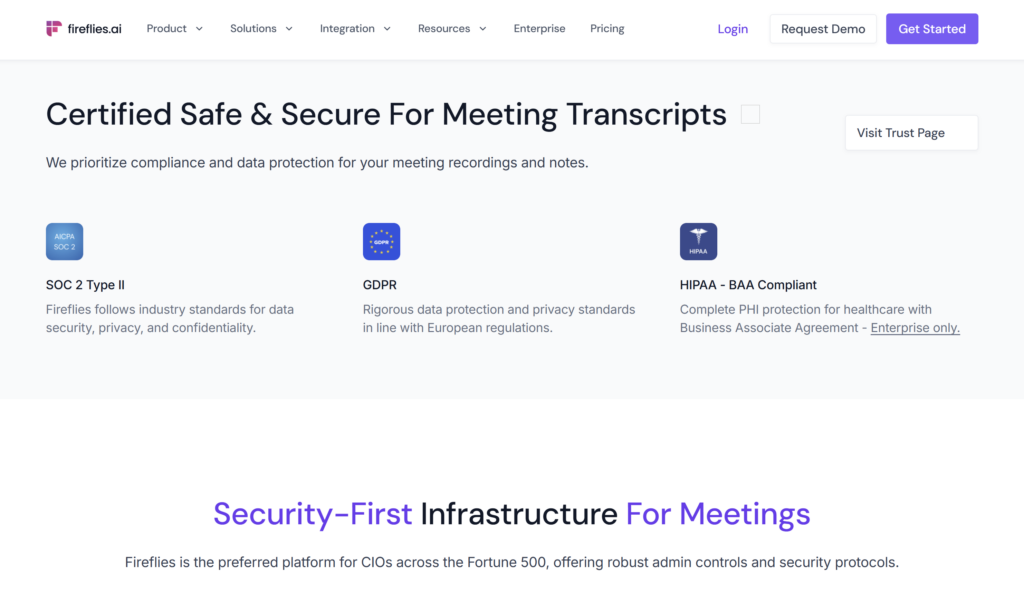
According to its security documentation, Fireflies uses 256-bit AES encryption for meeting notes and transcripts at rest and TLS for data in transit. It also states that it undergoes annual SOC 2 Type II audits and aligns its controls with GDPR and HIPAA requirements.
Fireflies additionally advertises SSO, limited internal access to meeting content, uptime monitoring, a bug bounty program, OWASP-aligned development practices, and Enterprise controls such as custom retention, Rules Engine, Private Storage, and Super Admin.
These are meaningful signals. SOC 2 Type II, for example, is more useful than a vendor simply claiming to take security seriously because it evaluates the operation of controls over time.
But no certification proves that a service cannot be breached, misconfigured, or used inappropriately. It also does not tell you whether your specific sharing defaults, retention period, legal basis, and integration permissions are acceptable.
The correct conclusion is not “SOC 2 means safe.” It is “Fireflies has a credible baseline that still needs to be matched to your risk.”
Does Fireflies use your meetings to train AI?
Fireflies’ current answer is no.
Its Privacy Policy says personal data is not collected, used, or sold for training large language models. Its 2026 policy materials go further, stating that meeting audio, video, transcripts, and summaries are not used to train internal or external AI models, and that vendors are contractually prohibited from training on that content.
This is stronger than vague “we do not train by default” language. Still, it remains a policy and contractual commitment from the vendor. Organizations with strict requirements should obtain the applicable DPA, subprocessor list, security report, and contract rather than rely only on a public webpage.
Also note the scope. Fireflies’ zero-retention statement concerns third-party vendors after they process meeting content. It does not mean your recording and transcript instantly disappear from your own Fireflies workspace.
Data retention and deletion
This is where a seemingly reassuring phrase can be misunderstood.
Fireflies says third-party processors do not store meeting content after processing and cannot access it after the service is completed. That is a zero-retention policy for those vendors.
Separately, your meeting recap may remain in Fireflies until it is deleted under your account, workspace, or custom retention settings. The public Privacy Policy says account-associated personal information is stored while the account is active and deleted within 30 days after account closure. It also gives users controls to delete account data and meeting content.
Before deployment, answer four questions:
- How long will recordings and transcripts remain in the workspace?
- Who can delete them, and can deletion be enforced automatically?
- Are backups, exports, CRM copies, or shared links covered by the same policy?
- Does your plan include the retention and storage controls your policy requires?
Custom retention and Private Storage are presented as Enterprise controls. If they are mandatory for your organization, confirm them in writing before purchasing.
Meeting privacy and recap sharing
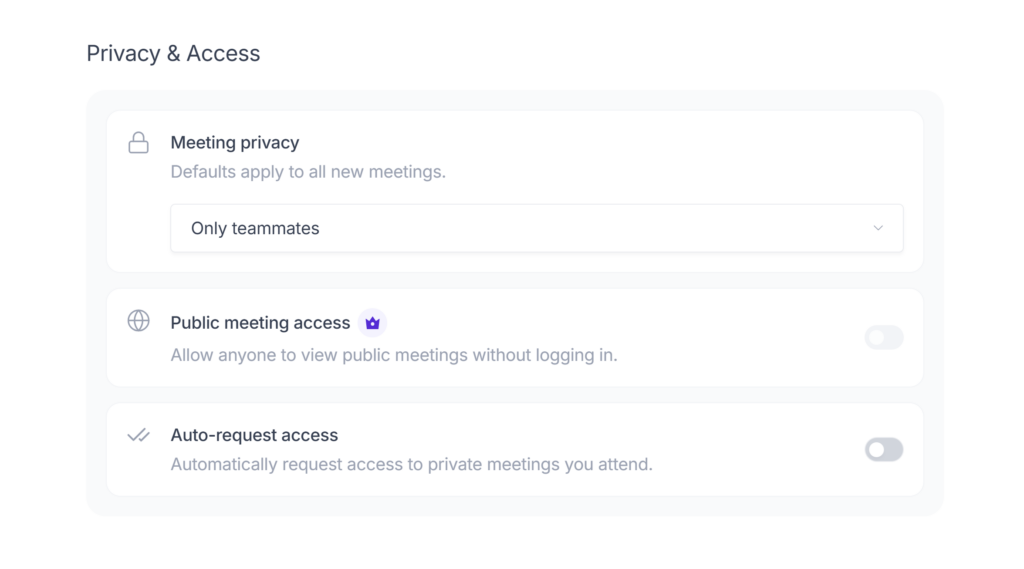
Fireflies lets users decide who can view a recap. Options documented in its sharing guide include teammates, participants, both groups, selected recipients, or only the owner. Shared links can also have an expiration period.
The control is useful, but the operator must choose correctly. “Teammates and participants” can include everyone in a workspace and external people who attended the meeting. That may be appropriate for a project call and completely wrong for an HR, executive, legal, or customer escalation meeting.
For sensitive conversations, start with Only Owner, invite named recipients, and use an expiring link where possible. Review workspace defaults instead of assuming every host will remember to change them manually.
Integrations add another layer. Sending summaries automatically to Slack, a CRM, email, or another system creates additional copies governed by that service’s access and retention rules. Least-privilege access matters more than the number of integrations available.
Does Fireflies obtain recording consent?
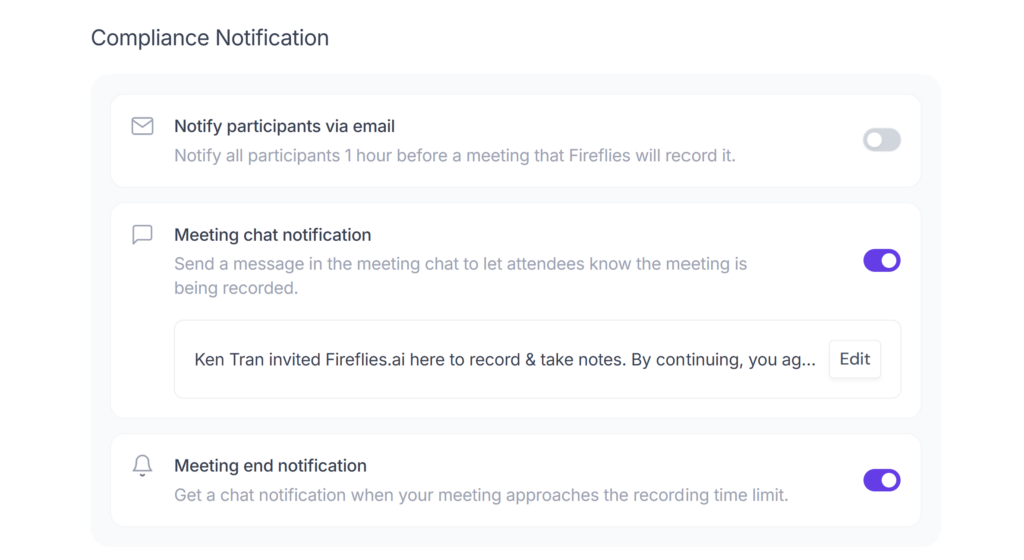
Fireflies provides consent and compliance controls, but having those controls is not the same as using them correctly.
The current consent guide documents:
- an email one hour before the meeting;
- an in-meeting chat message explaining that Fireflies is recording and taking notes;
- a pre-join decline option;
- chat commands to pause or remove Fireflies on supported platforms;
- platform consent prompts in some Zoom, Google Meet, and Microsoft Teams workflows.
The important caveat is that Fireflies’ current settings guide lists participant email notification as off by default. A team can therefore have a notification feature available without consistently using it.
There is no universal consent rule for every US state, UK context, industry, and type of meeting. A visible bot or chat notice may improve transparency, but it does not automatically establish a valid legal basis for processing. Your organization remains responsible for applicable law, contracts, workplace policy, and promises made to customers or employees.
A practical baseline is to notify people before the meeting, explain that audio will be transcribed and summarized, identify how the recap will be used and shared, and provide a genuine opt-out path. Do not force the bot back into a meeting after someone declines.
GDPR and international data transfers
Fireflies states that it supports GDPR requirements and uses the EU–US Data Privacy Framework, Standard Contractual Clauses, and the UK International Data Transfer Addendum for global transfers. Its Privacy Policy also says Fireflies is US-based and that it and its providers may process personal information in the United States and other countries.
For a UK or European organization, a vendor’s GDPR statement is only one part of the assessment. The customer may still need to establish a lawful basis, provide transparency information, minimize collected data, set retention, manage data-subject requests, review subprocessors, and assess international transfers.
Business and Enterprise customers should inspect the DPA and current subprocessor list. If data residency is mandatory, verify exactly where content is stored, processed, backed up, and accessed; do not treat “Private Storage” as a complete answer without the contract and architecture details.
HIPAA and healthcare use
Fireflies markets HIPAA support, but its current security page describes HIPAA protection with a Business Associate Agreement as Enterprise-only.
That means a healthcare organization should not upload protected health information merely because the website displays a HIPAA badge. It should first confirm the eligible plan, execute a BAA, configure the required storage and access controls, restrict integrations, and document its own risk assessment.
The same principle applies to legal privilege, financial data, education records, recruitment interviews, and confidential product discussions: a general certification does not replace a workload-specific review.
Several advanced safeguards are plan-dependent. See Fireflies AI pricing and plan limits before assuming that a self-service tier includes the control your organization requires.
Risks the security badges do not remove
Even if every vendor claim is accurate, several risks remain:
- Human sharing errors: a recap can be sent to a broader group than intended.
- Over-recording: automatic join rules may capture meetings that should have been excluded.
- Integration sprawl: transcripts can flow into systems with different permissions and retention.
- Account compromise: a reused password or excessive admin access can expose a large meeting archive.
- Consent failure: participants may not receive or understand the notice.
- Sensitive-topic drift: a routine call can unexpectedly turn into an HR, legal, medical, or security discussion.
- Plan mismatch: required controls may be available only on Business or Enterprise tiers.
- Policy change: privacy, subprocessors, product behavior, and plan entitlements can change after deployment.
These are governance risks, not proof that Fireflies is insecure. They explain why “Is it safe?” must include both the product and the way it is operated.
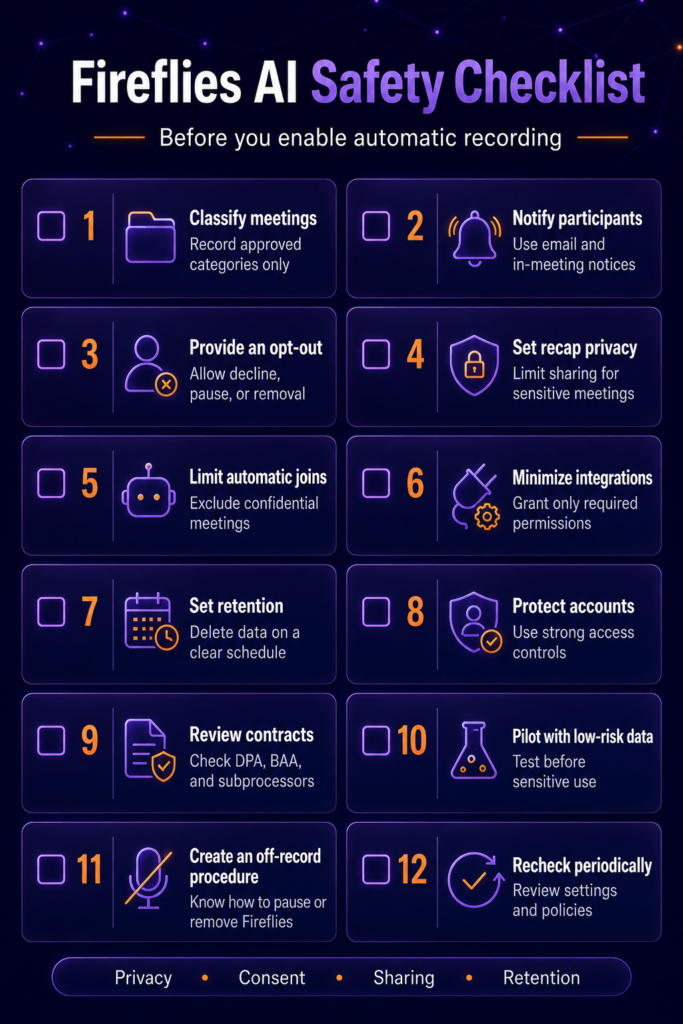
A practical Fireflies safety checklist
Before enabling automatic recording, use this minimum checklist:
- Classify meetings. Decide which categories may be recorded and which must always be excluded.
- Enable participant notices. Turn on pre-meeting email and in-meeting chat notifications where supported.
- Provide an opt-out. Tell participants how to decline, pause, or remove the notetaker.
- Set recap privacy. Use Only Owner for sensitive meetings and avoid broad default sharing.
- Limit automatic joins. Use recording rules to exclude confidential titles, domains, participants, or meeting types.
- Minimize integrations. Grant only the calendar, CRM, messaging, and storage permissions actually required.
- Set retention. Define when recordings, transcripts, summaries, and downstream copies are deleted.
- Protect accounts. Use unique passwords, SSO where appropriate, least-privilege roles, and prompt offboarding.
- Review contracts. Check the DPA, BAA if relevant, subprocessor list, international transfer terms, and incident obligations.
- Pilot with low-risk data. Test the workflow before using customer secrets, health information, legal advice, credentials, or unreleased product plans.
- Create an off-record procedure. Make sure hosts know how to pause or remove Fireflies immediately.
- Recheck periodically. Review product settings and policies after material updates.
Who is Fireflies AI safe for?
Fireflies is easier to justify for teams recording routine internal meetings with informed participants, controlled sharing, limited integrations, and a clear deletion policy.
It needs a deeper review for:
- healthcare and patient information;
- legal or privileged conversations;
- financial services and regulated customer data;
- HR investigations, performance reviews, or recruiting interviews;
- government, defense, and high-value intellectual property;
- organizations with strict UK/EU transfer or residency requirements;
- companies that cannot centrally enforce recording and access rules.
If your security or legal team cannot get satisfactory answers to its data-flow questions, that is a valid reason to delay deployment or evaluate alternatives. A useful product is not automatically an acceptable risk.
If Fireflies passes your initial risk check, start with a low-risk Fireflies pilot before enabling it for confidential or regulated meetings.
Final verdict: Is Fireflies AI safe?
Yes, with conditions. Fireflies has stronger public security and privacy documentation than a basic consumer transcription app, and its current policy makes clear commitments on encryption, independent controls, AI training, and third-party retention.
The main risk is not a missing security badge. It is treating those badges as permission to record every meeting automatically.
For ordinary work, Fireflies can be a reasonable choice after participant notices, narrow sharing, limited integrations, and retention rules are configured. For regulated or highly confidential conversations, require a formal review of the plan, DPA, subprocessors, data location, access model, retention, and applicable consent rules before deployment.
Frequently asked questions
Is Fireflies AI a secure app?
Fireflies documents a credible security baseline, including SOC 2 Type II, AES-256 encryption at rest, TLS in transit, access controls, and a policy against AI training on meeting content. Those controls reduce risk but do not guarantee that every account or meeting is safe.
Does Fireflies AI sell your meeting recordings?
Fireflies’ current policy says it does not sell or share Customer Personal Data under its business DPA and does not use meeting content to train AI. Its public Privacy Policy separately describes targeted-advertising disclosures involving identifiers and website or app activity. Buyers should not collapse those different data categories into one claim.
Does Fireflies AI store recordings?
Recordings and recaps can remain in the user’s Fireflies workspace according to account and retention settings. Fireflies’ “zero data retention” statement refers to third-party vendors not retaining meeting content after processing; it does not mean every workspace copy is immediately deleted.
Can meeting participants refuse Fireflies?
Fireflies provides pre-meeting decline, platform approval, chat notification, pause, and leave controls in supported workflows. The organizer should enable the relevant notifications and respect an objection.
Is Fireflies AI GDPR compliant?
Fireflies states that it supports GDPR requirements and international transfer safeguards. However, compliant deployment also depends on the customer’s lawful basis, notices, minimization, sharing, retention, contracts, and transfer assessment. The product cannot make an organization automatically compliant.
Is Fireflies AI HIPAA compliant?
Fireflies advertises HIPAA support with a BAA on Enterprise. A healthcare organization should confirm plan eligibility, sign the BAA, and configure required controls before processing protected health information.