
Same-recording comparison
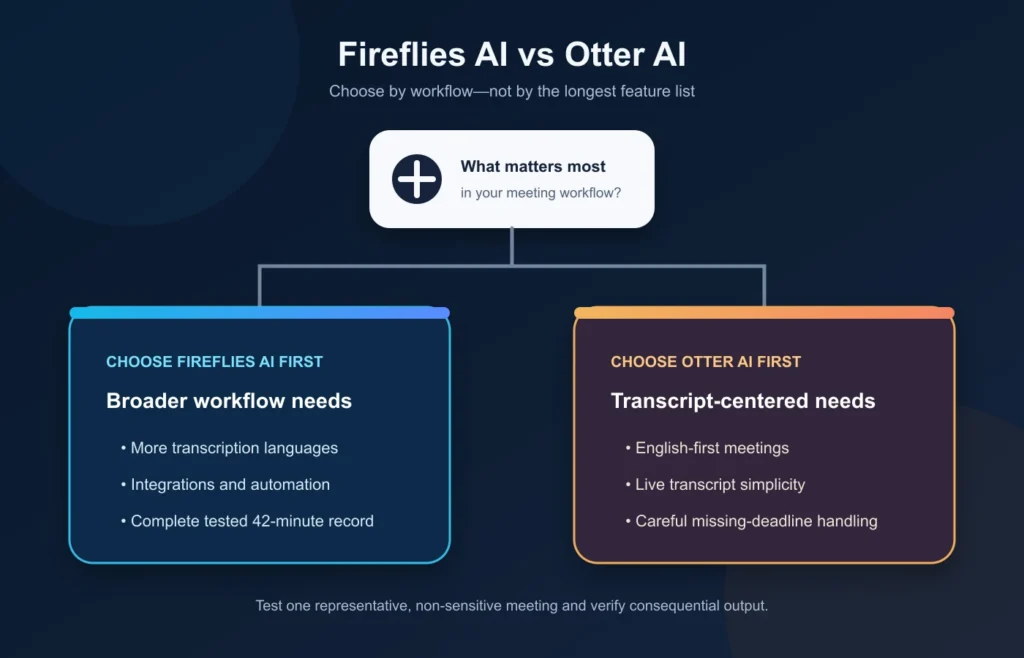
Fireflies AI is the better first test if you need broad language coverage, extensive integrations, and a meeting-to-workflow system that can grow beyond transcripts. Otter AI is the better first test if your work is primarily in English and you want a simpler, live-transcript-centered experience.
Neither product is the universal winner. In our hands-on comparison, Fireflies gave us a complete record of the same approximately 42-minute meeting, while Otter Basic showed only about 30 minutes of visible transcript. Otter, however, handled missing deadlines and a strict email word limit better in our AI Chat prompts. Fireflies identified the final meeting decision more cleanly.
The practical choice depends on which constraint matters most—not which tool has the longest feature list.
Evidence boundary: We evaluated both products with the same approximately 42-minute English source meeting and aligned eight-prompt AI Chat tests. The capture and account conditions were not identical, and we did not calculate a transcription accuracy percentage. These results describe one meeting and prompt set, not every account, language, or product version.
Fireflies AI vs Otter AI at a glance
| Decision factor | Fireflies AI | Otter AI |
|---|---|---|
| Best first test for | Broad languages, integrations, and automation | English-first live transcription and simpler meeting notes |
| Free-plan evaluation | Complete tested 42-minute record, but storage and advanced AI limits apply | 300 monthly minutes, but our visible transcript stopped around minute 30 |
| Major meeting platforms | Zoom, Google Meet, Microsoft Teams, and more listed | Zoom, Google Meet, and Microsoft Teams listed |
| Language coverage | Vendor advertises 100+ transcription languages | Smaller documented transcription-language selection |
| AI assistant result | Correct final decision; action-table labeling and word-limit failures | Strong uncertainty handling and concise revision; hidden-audio retrieval path unclear |
| Integration depth | Broader documented integration and automation surface | More transcript-centered; selected integrations and higher-tier expansion |
| Model-training policy | Vendor says meeting data is not used for AI model training | Vendor says it de-identifies user data before model training |
This table is a decision router, not a product scorecard. Plan availability and policy wording can change, and only English was tested hands-on.
How we compared Fireflies and Otter
We evaluated both products with the same approximately 42-minute English product-marketing meeting. The conversation included five speakers, technical names, competing priorities, explicit and implied action items, a nonexistent budget, and a final tagline selected near the end.
We used aligned prompts to test:
- a five-point summary;
- actions with owners and deadlines;
- the final decision near the end;
- retrieval after the 30-minute mark;
- proper names with source references;
- refusal to invent an approved budget;
- a follow-up email; and
- a revision under 120 words.
Fireflies captured the meeting through its Zoom bot workflow. Otter processed the same source meeting through its Basic workflow. Because Otter showed only about 30 minutes of visible transcript, this is a matched practical comparison—not a laboratory benchmark of transcript accuracy.
For the full standalone evidence, see our hands-on Fireflies AI review and Otter AI review.
Which has the better free plan?
Fireflies Free is more permissive for testing a normal-length meeting in our workflow. Its current public plan is listed as free forever with unlimited transcription and standard AI summaries, 400 minutes of storage per team, and 20 AI credits. The storage cap and advanced AI credits still create real boundaries, so “unlimited transcription” should not be confused with unlimited retained content or unlimited use of every AI feature.
Otter Basic currently lists 300 monthly transcription minutes and three lifetime audio/video imports. It includes live transcription, speaker identification, AI Chat, mobile apps, and the major meeting platforms. The limiting factor in our test was access to the transcript: the source meeting lasted about 42 minutes, but the visible Basic transcript ended around minute 30.
That makes Fireflies the stronger free evaluation route for a representative meeting longer than 30 minutes. Otter Basic can still demonstrate the core workflow, but its limits may prevent you from inspecting the entire source directly.
Paid prices are not a reliable shortcut to the winner. Fireflies uses separate AI credits for advanced features, while Otter’s pricing page may show regional or promotional values. Use our current Fireflies AI pricing guide and Otter AI pricing guide for the complete plan decision.
Capture and live transcription
Both tools cover Zoom, Google Meet, and Microsoft Teams. Fireflies also lists desktop and mobile apps, a Chrome extension, uploads, and broader meeting-platform support. Otter lists live transcription, mobile apps, file imports, and AI Chat on Basic.
The difference is emphasis. Fireflies focuses on moving meeting information into a wider automation and knowledge workflow. Otter makes a stronger case when the live transcript itself is the center of the experience.
Our Fireflies test confirmed that its Zoom bot could join and complete this particular meeting workflow. It did not test every Fireflies capture route. Our Otter test covered its Basic processing, transcript, summary, and Chat experience; it did not test every live-agent workflow across all supported platforms.
Transcript access and meeting length
Fireflies gave us a complete record to inspect for the approximately 42-minute meeting. That allowed us to compare late-meeting statements with the visible transcript and verify the final tagline directly.
Otter’s recording was also about 42 minutes, but the Basic account showed only around 30 minutes of visible transcript. The source file did not end there; the limitation affected how much transcript we could inspect.
This is an important free-plan difference, but it is not proof that Fireflies transcribes every meeting more accurately. It shows that Fireflies allowed a more complete review of this normal-length sample under the tested free workflow.
Summary and action items
Both tools turned a long conversation into useful structure.
Fireflies produced a five-point summary that captured the major workstreams and the final “More speed, less risk” decision. One statement—“the team committed”—was slightly stronger than the source, where campaign-manager confirmation was still incomplete.
Its action extraction found eight relevant tasks, but the requested table contained an operationally important labeling error: values such as 10:23 and 24:18 appeared in the Deadline column even though they were discussion timestamps. A note later clarified the distinction and found the Tuesday deadline, but the table itself did not follow the requested schema. Fireflies also missed some direct ownership cues.
Otter produced a useful five-point summary and structured seven action items. When deadlines were missing, it used Not specified rather than completing every row with invented certainty. Otter handled uncertainty better in this part of the test.
The lesson is not that Otter is more accurate overall. Fireflies captured the full meeting record and correctly classified the final decision; Otter handled the action-item schema more carefully. Each tool failed differently.
AI Chat: retrieval, grounding, and follow-up
Finding the final decision
Fireflies correctly identified “More speed, less risk” as the selected final tagline and linked it to the late-meeting discussion.
Otter also returned the correct phrase. However, it later said that no post-30-minute transcript was available in its current context. The phrase may have come from generated meeting notes, but our test did not prove that Otter Chat directly searched the hidden final 12 minutes of audio.
Fireflies therefore gave us a clearer way to verify the answer to this particular final-decision question.
Refusing to invent a budget
We asked both tools what budget had been approved and who approved it. The meeting contained no approved budget.
Both answered correctly that no such amount or approver appeared in the available content. This was a successful adversarial prompt for each product—not evidence that either system never hallucinates.
Proper names and source grounding
Fireflies retrieved a broad set of names with transcript excerpts and timestamps, but it repeated some apparent source-transcript errors such as Semgrip. This is grounded retrieval, not terminology correction.
Otter supplied transcript quotes and timestamps while normalizing several apparent technical-name errors, including Semgrep, HashiCorp, and Browserker. That was more convenient in this meeting, though contextual correction can also introduce risk when the inferred name is wrong.
Writing and revising a follow-up email
Both tools produced usable follow-up emails without inventing a budget or new decisions.
Fireflies preserved the major decisions and final tagline, but its “under 120 words” revision was approximately 131 words before the appended source URL when counting the subject and sign-off.
Otter shortened its follow-up below 120 words, made the actions easier to scan, and introduced no new meeting facts in the revision. Otter followed the explicit formatting constraint better in this test.
Which supports more languages?
Fireflies is the clearer choice when transcription-language breadth matters. Its current pricing page advertises support for more than 100 languages. Otter’s documented language list used for this comparison includes English, Spanish, French, German, Japanese, and Simplified Chinese.
Those are coverage claims, not accuracy findings. We tested English only. This comparison cannot tell you how either product performs with a particular accent, mixed-language conversation, poor audio, or overlapping speech.
Run a representative sample before choosing either tool for multilingual work.
Integrations and automation
Fireflies presents the broader documented automation surface. Its paid plans list unlimited integrations, while its wider product ecosystem includes AI Skills, CRM workflows, API access, meeting search, personal-assistant features, and other automation routes.
Otter’s current plans list selected Salesforce, HubSpot, and Zapier integrations on Pro, with custom integrations, API, and webhooks positioned higher in the plan structure.
This makes Fireflies the stronger option when meeting notes must feed several downstream tools. There is an important evidence boundary: Volticen did not test CRM writeback or calculate automation ROI in this comparison. Fireflies’ advanced AI features can also consume separate AI credits, so a broader automation workflow is not automatically less expensive.
Privacy and model-training policies
The vendors currently describe different approaches to model training.
Fireflies says meeting data is not used for AI model training and describes a zero-day retention policy with relevant vendors and partners. Otter says it uses a proprietary process to de-identify user data before using it to train models.
Readers who do not want meeting content used for model training may prefer Fireflies’ stated policy. This is a comparison of vendor policy claims—not an independent security audit or a guarantee that every account configuration meets a particular legal or regulatory requirement.
Whichever product you choose, review participant notice, consent, auto-join behavior, sharing, access, retention, and administrative controls before regular deployment. Our guide to Fireflies AI privacy and security covers that side of the Fireflies decision in more depth.
Choose Fireflies AI if…
Fireflies is the better first test when:
- you need vendor-stated transcription coverage beyond Otter’s smaller language set;
- meeting data must feed CRM, collaboration, or automation workflows;
- you want to inspect a normal-length free test without the transcript interruption we observed on Otter Basic;
- a full meeting record and late-meeting source timestamps matter;
- you are willing to manage a broader feature set and separate AI-credit limits and costs.
Fireflies is less attractive if you mainly want a simple English transcript workflow and do not need its automation depth.
Choose Otter AI if…
Otter is the better first test when:
- your meetings are primarily in English;
- live transcription and a transcript-centered interface are the priority;
- you prefer a simpler path from conversation to searchable notes and Chat;
- preserving missing deadlines as unspecified matters more than filling every action field;
- you can evaluate the product within Basic’s meeting/import constraints or are prepared to assess a paid plan.
Otter is less attractive when broad language support, a complete long-meeting free evaluation, or extensive integrations are central requirements.
Frequently asked questions
Is Fireflies better than Otter?
Fireflies is better for broader language coverage, integrations, and automation-heavy workflows. Otter is better for an English-first, live-transcript-centered workflow. Neither is universally better, and both require source review.
Which has the better free plan?
Fireflies provided the more complete free evaluation in our test because we could inspect the full approximately 42-minute meeting record. Otter Basic exposed about 30 minutes of visible transcript from the same source. Fireflies still limits retained storage and advanced AI usage.
Is Fireflies or Otter better for action items?
Otter handled missing deadlines more carefully in our sample, using Not specified. Fireflies found relevant actions but mislabeled discussion timestamps as deadlines in its table. One meeting does not establish a universal winner.
Which supports more transcription languages?
Fireflies advertises more than 100 transcription languages, while Otter’s documented list used for this comparison includes six. We tested English only, so this comparison does not establish multilingual accuracy.
Which is better for privacy?
Fireflies says meeting data is not used for AI model training. Otter says it de-identifies user data before model training. Whether one policy is acceptable depends on your organization’s requirements, consent process, and account configuration.
Can Fireflies or Otter replace manual meeting review?
No. Both were useful in our test, and both showed limitations. Verify consequential names, decisions, owners, deadlines, quotations, and generated follow-up against the source.
Final verdict
Choose Fireflies first if you need broader languages, integrations, automation, or a less interrupted free evaluation of a normal-length meeting. Choose Otter first if you work mainly in English and want a simpler live-transcript and AI Chat workflow.
In our shared-source test, Fireflies gave us the more complete meeting record and the cleaner final-decision evidence. Otter handled action-item uncertainty and the strict email revision more effectively. Both passed the nonexistent-budget check, and neither earned a universal accuracy verdict.
Test the product that matches your primary constraint with one representative, non-sensitive meeting. Review the output before paying or connecting it to a downstream workflow.