

Table of Contents
Fireflies AI has four plans: Free, Pro, Business, and Enterprise. Paid pricing starts at $10 per seat per month on annual billing for Pro, while Business costs $19 per seat per month annually. Enterprise is $39 per seat per month and annual only.
Those advertised prices are only the base subscription cost. Your total cost also depends on how many people need paid seats, whether you pay monthly or annually, how much meeting storage you need, how much recorded media you upload, and whether your team uses advanced features that consume AI credits.
Pricing checked: August 3, 2026. SaaS pricing changes frequently, so verify the current Fireflies pricing before purchasing.
Fireflies AI pricing at a glance
| Plan | Monthly billing | Annual billing | Best fit |
|---|---|---|---|
| Free | $0 | $0 | Individuals testing basic meeting capture |
| Pro | $18/seat/month | $10/seat/month | Professionals and small teams needing downloads, video, and integrations |
| Business | $29/seat/month | $19/seat/month | Growing teams needing unlimited storage, analytics, and admin controls |
| Enterprise | Not available | $39/seat/month | Larger organizations needing advanced security and administrative controls |
Fireflies displays annual prices as a monthly rate, but charges for the full year. One Pro seat therefore costs $120 per year, one Business seat costs $228, and one Enterprise seat costs $468 before optional AI-credit add-ons.
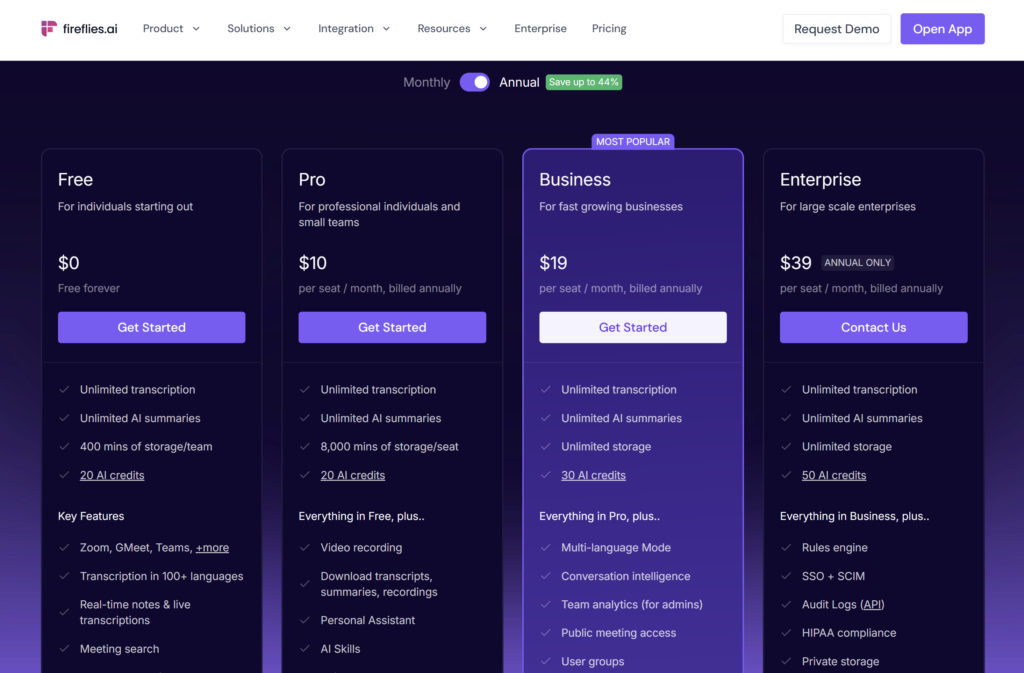
All four plans currently include unlimited transcription and unlimited standard AI summaries. “Unlimited” does not apply to every resource: storage differs by plan, uploaded files have rate limits on paid tiers, and advanced AI actions can require separate credits.
Annual versus monthly billing
The annual discount is substantial:
- Pro: $18 monthly versus $10 per month billed annually—a difference of $96 over 12 months for one seat.
- Business: $29 monthly versus $19 per month billed annually—a difference of $120 over 12 months for one seat.
- Enterprise: $39 per seat per month, available only with annual billing.
Annual billing makes sense when you already know that your team will use Fireflies regularly. Monthly billing costs more, but lets you test meeting capture, integrations, and team adoption without paying for a full year upfront.
Refunds and cancellation: do not assume you will get your money back
Fireflies’ public refund pages do not give one consistent answer. Its billing overview says subscriptions and AI-credit purchases are non-refundable. However, a separate refund-policy page describes full or partial refunds in some cases, depending on usage. The billing FAQ also says that timing, usage, and a review by support can affect eligibility.
The safest assumption is therefore that a refund is not guaranteed. Before paying—especially for an annual plan—ask Fireflies support which refund terms apply to your purchase. Treat AI-credit purchases as non-refundable. Canceling stops the next renewal and moves the workspace to Free at the end of the current billing period; it does not automatically return the money already paid.
Fireflies Free plan: useful for evaluation, but storage is tight
The Free plan includes unlimited transcription and standard AI summaries. It also provides meeting capture, search, apps, and basic collaboration features. You can therefore test whether Fireflies fits your meeting workflow without entering payment details. See our Fireflies AI Free plan guide for its practical limits and upgrade triggers.
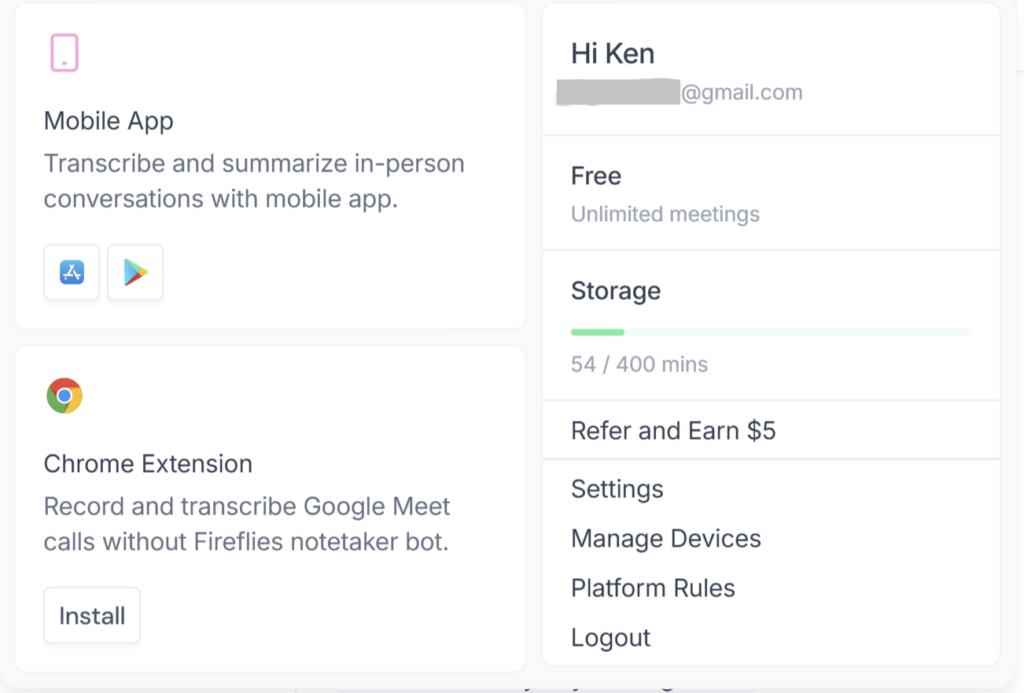
The main constraint is storage. Fireflies’ live pricing page and current storage guide list 400 minutes per team/workspace. In the hands-on test, a second Free account joined the first account’s team, but both accounts still shared the same 400-minute storage allowance. The Free limit therefore does not multiply when another member joins the team.
The 400 minutes are the total amount of meeting content the workspace can keep; they do not reset each month. When the workspace reaches that limit, you must delete older content or upgrade. Free is therefore useful for testing, but is unlikely to provide enough long-term storage for teams that record meetings regularly.
Fireflies Pro: the practical individual plan
Pro costs $18 per seat with monthly billing or $10 per seat per month when billed annually. It raises storage to 8,000 minutes per seat and adds useful professional capabilities, including video recording, transcript and recording downloads, AI Skills, action items, and unlimited integrations.
Pro is a practical starting point for consultants, recruiters, salespeople, and small teams that need to keep and export meeting content, but do not need team analytics or advanced administrative controls.
Pro still has a storage limit: 8,000 minutes for each paid seat. This differs from Free, where the entire team shares one 400-minute allowance. Fireflies does not describe Pro storage as one shared 8,000-minute pool for the team. Business may be easier to manage if the team wants to keep all meeting content without monitoring a separate storage allowance for each seat.
Fireflies Business: the storage and team-management upgrade
Business costs $29 per seat monthly or $19 per seat per month with annual billing. It includes unlimited storage and adds features aimed at growing teams, such as conversation intelligence, team analytics, user groups, and broader collaboration controls.
Business is not automatically the right choice just because a company has several employees. The upgrade becomes worthwhile when at least one of these conditions applies:
- the 8,000-minute storage allowance for each Pro seat is no longer sufficient;
- managers need team-level analytics;
- administrators need more structured access and workspace controls;
- the team relies on multi-language mode or conversation intelligence.
If your team mainly needs transcription and summaries, Pro may provide everything you need at a lower price.
Fireflies Enterprise: best for security and administrative control
Enterprise costs $39 per seat per month and is sold on annual billing. It includes unlimited storage and adds enterprise-oriented controls such as SSO and SCIM, audit logs, private storage, custom data retention, a rules engine, and a dedicated account manager.
Enterprise is intended for organizations with advanced security, administration, and data-control requirements. Our guide to Fireflies AI privacy and security explains the main data-handling and consent considerations. It does not provide more transcription than the lower-priced plans, because every plan already includes unlimited transcription. Choose Enterprise when your organization specifically needs features such as single sign-on (SSO), automated user management through SCIM, audit logs, private storage, custom rules for how long data is kept, or documentation and support for a formal purchasing process.
AI credits: the variable cost buyers can miss
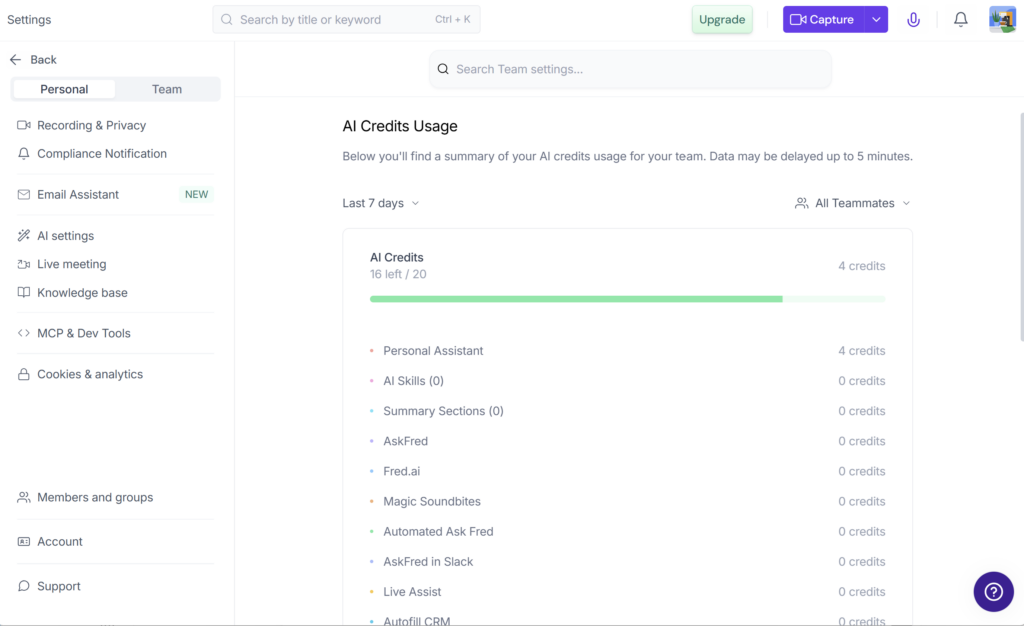
Fireflies does not charge AI credits for standard transcription, notes, or recap emails. It uses credits for more advanced AI actions, including AskFred queries, AI Skills, custom summary sections, Magic Soundbites, voice agents, and some automated assistants.
Each new account starts with a one-time plan credit allocation:
| Plan | One-time initial AI credits |
|---|---|
| Free | 20 |
| Pro | 20 |
| Business | 30 |
| Enterprise | 50 |
The team shares these credits as one pool. Adding members or paid seats does not create another allocation for each person. This was also confirmed in a hands-on Free-plan test: after a second account joined the team, both accounts still shared the same 20 AI credits. Credits also do not accumulate when you upgrade. For example, moving from Free to Business replaces the original 20 credits with 30 Business credits; it does not produce a balance of 50. One Fireflies Pro feature page uses the phrase “per seat,” but the dedicated AI-credit guide says the credits are shared by the team and do not increase with additional teammates. This article follows that dedicated policy guide.
When a paid workspace needs more, Fireflies sells monthly add-ons:
| Credits per month | Monthly price |
|---|---|
| 50 | $5 |
| 200 | $20 |
| 1,000 | $90 |
| 2,500 | $200 |
| 5,000 | $375 |
| 7,500 | $450 |
| 10,000 | $600 |
Purchased credit packages renew automatically unless you pause them. Any purchased credits left at the end of the billing cycle do not carry over to the next cycle. Fireflies also says that when a paid workspace runs out of credits, it may automatically subscribe the workspace to the lowest package: $5 for 50 credits per month. Check the AI-credit settings after signup if you do not want an unexpected recurring add-on charge.
Different AI actions can consume different numbers of credits, depending on their complexity. You therefore cannot estimate monthly AI costs from the number of seats alone. Monitor the team’s actual credit use during the first month before purchasing a larger add-on.
Storage and upload limits are different
Fireflies uses two separate controls that are easy to confuse:
- Storage controls how many minutes of meeting content the workspace can keep. Free provides 400 minutes shared by the whole team/workspace, Pro provides 8,000 minutes for each paid seat, and Business and Enterprise provide unlimited storage.
- Upload rate limits control how many minutes of recorded media a user can send to Fireflies through a particular upload method, such as dashboard uploads, Zapier, storage integrations, dialers, or past-meeting imports.
For paid plans, each user can upload up to 3,000 minutes per month through each source. Across the whole team, each source is limited to 150,000 minutes per month. Normal meetings captured by the Fireflies notetaker, Chrome extension, or mobile app do not count toward these upload limits.
The current guide says that Fireflies charges an overage fee of $0.01 for each additional minute after the relevant limit is exceeded. Most small teams are unlikely to approach the 150,000-minute limit for one upload source. Teams that import large volumes of recorded calls or media should still include possible overage charges in their budget.
What Fireflies AI costs for a team
The formula is straightforward:
Base annual cost = advertised annual rate per month × seats × 12
Examples before optional credit add-ons:
| Team | Pro annual | Business annual | Difference |
|---|---|---|---|
| 1 seat | $120 | $228 | $108 |
| 5 seats | $600 | $1,140 | $540 |
| 10 seats | $1,200 | $2,280 | $1,080 |
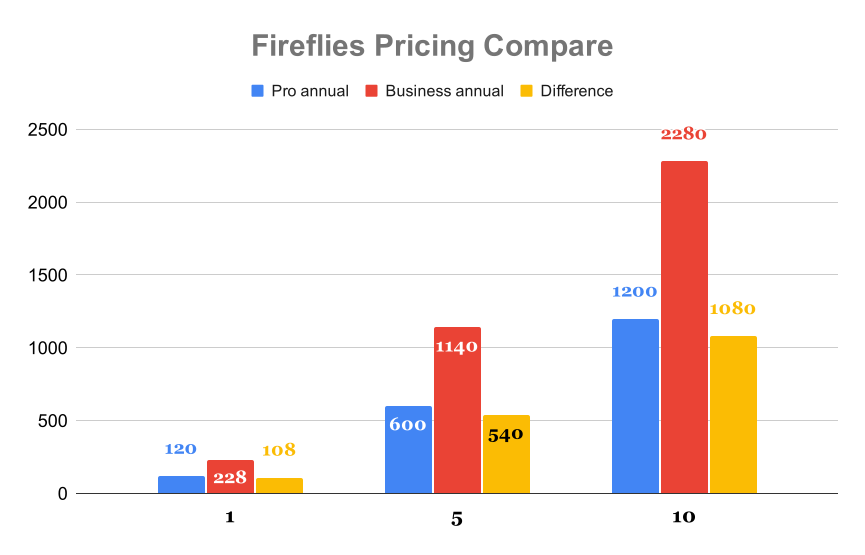
A five-person Business workspace with the smallest AI-credit add-on would cost $1,200 for one year: $1,140 for the five seats plus $60 for 50 credits each month. By comparison, paying monthly for five Pro seats would cost $1,080 over 12 months. This is close to the annual Business price, which shows why the billing cycle can affect total cost almost as much as the plan itself.
These examples exclude taxes, currency conversion, and any negotiated enterprise terms.
How Fireflies’ price compares with another major option
As a limited price reference, Otter’s official pricing page currently lists Pro at $8.33 per user per month and Business at $19.99 when billed annually, before temporary promotions. On the same annual-price basis, Fireflies lists Pro at $10 and Business at $19 per seat per month.
These prices alone do not show which tool offers better value. Otter and Fireflies have different transcription allowances, storage rules, AI usage limits, integrations, and workflows. The figures only show that Fireflies is priced within a similar per-user range. A fair winner recommendation requires a separate comparison based on the same research criteria for both tools.
Which Fireflies AI plan should you choose?
Choose Free if you are testing meeting capture and do not need to store many hours of past meetings.
Choose Pro if you are an individual or small team that needs downloads, video recording, integrations, and substantially more storage. For most professional buyers, this is the sensible starting tier.
Choose Business if your team needs unlimited storage, conversation intelligence, team analytics, or stronger workspace controls and those features justify paying $9 more per seat each month on annual billing.
Choose Enterprise only if your organization needs advanced security and administrative controls. Examples include single sign-on, automated user management, audit logs, private storage, custom rules for how long data is kept, or support for a formal purchasing and approval process. Do not choose Enterprise just to get unlimited transcription, because Free, Pro, and Business already include it.
If you also want to assess transcription quality, summaries, integrations, and everyday usability, read our complete Fireflies AI review.
Disclosure: Volticen may earn a commission if you purchase through links on this page, at no additional cost to you. Our recommendations are based on documented product information and buyer fit, not commission size.
Try Fireflies Free before choosing a paid plan
Before selecting a paid plan, estimate three things: how many paid seats you need, how many minutes of meeting content you want to keep, and how often the team will use advanced features that consume AI credits. These estimates give you a more realistic total cost than the advertised price per seat alone.
Fireflies may be a poor fit if you hold very few meetings, cannot allow a recording bot to join calls, or need advanced AI costs to remain fixed and predictable. If you are unsure whether your team will keep using it, test Free or pay monthly for one seat before committing to an annual plan.
Frequently asked questions
How much does Fireflies.ai cost?
Fireflies has a Free plan. Pro costs $18 per seat with monthly billing or $10 per seat per month when billed annually. Business costs $29 per seat with monthly billing or $19 per seat per month when billed annually. Enterprise costs $39 per seat per month and is available only with annual billing.
Does Fireflies.ai have a free plan?
Yes. The Free plan includes unlimited transcription and standard AI summaries, but retained storage is limited to 400 minutes shared across the team/workspace. Adding another Free member does not create another 400-minute allowance.
Are Fireflies AI credits monthly?
The initial 20, 30, or 50 plan credits are a one-time allocation, according to Fireflies’ current AI-credit guide. Purchased add-on credits renew monthly, and unused purchased credits do not roll over.
Does Fireflies charge per meeting minute?
The subscription price is based on the number of seats, not the number of meeting minutes. However, storage and uploaded-media limits still apply, and advanced AI actions use a separate credit system.
Is Fireflies Pro or Business better?
Pro is usually the better-value choice for individuals and small teams. Business is the stronger fit when unlimited storage, team analytics, conversation intelligence, or additional administrative controls matter.
Does Fireflies offer refunds?
Do not assume that you will receive a refund. One official Fireflies page says subscriptions and AI-credit purchases are non-refundable, while another describes limited refunds based on usage. Ask support which terms apply before purchasing, and treat AI-credit purchases as non-refundable.
Bottom line
Fireflies.ai can be affordable when you mainly need meeting transcription and summaries. For many individual professionals and small teams, Pro at $10 per seat per month on annual billing is the most practical starting plan.
Costs become harder to predict when a team needs unlimited storage or frequently uses advanced AI features. Business increases the price of every paid seat. AI-credit packages add a separate monthly charge, and adding more seats does not add more credits to the shared team balance.