
Table of Contents
Is Fireflies AI free? Yes. Fireflies AI has a $0 Free plan that you can use without entering payment details. It currently includes unlimited transcription, standard AI summaries, meeting search, and support for major meeting platforms.
However, “free” does not mean every feature or resource is unlimited. The most important restrictions are 400 minutes of stored meeting content for the Free team/workspace, a limited one-time pool of advanced AI credits, no transcript or recording downloads, and no video recording.
Checked August 4, 2026: Fireflies changes plans and help documentation over time. This article follows the current pricing page, the latest dedicated AI-credit guide, and a hands-on Free workspace. Verify the allowance displayed in your account before relying on it. You can also verify the latest limits on the official Fireflies pricing page.
Is Fireflies AI free? Free plan at a glance
| Free-plan item | Current limit or availability |
|---|---|
| Subscription price | $0 |
| Payment card required to start | No card was required in our test |
| Transcription | Unlimited for supported meeting workflows |
| Standard AI summaries | Unlimited |
| Stored meeting content | 400 minutes shown for the Free team/workspace |
| Maximum meeting duration | Up to 2 hours per meeting |
| Initial AI credits | 20 one-time credits shared within the team |
| Transcript and recording downloads | Pro or higher |
| Video recording | Pro or higher |
So, is Fireflies AI free in practice? Yes—the Free plan is a real product tier, not simply a short paid-plan trial. You can keep using it at $0, but its limits make it better for evaluation and light use than for building a large permanent meeting archive.
What can you do with Fireflies for free?
Fireflies Free covers the core meeting-note workflow:
- connect supported calendars and meeting platforms;
- let the Fireflies notetaker join supported online meetings;
- transcribe conversations;
- generate standard meeting summaries;
- search and revisit captured meetings;
- use web, desktop, mobile, and Chrome-extension entry points;
- upload supported audio or video files within applicable Free limits;
- collaborate with teammates using basic workspace features.
This is enough to answer the most important pre-purchase question: can Fireflies join your meetings and produce notes that are useful for your workflow?
For a broader assessment of output quality, limitations, and buyer fit, read our hands-on Fireflies AI review.
What happened in our Free-plan test?
We tested Fireflies Free with one English-language Zoom meeting lasting approximately 42 minutes with five speakers. The notetaker joined successfully and Fireflies produced a transcript, structured summary, and Action Items.
The summary captured the main topics and several important decisions well enough to help someone revisit the meeting. The Action Items also identified real tasks. However, owners and at least one spoken deadline were missing, while some technical terms in the transcript appeared incorrect.
That result makes the Free plan useful for testing the full capture-to-notes workflow. It does not make the output an authoritative record. Important assignments, deadlines, names, and technical language should still be checked by a person.
Hands-on boundary: These findings come from one approximately 42-minute English Zoom meeting with five speakers. We compared the summary with the Fireflies transcript, not the transcript with the original audio, so we do not claim an overall transcription-accuracy percentage.
The 400-minute storage limit is not a monthly allowance
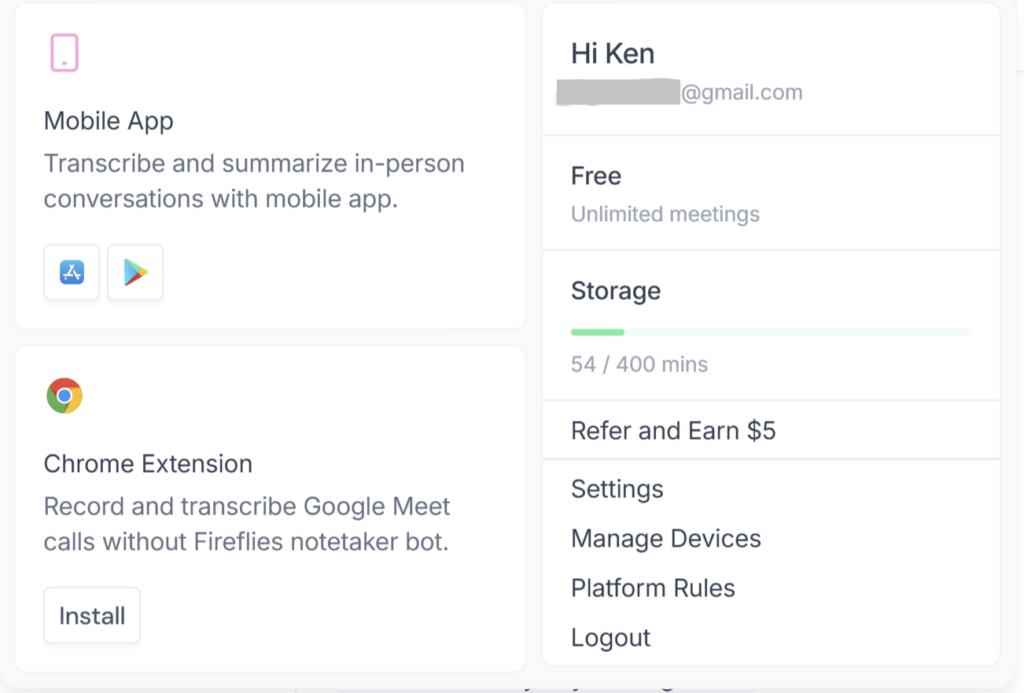
Fireflies’ current pricing page lists 400 minutes of storage per Free team. In our tested workspace, the account panel displayed 0 / 400 mins. After a second Free account joined the same team, both accounts still saw the same shared 400-minute allowance.
Four hundred minutes equals about:
- ten 40-minute meetings;
- six 60-minute meetings plus 40 minutes;
- three two-hour meetings plus 40 minutes.
The important detail is that storage is a total retained-content cap, not 400 new minutes each month. When you approach the limit, you need to delete older meeting content or move to a paid plan with more storage.
Fireflies’ help center is not perfectly consistent here. One newer storage article describes Free storage per user and pooled across a team, while the live pricing page says 400 minutes per team. The tested Free workspace followed the 400-minute shared-team display. Because account configurations and documentation can change, treat the allowance shown inside your workspace as the final operational figure.
Are the 20 Fireflies AI credits monthly?
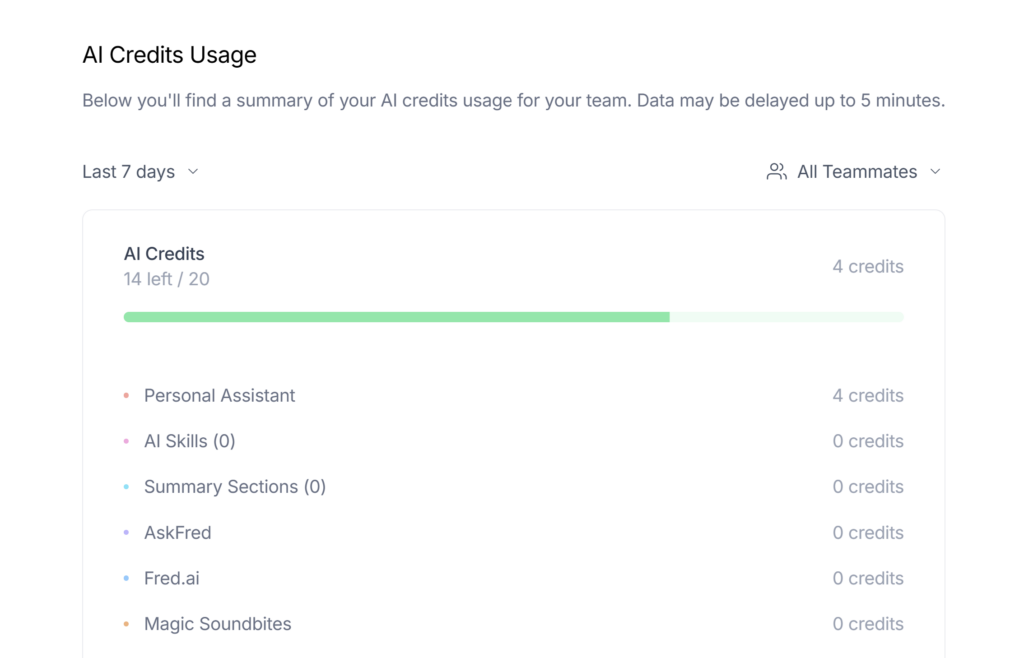
No. Fireflies’ dedicated AI-credit guide says the Free plan’s 20 AI credits are a one-time allocation, not 20 new credits every month.
The credits are shared within the team, do not increase when teammates are added, and do not stack when you upgrade. Advanced actions such as AskFred queries, AI Skills, custom summary sections, and certain other AI features can consume credits dynamically.
Standard transcription and standard AI summaries are listed as unlimited on the current pricing page. The separate credit pool matters when you start using advanced AI actions. Once a Free workspace runs out of AI credits, Fireflies says it presents a paywall and asks the user to upgrade.
This distinction prevents two common misunderstandings:
- “Unlimited summaries” does not mean unlimited use of every AI feature.
- The 20-credit starting balance is not a recurring monthly benefit.
What is not included in Fireflies Free?
The features most likely to trigger an upgrade are:
- Downloads: exporting transcripts, summaries, audio, or recordings requires Pro or higher.
- Video recording: Free can capture meeting audio and generate notes, but video recording is a Pro feature.
- Large retained archive: Free storage is limited, while Pro provides substantially more storage.
- Unlimited integrations: listed as a Pro feature on the current pricing page.
- Advanced workflow features: AI Skills, Personal Assistant, Voice Agents, task-management features, and other advanced capabilities may require Pro and/or AI credits depending on the feature.
The Free plan is not useless after the initial test. It remains practical if you only need searchable meeting notes and are willing to remove old content. The friction appears when meeting history, exporting, video, or professional integrations become part of the workflow.
For current paid-plan prices and the full feature breakdown, see our Fireflies AI pricing guide.
Fireflies Free vs Pro: when is Pro worth it?
| Decision factor | Stay on Free | Consider Pro |
|---|---|---|
| Main goal | Test or lightly use meeting notes | Use Fireflies as a regular professional system |
| Storage | You can delete older meetings | You need to retain a larger archive |
| Downloads | You can review content inside Fireflies | You need local transcript, summary, audio, or recording files |
| Recording | Audio/transcript workflow is enough | You need meeting video |
| Integrations | Basic connectivity is enough | You rely on broader integrations |
| Advanced workflow | Standard notes cover the need | You need paid workflow and automation features |
Do not upgrade only because a pricing page labels Pro as more capable. Upgrade when a Free limit interrupts something you actually need to do.
Who should use Fireflies Free?
Free is a good fit for:
- someone evaluating Fireflies before paying;
- an individual with a small number of meetings;
- a user who mainly wants transcript search and standard summaries;
- a person willing to delete old meetings as storage fills;
- a team running a controlled pilot before choosing paid seats.
Free is a poor fit for:
- teams that need to preserve a long meeting history;
- users who must download or export every transcript;
- workflows that require meeting video;
- organizations that need advanced security, retention, or administrative controls;
- anyone expecting AI-generated notes to replace human review for high-stakes decisions.
If meetings contain sensitive personal, customer, legal, HR, or confidential business information, plan configuration is only one part of the decision. Review our guide to Fireflies AI privacy, consent, and security before deployment.
When should you upgrade from Free?
Consider upgrading when one of these events occurs:
- You repeatedly delete useful meetings to remain under the storage cap.
- You need to download transcripts, summaries, audio, or recordings.
- You need video recording rather than audio and notes alone.
- A required integration or workflow feature is locked behind Pro.
- The team has completed a successful pilot and will use Fireflies regularly.
If none of these conditions applies, staying on Free is a reasonable choice. There is no benefit in paying for capacity that your workflow does not use.
Frequently asked questions
Is Fireflies AI completely free?
Fireflies has a Free plan that costs $0, but it has limits. Current public information lists 400 minutes of Free storage per team, 20 one-time AI credits, and paid-plan requirements for downloads and video recording.
Does Fireflies Free require a credit card?
No payment card was required when we created and tested a Free account in August 2026. Signup conditions can change, so check the current form before completing registration.
Does Fireflies Free require a credit card?
No payment card was required when we created and tested a Free account in August 2026. Signup conditions can change, so check the current form before completing registration.
How long can a Fireflies Free meeting be?
Fireflies’ current Free-plan features guide lists a maximum recording duration of two hours per meeting.
Does Fireflies Free include unlimited transcription?
The current pricing page lists unlimited transcription and unlimited standard AI summaries on Free. Separate limits still apply to storage, advanced credit-consuming AI actions, uploads, and paid features.
Does Fireflies Free storage reset every month?
No. Fireflies’ current storage guide describes storage as a total cap that does not reset monthly. When the workspace reaches its allowance, users must delete older meetings or upgrade.
Do Fireflies Free AI credits renew monthly?
No. The dedicated AI-credit guide says the 20 Free credits are granted once. They are shared by the team and do not increase when teammates are added.
Can I download a transcript on the Free plan?
Fireflies’ current documentation says downloading transcripts, summaries, and meeting recordings is available on Pro plans and higher. In our Free test, the export control was also locked behind an upgrade.
Is Fireflies Free a trial?
The $0 plan is described as “Free forever,” so it is not merely a time-limited subscription trial. Fireflies may offer separate trials for advanced AI features, but the core Free tier remains available subject to its limits.
Bottom line: is Fireflies Free worth using?
Yes—as a test environment and a light-use meeting-notes tool. Fireflies Free lets you verify the core workflow without paying: capture a supported meeting, receive a transcript and summary, and decide whether the result saves you time.
Its biggest limitation is not transcription but what happens around it. Retained storage is tight, advanced AI uses a limited credit pool, and downloads and video recording require Pro. Start with Free, observe your real usage, and upgrade only when one of those limits blocks a necessary workflow.