
Table of Contents
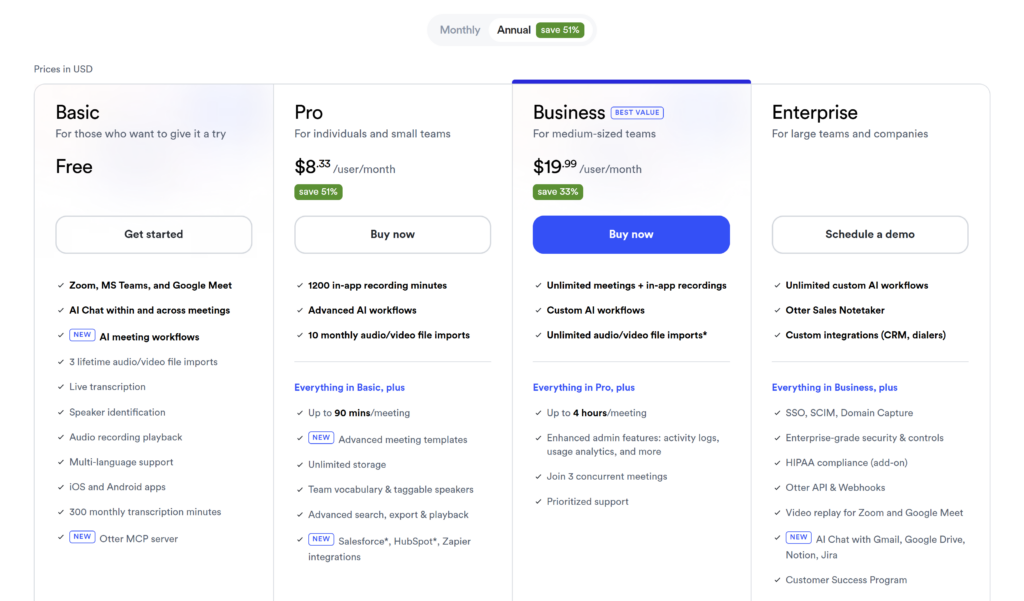
Otter AI pricing starts with a free Basic plan. Pro costs $16.99 per user per month with monthly billing or $8.33 per user per month when billed annually. Business costs $30 monthly or $19.99 per user per month on annual billing. Enterprise uses custom pricing.
Price is only part of the decision. Otter also limits monthly transcription minutes, the length of each conversation, file imports, conversation history, and AI Chat queries. Business removes some of those restrictions, but “unlimited meetings” still does not mean every type of transcription is unlimited.
Pricing checked: August 4, 2026. Otter changes prices and promotions, so verify the current Otter pricing before purchasing.
Otter AI pricing at a glance
| Plan | Monthly billing | Annual billing | Best fit |
|---|---|---|---|
| Basic | Free | Free | Testing short meetings and live transcription |
| Pro | $16.99/user/month | $8.33/user/month | Individuals and small teams with regular meetings |
| Business | $30/user/month | $19.99/user/month | Teams needing longer meetings, more imports, and admin tools |
| Enterprise | Custom | Custom | Organizations needing advanced governance and integrations |
Annual prices are displayed as monthly equivalents, but the annual term is paid upfront. At the listed rate, one Pro seat costs about $99.96 per year, while one Business seat costs about $239.88 per year, before taxes or currency conversion.
Otter’s pricing page currently shows two promotions that require care:
- Business Monthly is shown at $24 per user per month for the first three months for first-time subscribers. The standard listed price is $30.
- A 50% offer that can reduce Pro to $4.17 is limited to an India-issued credit card. It should not be used when estimating costs for a typical US or UK buyer.
Because these offers can change or depend on eligibility, the calculations in this guide use standard public prices.
Annual versus monthly billing
Annual billing cuts the standard Pro rate from $16.99 to $8.33 per user per month. Based on the displayed rates, that is approximately $103.92 less over 12 months for one seat.
For Business, annual billing reduces the standard rate from $30 to $19.99 per user per month, a difference of approximately $120.12 over 12 months for one seat.
The annual option offers the lowest effective rate, but it also requires a larger upfront commitment. Monthly billing may be safer if you have not yet tested transcript quality with your speakers, audio setup, and meeting platforms. Otter says direct subscriptions are non-refundable, so an annual discount is not automatically the lower-risk choice.
What Otter’s usage limits mean in practice
Otter uses several separate limits. Reading only the plan price can hide the one most likely to interrupt your workflow.
| Limit | Basic | Pro | Business | Enterprise |
|---|---|---|---|---|
| Meeting/recording minutes per month | 300 | 1,200 | Unlimited | Unlimited |
| Imported-file transcription per month | Shared 300-minute pool | Shared 1,200-minute pool | 6,000 minutes | 6,000 minutes |
| Maximum time per conversation | 30 minutes | 90 minutes | 4 hours | 4 hours |
| File imports | 3 lifetime | 10/month | Unlimited files* | Unlimited files* |
| Visible conversation history | 25 most recent | Unlimited | Unlimited | Unlimited |
| AI Chat queries per month | 20, with 3 per conversation | 50 | 200 | 200 |
| Concurrent meetings | 1 | 2 | 3 | 3 |
*Business and Enterprise can import an unlimited number of files, but the pricing table currently lists a 6,000-minute monthly imported-file transcription limit per user.
Basic and Pro use one monthly minute pool across meeting recordings and imported files. For example, importing a 60-minute recording on Pro leaves about 1,140 minutes for other transcription during that monthly cycle. Unused monthly minutes do not roll over.
The maximum time per conversation is a different control. A Basic user may have 300 minutes available but can access only the first 30 minutes of one longer conversation unless they upgrade. On Business, meetings and in-app recordings may be unlimited in monthly volume, but each conversation is still capped at four hours.
Otter Basic: genuinely useful for testing, but tightly capped
Basic is free with no stated expiry. It includes live transcription, speaker identification, automated summaries, AI Chat, meeting workflows, mobile apps, and support for Zoom, Microsoft Teams, and Google Meet.
Its practical limits are more important than its feature list:
- 300 transcription minutes per month;
- 30 minutes accessible per conversation;
- three audio or video file imports for the lifetime of the account, not each month;
- only the 25 most recent conversations immediately visible;
- 20 AI Chat queries per month, with up to three per conversation.
At 300 minutes, Basic could theoretically cover ten 30-minute conversations per month. It cannot fully cover a single 45- or 60-minute meeting because the per-conversation limit remains 30 minutes. Otter says longer recordings do not necessarily stop, but the transcript beyond the limit stays locked until the account upgrades.
Basic is therefore useful for validating the interface and a few short meetings. It is a poor long-term fit for regular hour-long calls, repeated interview imports, or anyone who needs full access to a growing conversation archive. Read full Otter AI review
Otter Pro: the practical individual plan
Pro costs $16.99 monthly or $8.33 per user per month when billed annually. It increases the monthly transcription pool to 1,200 minutes and the maximum conversation length to 90 minutes. It also includes ten file imports per month, unlimited conversation history, advanced search and exports, faster playback options, team vocabulary, and advanced meeting templates.
A 1,200-minute allowance equals roughly:
- 20 one-hour meetings;
- 40 half-hour meetings; or
- five hours of meetings per week across a four-week month.
These are simple planning examples. Imported recordings use the same monthly pool, so actual meeting capacity falls if you upload audio or video files regularly.
Pro is the likely starting point for consultants, recruiters, journalists, researchers, and other solo professionals whose meetings normally stay under 90 minutes. The main reasons not to choose it are high meeting volume, sessions longer than 90 minutes, more than ten monthly imports, or a need for team administration.
Otter Business: higher capacity with limits that still matter
Business costs $30 per user monthly or $19.99 per user per month when billed annually. It adds unlimited meetings and in-app recordings, a four-hour maximum per meeting, an unlimited number of file imports, custom AI workflows, activity logs, usage analytics, three concurrent meeting joins, and prioritized support.
The word “unlimited” needs qualification. It applies to meetings and in-app recordings. Imported-file transcription is still listed at 6,000 minutes per user per month, and each conversation remains limited to four hours. AI Chat is also limited to 200 queries per user per month.
Business is the stronger fit when a team needs at least one of the following:
- more than 1,200 meeting minutes per user each month;
- meetings longer than 90 minutes;
- more than ten imported files each month;
- three simultaneous meeting joins;
- custom workflows, usage analytics, activity logs, or centralized administration.
Do not upgrade only because the plan is labeled “Best Value.” If each person stays within Pro’s allowance and the team does not need administrative controls, Pro may cost less while covering the same core workflow.
Otter Enterprise: for governance and integration requirements
Enterprise uses custom pricing and includes the Business features. It adds capabilities such as SSO, SCIM, domain capture, enterprise security controls, custom integrations, API and webhooks, customer success support, and HIPAA compliance as an add-on.
Enterprise is intended for organizations with formal security, identity-management, integration, procurement, or regulated-workflow requirements. It is not necessary simply to get long meetings or unlimited in-app recordings; Business already provides those benefits.
Otter’s pricing table notes that SSO and SCIM require a minimum 100-user license. Buyers should confirm minimum seats, implementation costs, add-on pricing, data requirements, and contract terms directly with sales before comparing Enterprise with self-service plans.
What Otter AI costs for a team
For annual billing, the basic formula is:
Annual cost = displayed monthly-equivalent rate × paid users × 12
| Team size | Pro annual | Business annual | Difference |
|---|---|---|---|
| 1 user | $99.96 | $239.88 | $139.92 |
| 5 users | $499.80 | $1,199.40 | $699.60 |
| 10 users | $999.60 | $2,398.80 | $1,399.20 |
With monthly billing at standard prices, five Pro users would cost $1,019.40 over 12 months. Five Business users would cost $1,800. The annual discount becomes material as the team grows, but so does the risk of buying seats that people do not use.
Otter limits the maximum workspace size to five members on Basic, five billed users on Pro, and 25 billed users on Business. A larger deployment may therefore require Enterprise even when its feature set is not the original reason for contacting sales.
These examples exclude taxes, currency conversion, temporary promotions, and negotiated Enterprise pricing.
Trial, renewal, cancellation, and refunds
Basic can be used indefinitely within its limits. Otter also advertises a seven-day Business trial through its trial flow. Check the checkout screen carefully: Otter’s trial information says the workspace can convert automatically to a paid Business Monthly subscription unless the trial is cancelled.
Paid subscriptions renew automatically. Otter recommends cancelling at least 24 hours before the next billing date to avoid another charge. Cancellation takes effect at the end of the current paid period, so paid features remain available until then. After expiry, the workspace moves to Basic limits; cancelling the subscription does not delete the account or its conversations.
Otter states that subscriptions purchased directly are non-refundable. Purchases made through Apple’s App Store or Google Play are governed by those platforms’ billing and refund processes. Before starting an annual plan or trial, confirm the renewal date, billing channel, number of paid users, and the total charge shown at checkout.
Which Otter plan should you choose?
Choose Basic if you want to test Otter with short meetings and can accept the 30-minute conversation cap, three lifetime imports, and limited visible history.
Choose Pro if you are an individual or small team with up to 20 hours of transcription per month, meetings under 90 minutes, and no need for advanced administration. For many solo professionals, it is the most practical paid starting point.
Choose Business if you regularly exceed 1,200 meeting minutes, hold meetings longer than 90 minutes, import more than ten files per month, need concurrent meeting coverage, or require workspace analytics and controls.
Choose Enterprise when SSO, SCIM, domain controls, API access, custom integrations, a HIPAA add-on, or support for a larger deployment is a real purchasing requirement.
Otter may be a poor fit if your meetings routinely exceed the relevant per-conversation limit, you need far more transcription languages, you require a certified verbatim transcript, or you cannot establish permission to record participants. Transcript quality also varies with speakers, terminology, and audio conditions, so test Basic with representative audio before committing to annual billing.
Compare the latest Otter plans and pricing, or start with Basic if you are still validating fit.
If you need broader meeting-language support or a different allowance model, compare these limits with our Fireflies AI pricing guide.
Frequently asked questions
How much does Otter AI cost?
Otter Basic is free. Pro costs $16.99 per user with monthly billing or $8.33 per user per month when billed annually. Business costs $30 monthly or $19.99 per user per month annually. Enterprise uses custom pricing.
Is Otter AI free?
Yes. The Basic plan is free without a stated expiry. It provides 300 transcription minutes per month, a 30-minute limit per conversation, three lifetime file imports, and access to the 25 most recent conversations.
Does Otter Pro have unlimited transcription?
No. Pro currently includes 1,200 transcription minutes per user each month, shared across in-app recordings and imported files. Unused minutes do not roll over.
Is Otter Business really unlimited?
Otter Business includes unlimited meetings and in-app recordings. Imported-file transcription remains limited to 6,000 minutes per user each month, each conversation can run for up to four hours, and AI Chat has a monthly query limit.
How many file imports does Otter allow?
Basic allows three file imports for the lifetime of the account, while Pro allows ten each month. Business and Enterprise list unlimited file counts, subject to a 6,000-minute monthly imported-file transcription limit per user.
Do unused Otter minutes roll over?
No. Otter states that monthly transcription minutes reset and do not carry over to the next cycle.
Can I get a refund from Otter?
Otter states that direct subscriptions are non-refundable. App Store and Google Play purchases follow the billing and refund rules of those platforms. Cancel at least 24 hours before renewal if you do not want the subscription to continue.
Bottom line
Otter’s free plan is useful for testing, but its 30-minute conversation cap and three lifetime imports make it restrictive for regular professional use. Pro at $8.33 per user per month on annual billing is the sensible starting tier for many individuals whose meetings stay below 90 minutes and whose total transcription remains under 1,200 minutes per month.
Business is a capacity and administration upgrade, not a completely limit-free plan. Its unlimited meetings do not remove the four-hour conversation cap, 6,000-minute imported-file allowance, or AI Chat query limit. Compare those operational limits—not just the headline price—before paying for every team member.
Check Otter’s current plans before choosing a subscription.