
Table of Contents
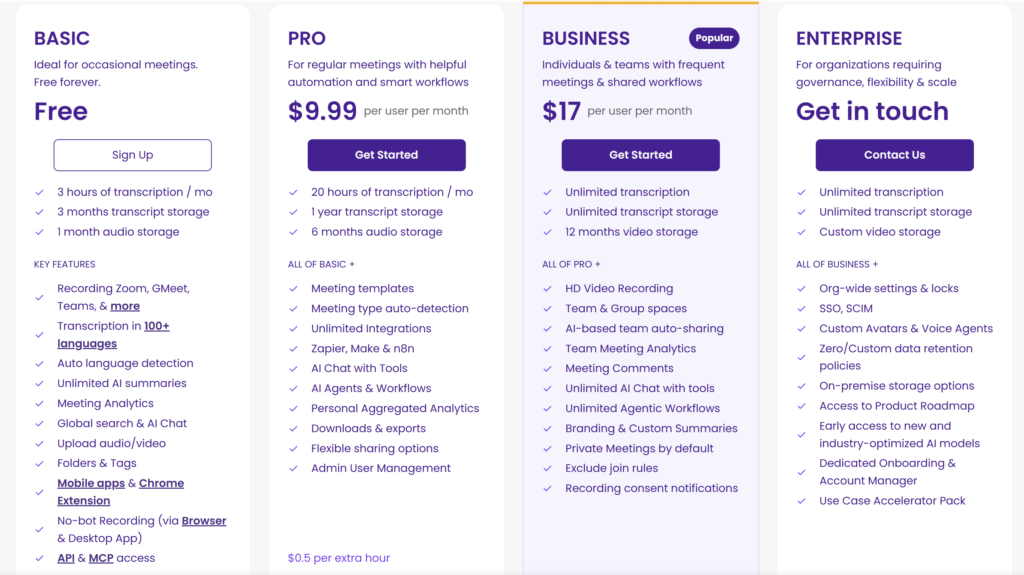
Is MeetGeek Free? Yes. MeetGeek offers a free-forever Basic plan with three transcription hours per month. You can use it to record or upload meetings, generate transcripts and AI summaries, search meeting content, and test AI Chat without first choosing a paid plan.
The important qualification is that only the plan—not the usage—is unlimited. Basic limits each meeting to two hours, stores transcripts for three months and audio for one month, and does not include the download and transcript-export options shown for paid plans.
For most new users, Basic is enough to answer one practical question: does MeetGeek turn your type of meeting into notes you can trust after reviewing them? It is less suitable as a permanent system if you record several hours every week, need local files, or want a long-term meeting archive.
Checked August 13, 2026: MeetGeek can change plan features and limits. The figures below follow its official pricing and subscription documentation checked on that date, plus a Volticen test using one approximately 42-minute English recording.
MeetGeek Basic at a glance
| Basic-plan item | Included or limited |
|---|---|
| Subscription price | $0; listed as free forever |
| Transcription allowance | 3 hours per month |
| Maximum meeting duration | 2 hours per meeting |
| Transcript storage | 3 months |
| Audio storage | 1 month |
| AI summaries | Listed as unlimited within recorded meetings |
| Capture | Meeting bot, browser and desktop no-bot recording, mobile apps, and media uploads listed |
| Search and organization | Global search, AI Chat, folders, and tags listed |
| Downloads and transcript exports | Not included on Basic in the official comparison table |
“Unlimited AI summaries” can be easy to misread. It does not mean that MeetGeek will transcribe unlimited meeting time for free. Basic still gives you three transcription hours per month, and summaries can only be generated from meetings that fit within the available workflow and allowance.
The pricing page also listed API and MCP access among Basic features when we checked it. We did not test those interfaces, so their practical limits and suitability for production integrations are outside this article.
What can you do with MeetGeek for free?
Basic includes enough of the core product to run a meaningful evaluation. Depending on the route available to your account, you can:
- let the MeetGeek bot join supported online meetings;
- record without a bot through the listed browser or desktop options;
- use the mobile apps for supported capture workflows;
- upload an existing audio or video file;
- receive a transcript, summary, next steps, and meeting insights;
- search across captured meeting content;
- ask AI Chat questions about a meeting;
- organize meetings with folders and tags.
That is more useful than a demo that only shows sample output. You can test MeetGeek with your own vocabulary, meeting structure, and follow-up needs before paying.
The test should still be controlled. Use a representative but non-sensitive meeting, configure recording notices and sharing first, and verify the output against the source. Our step-by-step MeetGeek guide covers the setup, consent, upload, and review workflow in more detail.
What do three free hours mean in practice?
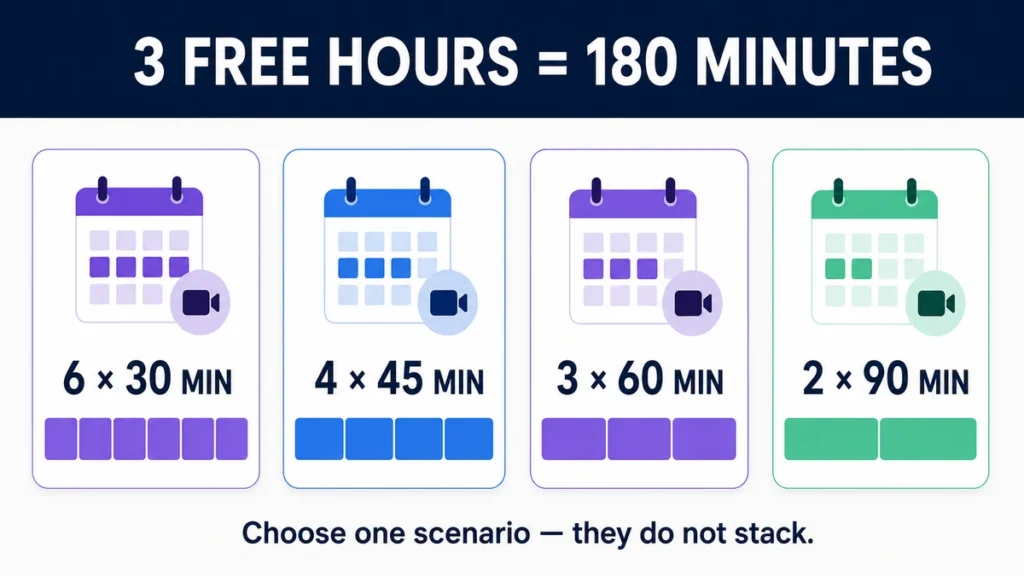
Three hours equals 180 minutes. If every meeting has the same length, the monthly allowance can cover approximately:
- six 30-minute meetings;
- four 45-minute meetings;
- three 60-minute meetings; or
- two 90-minute meetings.
These are planning examples, not additional quotas. A mix of meeting lengths still draws from the same 180-minute monthly allowance.
The two-hour per-meeting limit is separate. Having three hours left for the month does not make a three-hour recording eligible under a two-hour individual-meeting cap.
MeetGeek’s help documentation says the allowance resets on the plan-cycle date associated with the account, rather than necessarily on the first day of each calendar month. The exact reset date appears on the Plans page.
What happened in our MeetGeek Basic test?
We uploaded one English MP3 recording lasting approximately 42 minutes to a Basic account. MeetGeek processed it into a transcript, a structured summary, next steps, insights, and an AI Chat workspace.
After processing, the account showed 2.3 of 3 hours available, consistent with roughly 0.7 hour being used by the recording. This was one account and one upload, so it should not be treated as proof of every capture route or quota edge case.
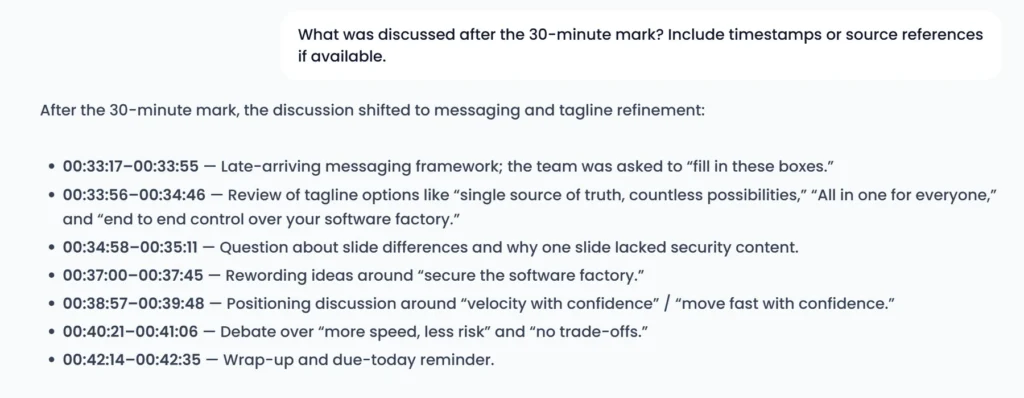
The output was useful, but it was not ready for blind follow-up. The summary captured the main arc and selected tagline. Timestamped next steps made source checking easier. AI Chat also retrieved a late-meeting discussion with timestamps and correctly refused to invent an approved budget in one adversarial prompt.
The same test exposed important review points. The transcript included anonymous speaker labels and at least one technical-name error. AI Chat retrieved the selected phrase “More speed, less risk” but incorrectly said that no final tagline had been confirmed. Some owner and deadline details also required checking against the transcript.
This is why the free plan is valuable: it lets you discover these workflow-specific strengths and failure modes before paying. It does not prove how MeetGeek will perform in every language, accent, meeting platform, or live-bot scenario.
For the complete method and eight-prompt evaluation, read our hands-on MeetGeek review.
Which free-plan limits matter most?
The monthly allowance can disappear quickly
Three hours is generous enough for a focused evaluation but modest for regular meeting work. Four 45-minute calls would use the entire allowance. A consultant with several client meetings each week or a manager recording recurring team calls is likely to exceed it.
One meeting cannot exceed two hours
The public comparison lists a two-hour maximum per meeting on Basic. This may matter for workshops, interviews, training sessions, and extended discovery calls even when monthly quota remains.
Retention is short for an archive
Basic lists three months of transcript storage and one month of audio storage. That may be enough to review recent work, but it is a weak fit for users who need a durable source archive or must revisit the original recording months later.
Downloads and exports are not included
MeetGeek’s official comparison table excludes downloads and transcript exports from Basic. In our tested free account, the output screens offered buttons to copy the summary and transcript, but we did not see a download or export function.
Manual copy may be enough for occasional notes. It is less suitable when a workflow requires local files, repeatable exports, downstream document processing, or formal record retention.
How to test MeetGeek without paying
A useful free test does not require consuming all three hours. One representative 30–60 minute meeting can reveal most of the issues that matter.
- Choose a representative meeting. Include the vocabulary, decision types, and action items that appear in your normal work. Avoid sensitive material during an initial evaluation.
- Configure notice and access. Check the recording disclaimer, consent option, sharing rules, and recap recipients before capture. Product controls support this process but do not replace the rules that apply to your meeting.
- Create an evidence key. Write down several names, technical terms, numbers, decisions, owners, and deadlines you expect the tool to recover.
- Review the transcript and summary. Check the evidence key rather than judging the output only by how polished it looks.
- Challenge AI Chat. Ask for one detail that was discussed and one fact that never appeared. Inspect the cited timestamps where available.
- Test the operational boundary. Decide whether copying content manually is acceptable and whether the transcript and audio retention periods are long enough.
- Make the plan decision last. Stay on Basic if the output is useful and the limits do not interrupt the workflow.
This approach protects against paying for more capacity before you know whether the underlying notes are good enough for your meetings.
Who can stay on MeetGeek Basic?
Basic is most likely to fit:
- someone evaluating MeetGeek for the first time;
- a solo professional with only a few short meetings each month;
- a user who mainly reviews recent transcripts and summaries inside MeetGeek;
- someone who can copy occasional notes instead of exporting files;
- a small team running a controlled pilot before assigning paid seats.
Basic is less likely to fit:
- anyone recording more than three hours most months;
- users with workshops or sessions longer than two hours;
- teams that need downloadable transcripts or audio files;
- workflows that require a long-lived meeting archive;
- organizations that need broader automation, administration, or governance controls;
- high-stakes use where AI-generated notes might be accepted without source review.
When should you move to a paid plan?
Consider a paid plan when a specific Basic restriction becomes operationally expensive:
- You repeatedly run out of transcription time.
- A meeting exceeds the two-hour limit.
- You need downloads or exports instead of manual copying.
- You must retain transcripts or audio for longer.
- A required integration, automation, template, or team-control feature is unavailable on Basic.
- A successful pilot is expanding to regular team use.
Those triggers answer whether payment is necessary, but not which paid tier is best. Our MeetGeek pricing guide owns the current paid prices, billing options, plan comparison, PAYG details, and team-cost decision.
If none of these limits affects you, there is no reason to upgrade only because a paid plan has a longer feature list.
Frequently asked questions
Is MeetGeek completely free?
MeetGeek has a free-forever Basic plan, but usage is limited. It includes three transcription hours per month, a two-hour maximum per meeting, three months of transcript storage, and one month of audio storage. Downloads and transcript exports are not included in the official Basic comparison.
Is MeetGeek Basic a free trial?
No. MeetGeek lists Basic as a free-forever plan rather than a time-limited trial. It may still promote separate trials or paid features, but Basic itself remains a $0 tier subject to its limits.
How many meetings can I record with MeetGeek for free?
It depends on meeting length. Three monthly hours could cover six 30-minute meetings, four 45-minute meetings, three one-hour meetings, or two 90-minute meetings. Basic also lists a two-hour maximum for any individual meeting.
Does MeetGeek Basic include unlimited AI summaries?
The pricing page lists AI summaries as unlimited, but transcription is still limited to three hours per month. Unlimited summaries therefore should not be read as unlimited meeting recording or transcription.
Can I download MeetGeek transcripts for free?
The official comparison table does not include downloads or transcript exports on Basic. Our tested account allowed us to copy summary and transcript text, but it did not expose a download or export control.
When does the MeetGeek free allowance reset?
MeetGeek’s subscription help says the allowance resets according to the day of the month associated with plan activation. The Plans page shows the exact reset date for the account.
Do I need a paid plan to test MeetGeek?
No. Basic provides enough access to test a representative meeting from capture or upload through transcript, summary, action items, search, and AI Chat. A paid plan becomes relevant when a known quota, export, retention, automation, or team requirement blocks the free workflow.
Bottom line: is MeetGeek Free worth using?
Yes—as a real evaluation plan and, for some people, a light-use meeting assistant. Basic lets you process representative meeting content and inspect the core outputs before spending money.
Its boundaries are also clear. Three transcription hours can disappear quickly, individual meetings are capped at two hours, retention is limited, and Basic does not include downloads or transcript exports. AI-generated decisions and action items still need source review, regardless of plan.
Start with one non-sensitive meeting that resembles your normal work. Stay on Basic if the output is useful and the limits remain invisible. Upgrade only when a documented restriction stops you from completing a necessary workflow.